


Managing content and media across just one WordPress site can be time-consuming. Now, multiply that by five, ten, or even dozens of sites, and you’re looking at late nights, messy workflows, and a lot of unnecessary manual labor.
Whether you’re running an agency with dozens of client installs, overseeing a large multisite network, or managing multiple blogs for your business, keeping everything in sync can quickly become overwhelming.
Thankfully, there are proven ways to simplify the process. Tools like WP-CLI (WordPress Command Line Interface), programmatic updates via the WordPress REST API, and custom scripts make it possible to update posts, upload media, and optimize files across multiple sites without spending hours clicking through each dashboard. And when paired with a hosting dashboard like MyKinsta, these approaches can transform the way you work.
In this guide, we cover why bulk content and media management matter, how to use WP-CLI, APIs, and scripts for your team, and how MyKinsta ties it all together for faster, more efficient workflows.
Why bulk content and media management matter
When you’re running multiple WordPress sites as part of an agency portfolio, a multisite network, or a business with multiple blogs or microsites, the scale of daily tasks grows fast. Updating a single site might be straightforward, but multiplying those same updates across dozens of installs can suddenly make what used to take minutes consume entire workdays.
Bulk content and media management isn’t just about making your life easier. It’s about protecting brand consistency, ensuring performance stays high, and reducing the chances of costly mistakes. Without a coordinated approach, you might find yourself with:
- Outdated blog posts, product descriptions, or legal disclaimers that differ from site to site.
- Branding inconsistencies, like mismatched fonts, colors, or messaging.
- Media libraries stuffed with oversized, unoptimized images that drag down performance and waste storage space.
These issues not only hurt efficiency and damage your brand but also slow your sites and negatively impact search rankings. In fast-moving industries, lagging behind with outdated or inconsistent content can mean missed opportunities.
The more sites you manage, the greater the need for tools and processes that can handle updates in bulk, ideally without logging into each dashboard one by one. This is where command-line tools like WP-CLI, programmatic updates via APIs, and hosting dashboards designed for multisite management can transform the way you work.
Using WP-CLI for bulk media uploads and optimization
When dealing with repetitive WordPress tasks, WP-CLI is one of the fastest, most efficient ways to work.
Instead of clicking through menus and waiting for pages to load, you can manage WordPress directly from your terminal, making it super effective when you’re responsible for multiple sites.
With the proper commands, you can perform large-scale media imports, run optimizations, and even schedule recurring maintenance, all without ever touching the dashboard.
What is WP-CLI?
WP-CLI is a free, open-source command-line tool that lets you interact with your WordPress sites using simple text-based commands. Almost anything you can do in the dashboard, like installing plugins, importing content, and managing users, can be done with WP-CLI, often in a fraction of the time.
For bulk operations, it’s particularly valuable because it can process hundreds or thousands of items in one go without hitting browser timeouts or memory limits.
If you’re managing multiple sites, WP-CLI can be run individually for each site or included in a script that loops through multiple installs, applying the same commands everywhere. This makes it ideal for network-wide updates or client-wide media processing.
Bulk media uploads
Uploading files one at a time through the WordPress media library is slow and tedious. WP-CLI’s wp media import command allows you to bulk-import images, videos, PDFs, or any other supported file types in seconds.
For example:
wp media import /path/to/images/*.jpg --title="Bulk Upload" --featured_image
This command imports every .jpg file in the specified folder, assigns them a default title, and sets each as a featured image if applicable. Because it’s run from the command line, it’s significantly faster than uploading through the dashboard and bypasses common browser upload limits.
If you store media in a central location such as a shared drive or S3 bucket you can integrate wp media import into a script that loops through your list of sites, making the process completely hands-off.
Media optimization
Large, unoptimized images are one of the biggest contributors to slow site performance. With WP-CLI, you can pair your site with optimization plugins like Smush, Imagify, or ShortPixel and run batch compression from the terminal.
For example, with Smush installed:
wp smush images
This optimizes every image in the media library at once, saving you the time of navigating to each site’s media library and running the optimization manually. When working with dozens of sites, that time savings adds up quickly.
You can also combine WP-CLI with image resizing tools or conversion utilities (such as WebP converters) for even greater performance improvements.
Automation for recurring tasks
One of WP-CLI’s biggest advantages is that it can be paired with cron jobs or server schedulers to run tasks automatically. This is perfect for:
- Importing new media from a shared folder every night.
- Running weekly or monthly optimization to keep file sizes small.
- Deleting unused media files on a regular schedule to free up storage space.
For example, you could set up a weekly cron job to run both a media import and optimization process across all sites, ensuring that every site is always updated and performance-ready with zero manual intervention after setup.
Combining WP-CLI with automation creates a repeatable, reliable workflow that keeps every site’s media library organized, lightweight, and fully optimized, no matter how large your network grows.
Managing and updating content across sites using APIs and custom scripts
Bulk content updates aren’t just about speed; they’re about ensuring every site in your network is delivering the same accurate, up-to-date information.
Whether you’re adding a new legal disclaimer, changing product details across an e-commerce portfolio, or publishing a time-sensitive announcement on dozens of microsites, APIs, and custom scripts can handle these changes at scale with far greater precision than manual edits.
Using the WordPress REST API
The WordPress REST API is built into WordPress core and provides a standardized way to interact with your site’s data programmatically. With the API, you can fetch, update, delete, or create posts and pages without logging into the admin dashboard, all through simple HTTP requests.
The REST API’s flexibility is invaluable for multisite management. You can create a script that loops through each site’s API endpoint, applies updates in sequence, and confirms the results in one automated process.
For example, to update the title of a post via the REST API, you might send a request like:
POST https://example.com/wp-json/wp/v2/posts/123
{
  "title": "Updated Post Title"
}
Once authenticated (typically via application passwords or OAuth), this request updates the post instantly, bypassing the WordPress admin interface entirely. This same approach can be used for bulk publishing, taxonomy updates, or metadata changes.
Writing custom scripts for bulk updates
While the REST API can be used directly, many teams prefer wrapping it in custom PHP, Python, or Bash scripts to speed up workflows. A custom script can:
- Pull a list of sites from a configuration file or database.
- Authenticate with each site’s API endpoint.
- Execute the desired updates, for example, adding a new category to posts tagged “News” or replacing a block of outdated text across all pages.
- Log success or failure for each update, so nothing slips through the cracks.
Because these scripts can be customized, they’re ideal for changes that are too specific or complex for off-the-shelf plugins.
Best practices for bulk content operations
Running large-scale updates across multiple WordPress sites is powerful, but it also comes with risks if you don’t plan carefully. A small error in a script can impact dozens of sites at once, so it’s important to have safeguards in place before you hit “run.”
These best practices help maintain control and minimize disruptions:
- Work in batches to avoid overwhelming servers or hitting API rate limits, especially when dealing with hundreds of sites or large datasets.
- Use pagination when retrieving content to avoid memory overload and process data more efficiently.
- Log every operation to create a record of which sites updated successfully and where follow-up work is needed.
- Test on staging first to confirm your script works as intended before applying changes to production sites.
- Implement error handling to allow the process to skip failed updates without stopping the entire batch.
Pairing these practices with the REST API and well-crafted scripts, you can roll out coordinated updates across your network in minutes instead of hours, using a repeatable and reliable process.
Using MyKinsta for WP-CLI and API integration
Kinsta’s managed WordPress hosting is built for performance, scalability, and operational efficiency — making it a strong fit for agencies, enterprise teams, and multisite operators who need to manage multiple WordPress installs without bottlenecks.
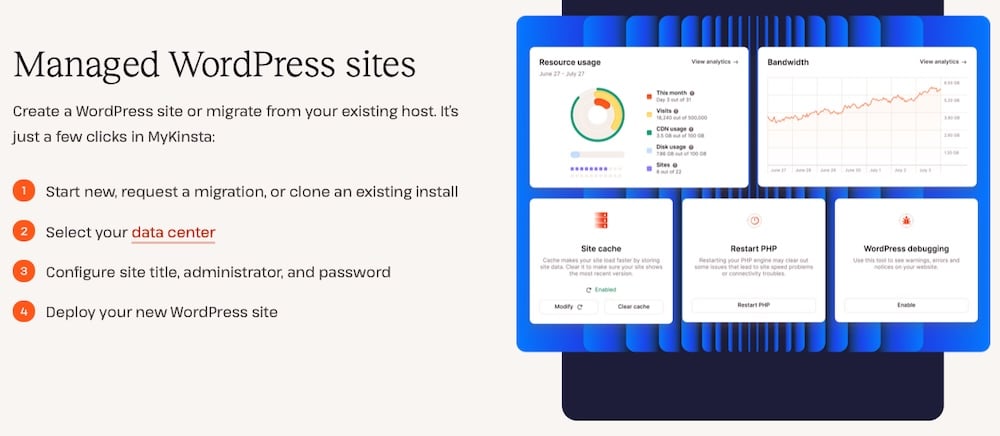
MyKinsta, Kinsta’s custom hosting dashboard, brings all your sites under one roof and provides direct access to tools that make bulk content and media management faster and more reliable.
WP-CLI access from the dashboard
For Managed WordPress Hosting at Kinsta, WP-CLI is available for all sites, but you’ll connect through an SSH client from a local terminal client (such as PuTTY on Windows or the built-in terminal on macOS/Linux) rather than through a browser-based terminal.
Once connected, you can run WP-CLI commands exactly as you would locally, giving you the flexibility to:
- Run large-scale media imports without touching the WordPress admin.
- Trigger bulk image optimization across sites in seconds.
- Automate recurring maintenance tasks on both staging and production environments.
Because WP-CLI is fully supported on Kinsta’s hosting infrastructure, you can manage multiple sites efficiently while benefiting from the platform’s performance and security features. And since all SSH credentials are accessible in MyKinsta, you can quickly connect to any site in your portfolio without digging through separate configuration files.
API-friendly hosting infrastructure
If your workflow relies on the WordPress REST API or custom scripts for content updates, Kinsta’s hosting environment is built to handle it.
With high-performance PHP threads, optimized databases, and automatic scaling, you can process large datasets quickly and reliably, even during periods of heavy traffic. This means you can run batch updates across multiple sites without worrying about slowdowns or timeouts.
In addition to supporting WordPress’s built-in API, Kinsta offers its own API, which opens up new possibilities for automation and multisite management. You can use it to programmatically create or delete sites, clear caches, manage domains, trigger backups, or retrieve analytics data.
When combined with the WordPress REST API, the Kinsta API allows you to orchestrate both infrastructure-level and content-level updates in a single workflow.
Other MyKinsta features for bulk management
Beyond WP-CLI and API integration, MyKinsta offers several features that make multisite management easier and safer, such as:
- Centralized backups: Create or restore backups in seconds for any site before running bulk updates, so you can roll back if needed.
- Staging environments: Test your scripts, media imports, and automation routines in staging before deploying to live sites.
- Site analytics: Monitor performance, traffic, and bandwidth after large updates to ensure everything is running smoothly.
By combining WP-CLI’s speed, the REST API’s flexibility, and the centralized control MyKinsta offers, you get a workflow that scales with your portfolio without the headaches of traditional dashboard-by-dashboard management.
Summary
Managing content and media across multiple WordPress sites doesn’t have to mean endless dashboard clicks or repetitive manual work. With WP-CLI, you can automate bulk media uploads, run image optimizations, and schedule recurring tasks in minutes.
The WordPress REST API and custom scripts enable precise updates of posts, pages, and categories across multiple sites, while best practices such as batching and logging ensure efficiency and error-free operations.
When you combine these tools with MyKinsta’s centralized management, built-in WP-CLI access, and API-friendly infrastructure, you get a complete system for high-volume updates that’s fast, reliable, and easy to maintain. Agencies, multisite operators, and growing businesses can keep their entire WordPress portfolio consistent without sacrificing time or accuracy.
If you’re ready to simplify bulk content and media management, explore MyKinsta features and see how Kinsta-managed hosting can support your workflow from the first upload to the final publish.

Kinsta
Senior Editor at Kinsta, WordPress Web Developer, and Content Writer. Outside of all things WordPress, I enjoy the beach, golf, and movies. I also have tall people problems.


