


Bot traffic is often framed as a security problem or an SEO problem. But on WordPress hosting infrastructure, it shows up as a performance problem, specifically one concentrated in a very particular set of URLs.
Not all requests cost the same. The difference between a cached static page and a dynamic endpoint isn’t a slight performance nuance. It’s the difference between a request that costs almost nothing and one that reserves a PHP thread, triggers a full database query, and generates session overhead, regardless of whether the visitor is a real customer or a bot that never converts.
Understanding why some endpoints are far more expensive than others is what separates a bot management strategy that actually works from one that blocks too much or too little.
Not all requests are equal
When a visitor lands on a typical WordPress page, such as a blog post, a product listing, or an “about” page, the server almost always serves that response from cache.
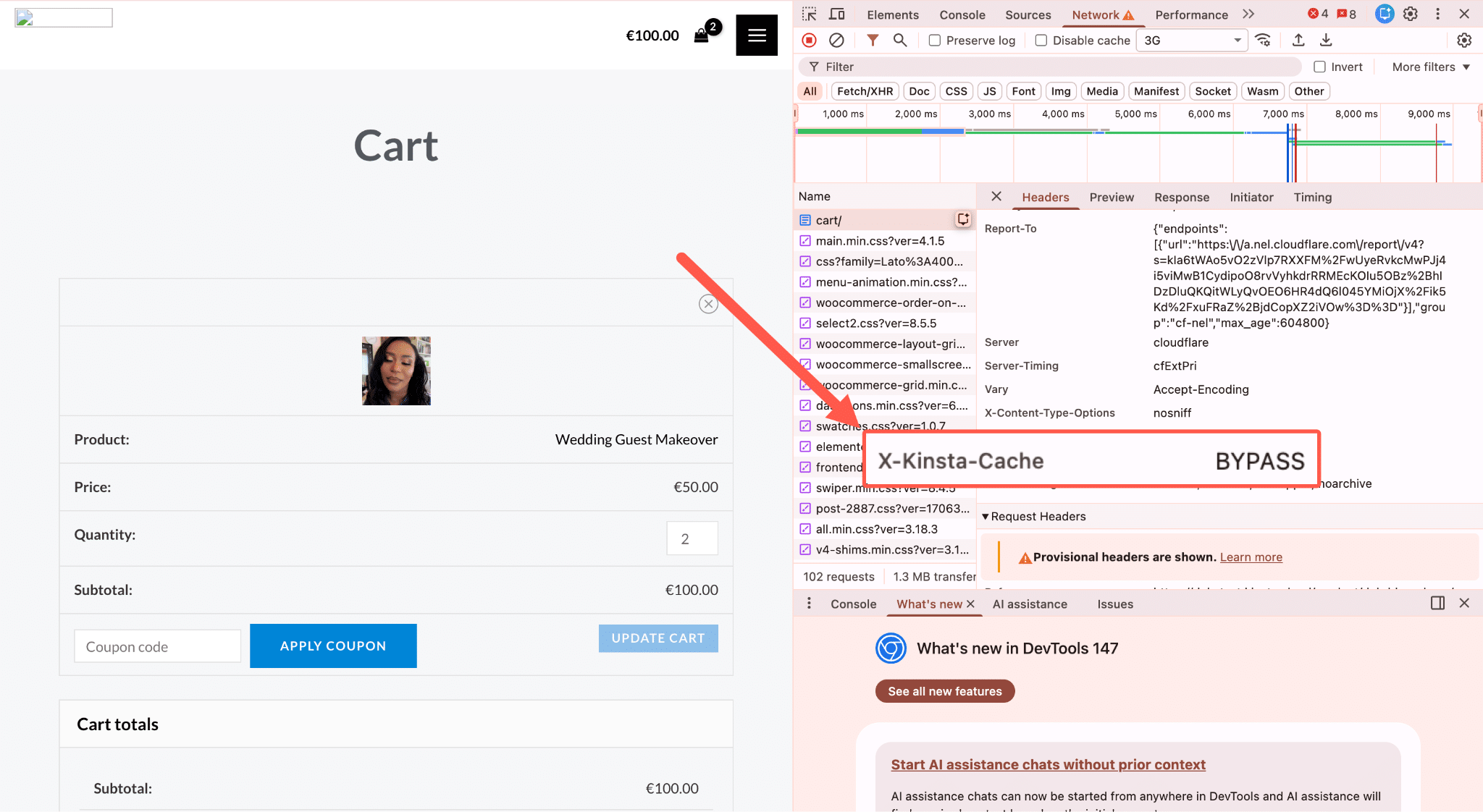
Kinsta’s full-page cache handles this at the edge, so the request never triggers a server’s PHP or its database.
But when a request lands on a non-cacheable endpoint, the server has to do real work. A PHP thread is allocated and held for the entire duration of the request, and your database is queried. If the page involves cart state, user sessions, or personalized content, session handling adds another layer. None of this can be cached, because the response is unique to each request.
On a healthy site with mostly human visitors, this is fine. Your dynamic endpoints serve real customers who add items to their cart, check out, and search for products. The load is proportional to actual usage.
Bot traffic breaks this model. A crawler doesn’t add to the cart or convert, but it triggers the same server-side execution as a real customer would, at a rate no human could maintain.
The specific endpoints where this bites
On a WooCommerce store, the following URL patterns and endpoints are non-cacheable by design, and they’re exactly the ones that bot traffic tends to hit hardest.
?add-to-cart=
This is the most resource-intensive example we documented in our AI & bot traffic report. Adding a product to the cart requires PHP execution, a database write, and session creation or validation. There’s no cached version of this response, as each hit is fresh work.
To put the scale in context: Kinsta’s infrastructure data once recorded 7.67 million add-to-cart hits from five bots in a 24-hour window.
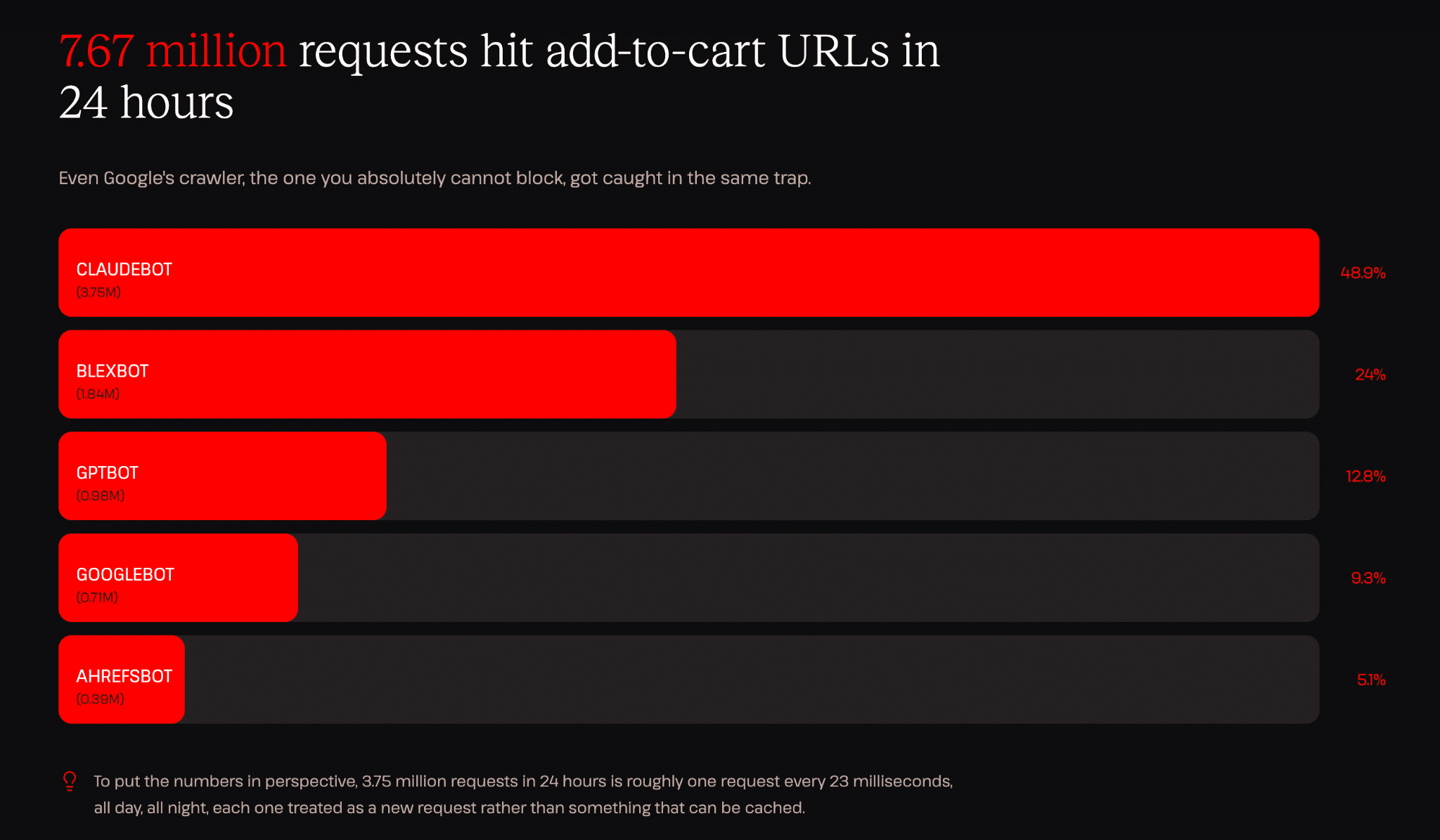
That’s about one request every 11 milliseconds, all day and all night, each demanding full PHP and database execution, each generating no meaningful output for the crawler, and none serving a customer.
/cart and /checkout
These pages are excluded from page cache by default in WooCommerce. They carry live session data, personalized cart state, and (in the case of checkout) payment processing logic.
A bot hitting /checkout repeatedly isn’t doing anything useful, but the server doesn’t know that. It processes every request as if it could be a real transaction.
?s= (Search queries)
WordPress and WooCommerce search queries run against your database on every request. There’s no cache layer that can absorb a unique search string.
A crawler working through parameterized URL variations or simply following every search link it finds can generate a long tail of unique, expensive database queries.
Faceted navigation and filter parameters
This is where the problem compounds. A typical WooCommerce product catalog generates URLs like:
/shop/?color=blue
/shop/?color=blue&size=M
/shop/?color=blue&size=M&orderby=price
/shop/?color=blue&size=M&orderby=price&paged=2
To a human, these are minor variations on the same page. To a bot following links, each one is a unique URL worth crawling, and each one requires the server to execute a filtered database query from scratch.
Google’s documentation explicitly identifies faceted navigation as a source of crawl inefficiency, where crawlers explore near-infinite variations of the same content. But the issue isn’t just that this wastes crawl budget. Each variation costs real server resources to generate.
AJAX-powered interactions
Many WordPress plugins, such as wishlists, availability checks, live pricing updates, and calendar views, rely on AJAX requests that bypass page cache entirely.
A bot that triggers these interactions, even indirectly by loading a page that fires them, creates server-side load that doesn’t show up as a “page request” in your analytics but does show up in your PHP thread usage.
What happens when PHP threads run out
Every dynamic endpoint hit holds a PHP thread for the full duration of that request. That detail seems minor in isolation, but thread capacity is finite, and bots don’t queue politely.
Kinsta allocates a fixed number of PHP threads per WordPress site, and each non-cached request reserves one for its duration.
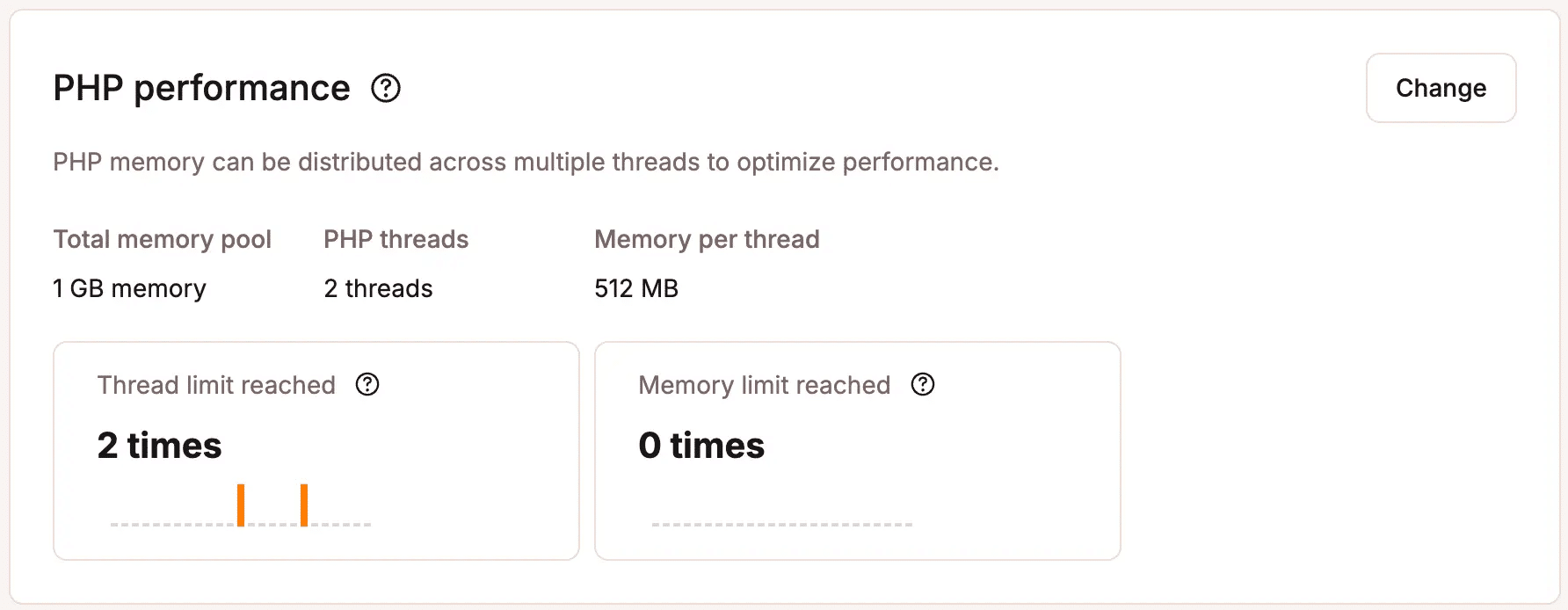
Under normal traffic, this is rarely a constraint. Requests come in, get processed quickly, and threads free up.
Under sustained bot load on dynamic endpoints, threads get reserved and held. When all threads are occupied, new incoming requests wait in a queue. Real customers actually trying to add a product to their cart or complete a checkout experience slow page loads, timeouts, or HTTP 504 errors.
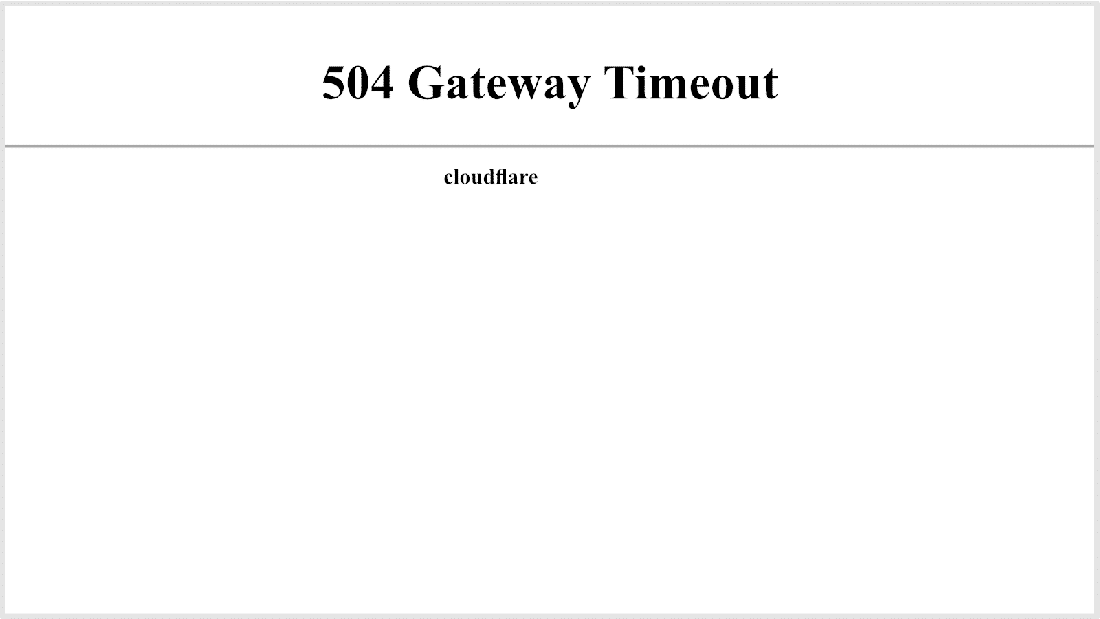
This is the infrastructural reality that makes bot traffic on dynamic endpoints materially different from bot traffic on cacheable pages.
The loop problem: When bots get stuck
Much of the bot traffic Kinsta’s infrastructure team sees isn’t the result of an intentional attack. It’s the result of crawlers following every link on every page without any mechanism to recognize when they’re going in circles.
Here’s what a query-string loop looks like in practice:
- A bot arrives at
/shop/ - The page contains a link to
/shop/?color=blue(a filtered view) - That page contains a link to
/shop/?color=blue&size=M - That page contains a link to
/shop/?color=blue&size=M&orderby=price - That page contains a link to add something to cart:
/shop/?add-to-cart=123 - Each of these generates slightly different links that the bot hasn’t visited yet
The bot follows everyone. It has no concept of “I’ve already seen this product page in a different filter state.” Each URL looks new, gets requested, and hits the server fresh.
This exact pattern of bots traversing query string variations across dynamic endpoints is one of the most common problems we noted in our report. A single loop rule triggered by one misbehaving pattern filtered 550 million requests in 30 days on Kinsta’s infrastructure. That isn’t an attack, but inefficient automation at scale, compounding because nothing caught it early.
What good bot management looks like at the endpoint level
For WooCommerce stores and WordPress sites with dynamic functionality, a few principles hold regardless of your specific setup.
- Robots.txt is a signal, not a shield. You can (and should) disallow crawlers from
/cart,/checkout, and?add-to-cart=paths in yourrobots.txt. Googlebot respects this. However,robots.txtcompliance is voluntary. A growing share of AI training crawlers either don’t check it or don’t honor it. Disallowing a path inrobots.txtcommunicates your intent; enforcing it requires a WAF-level rule. - Tighten up URL parameter generation. WooCommerce’s default configuration generates a long tail of URL variants through session tokens, quantity parameters, and filter combinations. Reducing parameter sprawl at the source through canonical tags, consolidated permalink structures, and robots.txt
Disallowrules on parameter variants gives crawlers fewer loops to get stuck in. - Monitor at the endpoint level, not just total request volume. A spike in overall traffic might be a campaign. A spike in requests to
?add-to-cart=from a non-browser user agent is a bot problem. Server logs and analytics tools that show you request distribution by URL pattern and user agent are the difference between catching this in hours and catching it in days. - Protect PHP thread capacity as a primary metric. If your PHP threads are regularly running at capacity and you don’t have a corresponding spike in real user sessions, bot traffic on dynamic endpoints is almost certainly a contributing factor. Kinsta’s APM tool surfaces the slowest PHP transactions by endpoint, so if cart or checkout paths are the culprit, you see it directly rather than guessing.
What this looks like for different site types
The dynamic endpoint problem is most acute for WooCommerce stores, but it appears across different site types in various forms.
- WooCommerce stores face the highest risk because their most expensive endpoints, like cart, checkout, and filtered product pages, are exactly the ones bots tend to find through normal link-following. The consequences are direct: PHP thread exhaustion during bot spikes degrades checkout performance for real customers.
- Content sites and blogs are less exposed on the checkout side, but can be significantly affected by bots traversing paginated archives, tag pages, and search results. Each unique search query is a fresh database hit. An aggressive crawler working through a large archive systematically can generate a sustained database load even without touching any “store” functionality.
- Business and services sites are more exposed on form endpoints (contact forms, quote request forms, and booking flows), which involve session handling and often database writes. Bot-submitted form data is a different kind of problem (CRM pollution, wasted sales effort), but the underlying mechanism is the same: dynamic endpoints that cost real resources on every hit.
- Web apps and SaaS products are the most sensitive case. Their API endpoints, dashboard routes, and application logic are entirely non-cacheable, and any bot traffic that reaches the application layer bypasses caching infrastructure entirely. The appropriate response here is usually a hard block on all non-authenticated traffic to
/apiand/apppaths, with explicit allowlisting for legitimate integrations.
Going deeper: The full picture on bot traffic
The dynamic endpoint problem is one part of a broader shift in how bot traffic affects WordPress infrastructure. AI crawlers have grown significantly in volume and changed in behavior, more aggressive link-following, more willingness to ignore crawl directives, and more traffic hitting precisely the endpoints that cost the most to serve.
For a complete look at what’s changed, the data behind it, and a framework for making bot management decisions based on your specific site type and priorities, Kinsta’s full report on The AI & Bot Traffic Reality Check covers all of it, including analysis across more than 10 billion requests on Kinsta-managed infrastructure.
If you’re ready to act on what you’ve read here, Kinsta’s Bot Protection handles the most common patterns automatically, including protection for high-cost dynamic endpoints. Enable your desired level of protection once in MyKinsta, and the system manages the rest.
You can also reach out to the support team if you need clarification.

Kinsta
Joel is a Frontend developer working at Kinsta as a Technical Editor. He is a passionate teacher with love for open source and has written over 300 technical articles majorly around JavaScript and it’s frameworks.


