

A portfolio website remains one of the most effective ways to showcase your work, build credibility, and attract new clients in 2026. Whether you’re a photographer, videographer, wedding professional, architect, or freelancer, your portfolio often creates the first impression before a potential client ever contacts you.
The best portfolios combine strong visual design, intuitive navigation, compelling content, a seamless user experience, and clear calls to action.
In this article, we’ll explore 10 outstanding portfolio website examples across multiple industries. For each example, we’ll examine the design, structure, user experience, and key ideas you can apply to your own portfolio website.
What Makes a Great Portfolio Website in 2026?
A great portfolio website helps visitors quickly understand what you do, builds trust in your expertise, and encourages them to take action. While design trends continue to evolve, the best portfolio websites in 2026 share several characteristics that make them effective regardless of industry.
Here are the five key factors that make a great portfolio website:
- Clear positioning. Within a few seconds of landing on the site, visitors should understand who the portfolio is for, what services are offered, and what makes the creator unique.
- Strong visual presentation. High-quality images and videos remain the foundation of any portfolio website, but they should be supported by consistent branding, typography, colors, and layouts that create a professional impression.
- Mobile-friendly experience. Responsive layouts, optimized media, and fast-loading galleries ensure visitors can browse projects smoothly on any device.
- Easy navigation. Projects should be logically organized, filterable where appropriate, and accessible through a clear menu structure that helps users find relevant work quickly.
- Conversion opportunities. Whether the goal is booking clients, generating leads, or landing freelance projects, clear calls to action, contact forms, and inquiry options make it easy for visitors to take the next step after viewing your work.
Further reading: 4 Key Features to Look for in a WordPress Photography Theme
Photography Portfolio Website Examples
Photography portfolios need to showcase visual work while staying out of the way.
#1: Levon Biss
Levon Biss is an award-winning macro and micro photographer known for capturing extraordinary details of insects, seeds, fruits, botanical subjects, amber, and extinct species.

What I Like About This Photography Portfolio
The website embraces a minimalist approach that puts the photography front and center. The homepage features a curated collection of images drawn from different categories, allowing visitors to discover Levon’s work visually before diving deeper into specific subjects. Both the homepage and portfolio sections use a masonry layout that accommodates images of varying dimensions while maintaining a clean and organized appearance.

Each category has its own dedicated gallery page, and clicking an image opens it in a lightbox for a distraction-free viewing experience. The generous use of whitespace throughout the site helps each photograph stand out.

Key Takeaways
- You don’t need complex layouts or visual effects to create an impressive photography portfolio.
- Use a masonry gallery to display images of different sizes in a clean, organized way.
- Give your photos room to breathe with plenty of whitespace.
- Keep the focus on the work rather than website elements.
- If you want a similar look, Inspiro Premium includes masonry portfolio layouts and gallery features well-suited to photography websites.
#2: Johanna Unternaehrer
Johanna Unternaehrer is a Switzerland-based photographer whose portfolio showcases a wide range of work across both professional and personal projects.

The site is organized into two primary categories (Business Photography and Private Photography) with additional subcategories beneath each, making it easy for visitors to navigate directly to the type of photography that interests them most.
What I Like About This Photography Portfolio
The standout feature of this portfolio is its organization. Rather than presenting all projects in a single gallery, Johanna uses a clear category structure that helps potential clients quickly find relevant work. The main portfolio page uses a masonry layout that accommodates different image sizes while maintaining a clean appearance.

Clicking an image opens a lightbox gallery where visitors can browse additional photos from the same album. Small visual cues, such as the three-dot indicator on portfolio images, subtly communicate that each photo is part of a larger collection, creating a more intuitive user experience.
Key Takeaways
- Organize your portfolio around the services or client types you want to attract.
- Showcase only the strongest images from each project or album.
- Use clear visual cues to help visitors understand how to interact with galleries.
- A masonry layout is an effective way to display photography portfolios with varied image sizes.
Also, be sure to check out my best tips for improving your photography portfolio gallery.
Video Portfolio Website Examples
Video portfolios must balance visual impact with performance and usability.
#3: Danny Cooke
Danny Cooke is a filmmaker, director, and cinematographer whose portfolio showcases work across commercials, documentaries, aerial productions, event coverage, and branded content.

What I Like About This Video Portfolio
The homepage makes excellent use of video backgrounds to immediately demonstrate Danny’s expertise. As visitors scroll, they’re presented with a collection of project thumbnails that autoplay on hover, creating an engaging experience without overwhelming the user.
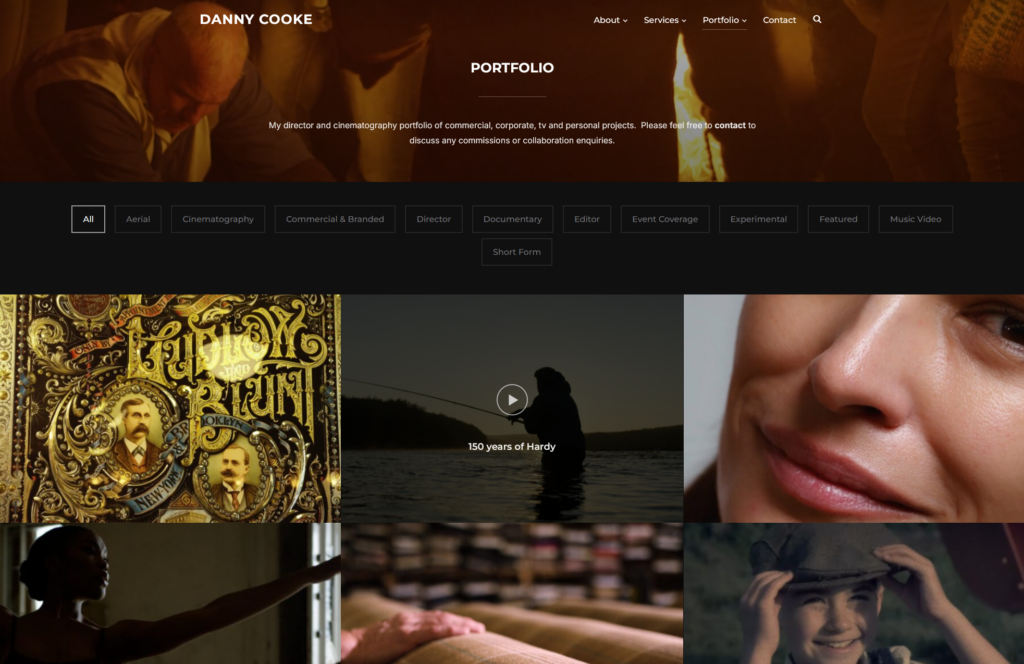
Clicking a project opens it in a lightbox with full video controls. The portfolio itself uses a fullscreen layout with category filters that make it easy to browse specific types of work, from aerial footage to documentaries and commercial projects.
Key Takeaways
- Use video backgrounds strategically to showcase your work.
- Add hover-to-play previews to encourage interaction.
- Organize projects with category filters.
- Keep the focus on the videos, not website effects.
- Inspiro Premium demonstrates how video portfolios can feel dynamic without becoming distracting.
#4: klod Kamera
Klod Kamera is the portfolio website of Markus, a Berlin-based photographer and cinematographer specializing in commercials, branded content, and social media campaigns for clients worldwide.

What I Like About This Video Portfolio
The website is simple, clean, and free from unnecessary distractions. The portfolio uses a grid layout to display projects, with category filters that help visitors quickly find relevant work. Video thumbnails open in a lightbox for seamless viewing, while project pages provide additional context through a dedicated “More” button.

The photography section uses a masonry layout with large previews, popup galleries, and autoplay video elements that add visual interest without overwhelming the experience. A sticky navigation menu keeps important pages and the contact option accessible at all times.
Key Takeaways
- Let your work take center stage by keeping the design simple and uncluttered.
- Minimize distractions and unnecessary design elements.
- Organize projects into clear categories to improve navigation.
- A simple portfolio can still feel polished and professional when the user experience is thoughtfully designed.
- klod Kamera uses the Reel theme.
Wedding Portfolio Website Examples
Wedding professionals need portfolios that build trust, showcase style, and generate inquiries.
#5: Claire Byrne Photography
Claire Byrne is an Ireland-based wedding photographer whose portfolio showcases real weddings through a collection of authentic, emotional, and candid moments captured throughout the day.

What I Like About This Wedding Photography Portfolio
The portfolio opens with a testimonial from a couple, immediately establishing trust and credibility. From there, visitors are guided through a simple two-column gallery featuring highlights from different weddings.

The layout encourages continuous scrolling, allowing potential clients to experience Claire’s storytelling approach and see the variety of moments she captures, from getting ready and ceremony details to portraits and celebrations. Despite the large number of images, the portfolio remains fast and responsive thanks to lazy loading.

Key Takeaways
- Let your wedding photography tell a story from beginning to end.
- Place testimonials near the top of the page to build trust.
- Use lightboxes to create a better viewing experience.
- Follow image SEO best practices, including descriptive file names.
- Use lazy loading when displaying large wedding galleries.
If you’re building a wedding photography portfolio, take a look at these best WordPress photography themes.
#6: Jeremy Chou
Jeremy Chou is a wedding photographer whose portfolio showcases weddings through a blend of artistic storytelling and an eye for architectural detail, highlighting everything from intimate moments to stunning venues.

What I Like About This Wedding Photography Portfolio
The homepage immediately grabs attention with a full-width slider featuring a mix of portraits, venue shots, details, and wedding highlights. The portfolio is organized into four categories, making it easy for visitors to browse relevant work. Within each category, weddings are displayed in a clean three-column layout, with clear buttons linking to full galleries.

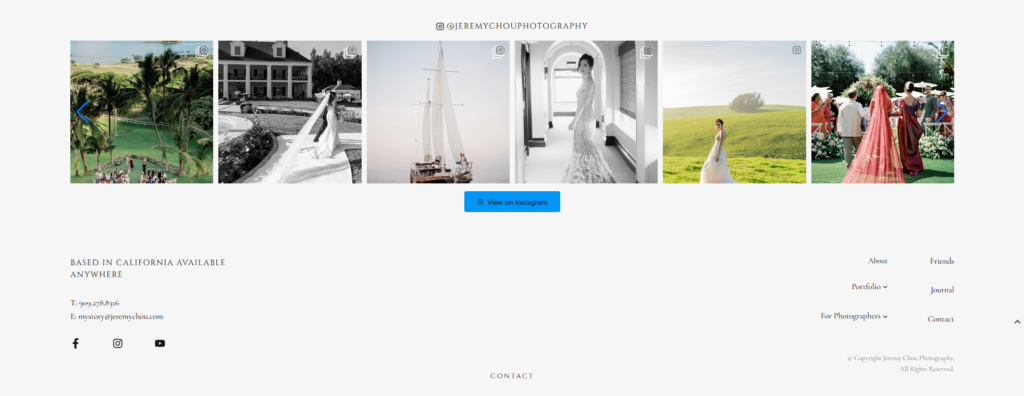
Individual albums can be viewed in an enlarged lightbox format, creating a more immersive viewing experience. An Instagram feed at the bottom of the portfolio page adds fresh content and encourages visitors to connect on social media.
Key Takeaways
- Feature your strongest wedding images on the homepage.
- Organize galleries into clear categories.
- Make it easy to browse complete wedding albums.
- Use lightboxes for a better photo-viewing experience.
- Embed your Instagram feed to showcase recent work and grow your audience.
Architecture Portfolio Website Examples
Architecture portfolios should communicate expertise, process, and project quality.
#7: Mike Kelley
Mike Kelley is an LA-based architectural photographer whose portfolio showcases striking images of buildings, interiors, and built environments through a highly visual, gallery-first experience.

What I Like About This Architecture Portfolio
Instead of displaying multiple images at once, the homepage presents a single large photograph that immediately commands attention. Visitors can browse through the portfolio using simple previous and next controls, creating a focused viewing experience.

For those who prefer to browse more quickly, a “Show Thumbnails” option reveals a grid of featured work. Mike also separates his portfolio into dedicated “Projects” and “Print Shop” sections, making it easy for visitors to explore collections or purchase prints.
Key Takeaways
- Large, single-image portfolios create a strong visual impact.
- Remove distractions and keep the focus on the work.
- Offer thumbnail views for visitors who prefer faster browsing.
- Separate projects and products into dedicated sections.
- If you plan to sell prints, Inspiro Premium’s WooCommerce integration makes it easy to add an online store.
#8: Zaha Hadid Architects
Zaha Hadid Architects (ZHA) is a global architecture and design studio known for creating innovative cultural, civic, workplace, transport, and urban development projects around the world.

What I Like About This Architecture Portfolio
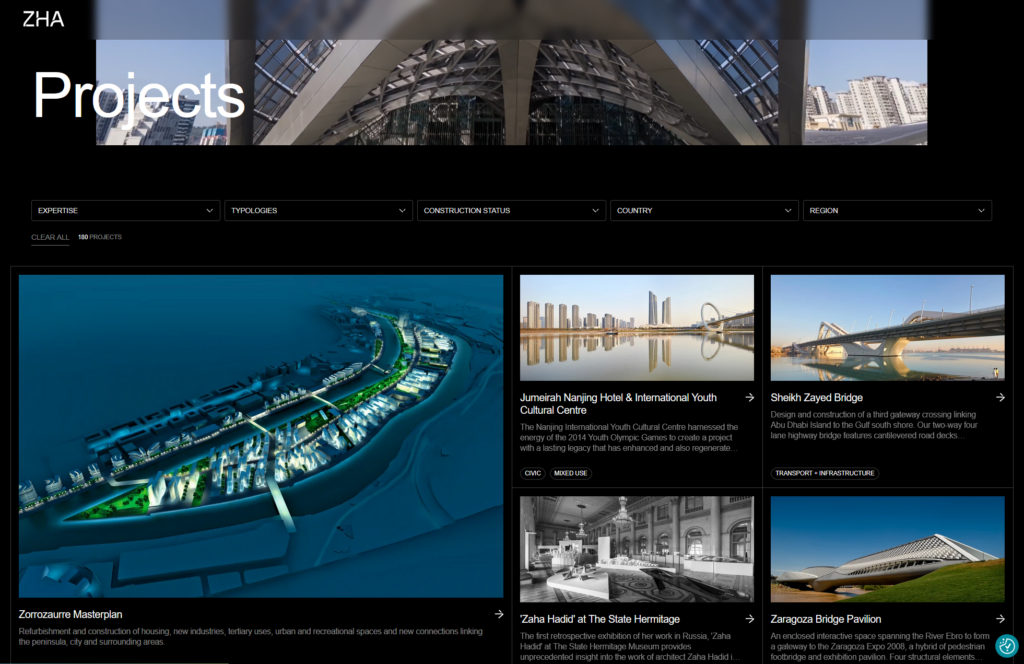
The website combines visual impact with excellent organization. The homepage features a video background and full-width project sliders that showcase recent and upcoming work. With more than 180 projects in its portfolio, ZHA relies on advanced filtering options to help visitors quickly find relevant projects by expertise, typology, construction status, country, or region.

Additional project tags such as civic, transport, culture, and masterplans make browsing even easier. A “Show More” option loads additional projects on demand, helping maintain a fast user experience.
Key Takeaways
- Strong organization becomes essential as your portfolio grows.
- Use filters to help visitors find relevant projects quickly.
- Tags can provide another layer of navigation.
- Video backgrounds can add visual impact when used thoughtfully.
- “Show More” functionality helps balance large portfolios with good performance.
- You can get the same look with Inspiro Premium.
Freelancer Portfolio Website Examples
Freelancer portfolios need to demonstrate expertise and make it easy for prospects to take action.
#9: Siena Mae
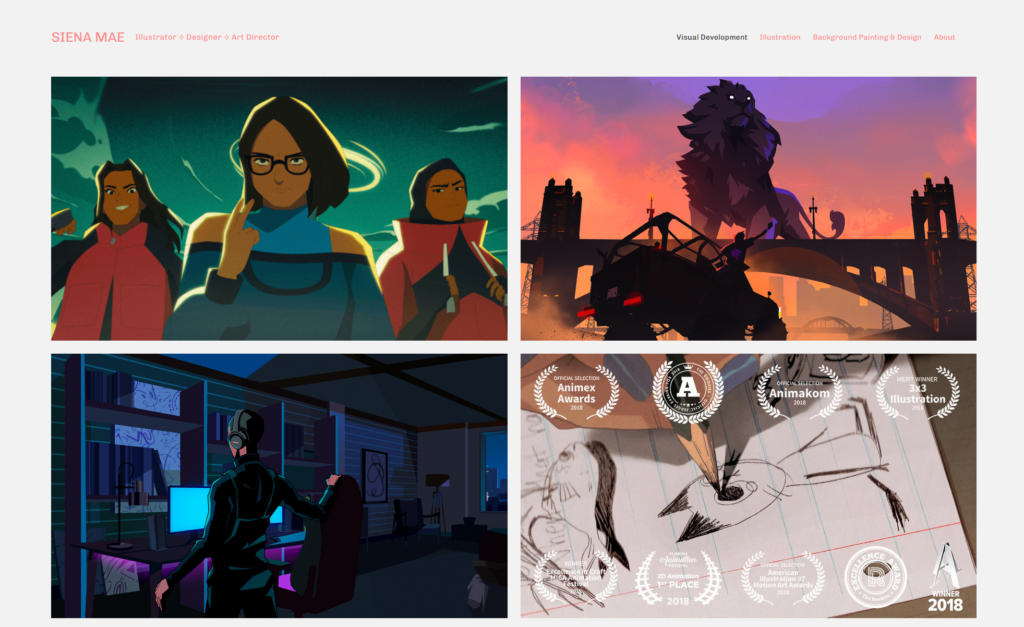
Siena Mae is an illustrator, designer, and art director whose portfolio showcases visual development projects, illustrations, and creative work across multiple disciplines.
What I Like About This Freelancer Portfolio
The portfolio is clean, focused, and easy to browse. Her “Visual Development” section uses a simple two-column layout to highlight a curated selection of projects, while the Illustration portfolio adopts a masonry layout that accommodates artwork of different sizes and formats.

One feature that stands out is the mix of static images and animated GIFs, which adds movement and visual interest throughout the portfolio. Visitors can click any illustration to view it in a larger lightbox and browse additional work using previous and next controls.
Key Takeaways
- Mix static images with GIFs or videos to create a more dynamic portfolio.
- Curate your work carefully. 10 to 15 strong projects are often enough.
- Use masonry layouts to display artwork with varying dimensions.
- Lightboxes provide a better viewing experience for detailed creative work.
- Focus on quality over quantity when showcasing projects.
#10: Mel Gardner
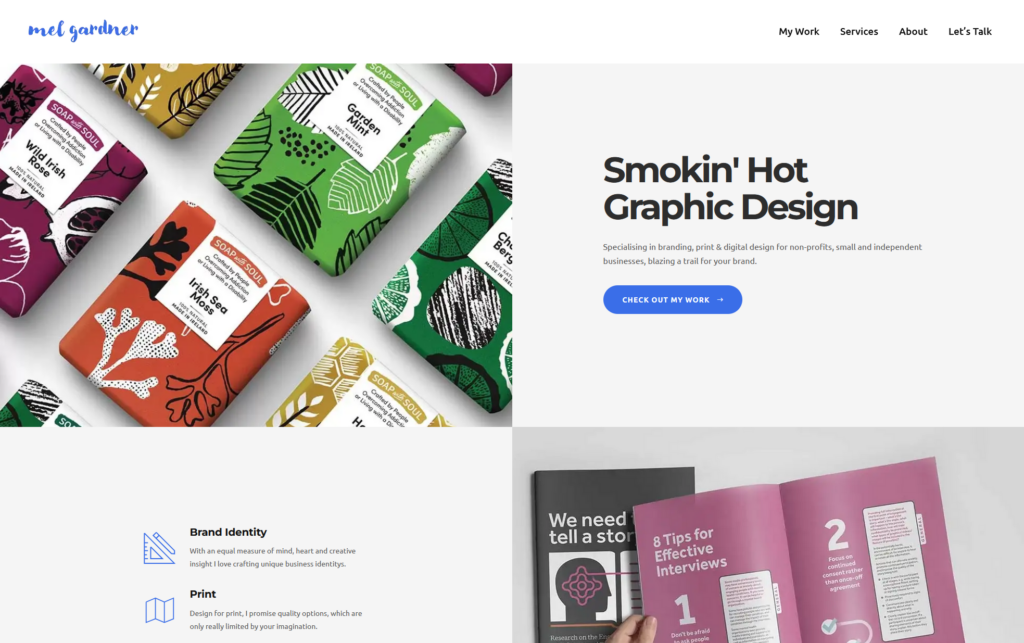
Mel Gardner is a Dublin-based freelance designer whose portfolio showcases branding, identity design, report design, websites, catalogs, and other client projects across a range of industries.
What I Like About This Freelancer Portfolio
The portfolio uses a clean masonry layout that makes it easy to browse different project types. Hovering over a project reveals its title and tags, helping visitors quickly identify relevant work.

Clicking a project opens a dedicated case study page that presents the work in a simple, single-column layout optimized for both desktop and mobile viewing. The overall experience feels intuitive and user-focused, making it easy to explore projects without getting lost.

Key Takeaways
- Organize projects so potential clients can quickly find relevant work.
- Use tags to help visitors understand project types at a glance.
- Design project pages for a smooth browsing experience on all devices.
- Keep navigation simple and intuitive.
- Make your CTA easy to access with a sticky menu or persistent navigation.
Conclusion
The best portfolio websites in 2026 share a common theme: they make it easy for visitors to discover great work. Whether it’s through clean layouts, intuitive navigation, strong visual presentation, thoughtful organization, or clear calls to action, every example in this collection is designed with the user experience in mind.
As you build your own portfolio, focus on showcasing your best work, minimizing distractions, and making it easy for potential clients to take the next step.
If you’re looking for a quick way to create a professional portfolio website, explore our collection of portfolio themes, including Inspiro Premium. With features like video backgrounds, portfolio galleries, lightboxes, filtering options, and WooCommerce integration, they provide everything you need to create a portfolio that stands out.


