


Before WordPress 7.0, plugins adding AI features had to request and manage an API key to communicate with an AI provider.
This came with several drawbacks in terms of code weight and maintainability. You had to bundle heavy, proprietary SDK libraries into your plugins and write provider-specific cURL requests.
This fragmented scenario has completely changed with the native AI integration introduced in WordPress 7.0. Today, WordPress features a centralized interface for configuring credentials for various AI providers, along with a new PHP API. This new architecture allows you to send commands, instructions, media files, and data structures seamlessly, while the Core handles the requests.
The new architecture offers substantial benefits for both site admins and plugin developers.
Admins no longer need to configure AI settings across multiple plugins. Starting with WordPress 7.0, you simply install and enable your plugin connectors, enter your API keys into the unified Connectors interface, and they become instantly available to all AI-powered plugins on your site. You can easily monitor AI usage, switch your preferred model, or revoke a provider’s access for all plugins with a single click.
For plugin developers, the advantages are even greater, ranging from data security to code portability and a drastic reduction in technical debt.
Ready to start this journey into the new WordPress AI architecture? Let’s dive in.
The three layers of the WordPress AI architecture
Today, your WordPress sites are natively AI-ready. This is not about out-of-the-box AI features, though, but rather the foundation for building AI-powered websites.
The new architecture is structured across three distinct layers:
AI Connector
Before WordPress 7.0, every plugin that added AI features to your site needed its own system to store and manage your API keys. Your credentials had to be hardcoded into the plugin or managed via a custom settings page. In either case, it was far from an ideal solution for handling sensitive data.
A unified interface lets you configure all your AI service providers in one central location. This interface brings several major benefits to site management.
From a management and security standpoint, the biggest advantage is that you only need to set up your providers once in the Connectors interface, and you can then forget about them, regardless of how many plugins use them. If you ever need to change your API keys, you won’t have to reconfigure every plugin; you can update them all at once in the Connectors screen.
Centralizing credentials also improves your site’s security by mitigating the risk of exposing sensitive data through third-party plugins that might be poorly coded or untrustworthy.
Another key advantage is code portability. Your plugins no longer need to know which AI provider you use because the new architecture decouples authentication from plugin logic. This means that if you switch AI providers, your plugin will keep working without requiring a single line of code change.
However, the real breakthrough in portability is the ability for site admins to configure multiple connectors simultaneously. When a plugin triggers a request, WordPress automatically selects the most suitable AI Provider and model to generate the response, based on both the specific configuration of the plugin and the capabilities of the available models.
AI Client
While the Connectors screen provides the configuration UI for AI Providers, the AI Client gives developers the operational tool to communicate with AI models.
It is a native software interface that standardizes interaction with artificial intelligence models through the global wp_ai_client_prompt() function and a unified set of PHP methods.
Reduced technical debt
For developers, a major advantage of the new AI architecture is the reduction of technical debt and dependencies. Before WordPress 7.0, adding AI features came at a very high cost in terms of code maintenance. You had to bundle third-party proprietary SDKs (such as the official libraries for OpenAI or Anthropic) and constantly monitor library versions. This resulted in a heavy plugin codebase and opened the door to compatibility errors.
Furthermore, you had to write many lines of code to handle network logic and response parsing. To make things even worse, the code was vendor-specific, so if you decided to switch AI providers, you would have to rewrite your plugin’s entire network architecture.
The AI Client solves this problem at its root by transferring all this heavy work to the WordPress core. Your code becomes completely agnostic to the AI provider; you only need to write your instructions once, and WordPress will translate them into the model’s specific “dialect”.
Intelligent model selection
A powerful feature of the AI Client’s Fluent Interface is the ability to set preferred models through the using_model_preference() method, available via the wp_ai_client_prompt() builder function. This method lets you declare an ordered list of models for your plugin’s specific task. For example, the following code requests text generation targeting 3 preferred models:
$text_result = wp_ai_client_prompt( 'Convert the following transcript into a concise, blog-ready draft.' )
	->using_model_preference(
		'gemini-2.5-flash',
		'claude-3-5-sonnet',
		'gpt-4o'
	)
	->generate_text();
WordPress will check the providers configured on the Connectors screen and scan the list of models defined in the plugin’s code, selecting the first connector that is also available on the site. If none of the models specified in your code are available among the active Connectors, WordPress will ignore the model preference list and fall back to the first compatible model configured on the site.
This mechanism ensures that your plugin will always work, even if the site admin switches to a different AI provider.
AI Provider
An AI Provider is the company that owns, trains, and hosts the Large Language Models (LLMs) we use every day. OpenAI, Google Gemini, and Anthropic are the most common AI providers supported via dedicated connectors in WordPress 7.0, but developers can register additional custom AI Providers.
When your plugin’s code calls the generate_text() method — or any other generation method — WordPress compiles and sends a data payload to the AI Provider via the endpoint established by the Connector. Here is the sequence of operations that takes place behind the scenes:
- As a first step, the AI Provider receives the input prompt text along with any attached multimedia files (data payload).
- Once received, it processes the request, applying any system instructions.
- From there, it generates the output structured as free text or a JSON object.
- Finally, it sends the output back to WordPress via an HTTP response.
Every provider offers a wide variety of models with different capabilities, speeds, and prices. These range from models specialized purely in text processing to multimodal models that accept media files (audio, images, video) alongside a text prompt, to models engineered for specific tasks, such as image generation or speech-to-text conversion.
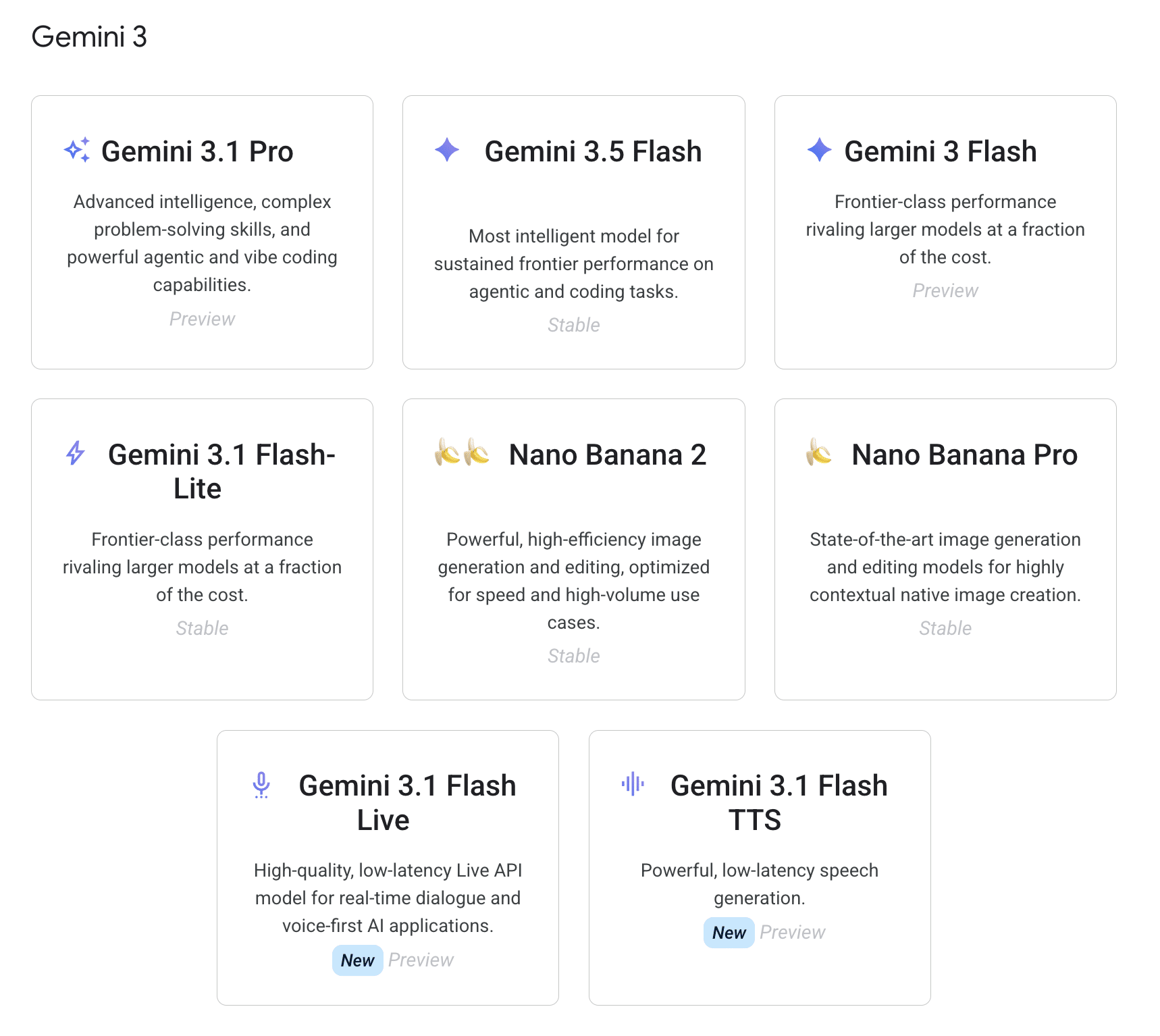
Again, the models available to a WordPress site depend on the AI providers the user configures in the Connectors screen. This means your plugin does not dictate which specific provider to use.
A deep dive into the wp_ai_client_prompt() function
The wp_ai_client_prompt() function enables plugins to communicate with AI models in a standardized way: you won’t install external libraries, handle provider-specific configurations, or hard-code manual HTTP requests.
It’s a software interface that lets you write your code once, leaving WordPress to handle the heavy lifting and translating your instructions into each model’s specific “dialect”.
The function returns an instance of the WP_AI_Client_Prompt_Builder class, which provides a fluent interface of chainable methods to customize your prompts. The function is described as follows:
/**
 * Fluent builder for constructing AI prompts, returning WP_Error on failure.
 *
 * This class provides a fluent interface for building prompts with various
 * content types and model configurations. It wraps the PHP AI Client SDK's
 * PromptBuilder and adds WordPress-specific behavior including WP_Error
 * handling instead of exceptions, snake_case method naming, and integration
 * with the Abilities API.
 *
 * Only the generating methods will return a WP_Error, to not break the fluent
 * interface. As soon as any exception is caught in a chain of method calls,
 * the returned instance will be in an error state, and all subsequent method
 * calls will be no-ops that just return the same error state instance. Only
 * when a generating method is called, the WP_Error will be returned.
 */
wp_ai_client_prompt() does not make an immediate HTTP request; instead, it instantiates and returns a WP_AI_Client_Prompt_Builder object. More than 50 configuration methods populate the object’s private properties using a Fluent Interface, which makes the code highly readable and easy to write.
Here is a non-exhaustive list of methods you will use most frequently:
with_text(): Adds text to the current message.with_file(): Adds a file to the current message.with_history(): Adds conversation history messages.using_model_preference(): Sets preferred models to evaluate in order.using_system_instruction(): Sets the system instruction.using_max_tokens(): Sets the maximum number of tokens to generate.using_temperature(): Sets the temperature for generation.using_top_p(): Sets the top-p value for generation.using_top_k(): Sets the top-k value for generation.as_output_file_type(): Sets the output file type.as_json_response(): Configures the prompt for JSON response output.is_supported_for_text_generation(): Checks if text generation is supported by the active configuration.is_supported_for_image_generation(): Checks if image generation is supported by the active configuration.is_supported_for_text_to_speech_conversion(): Checks if text-to-speech conversion is supported by the active configuration.is_supported_for_video_generation(): Checks if video generation is supported by the active configuration.generate_text(): Generates a text result from the prompt.generate_image(): Generates an image from the prompt.convert_text_to_speech(): Converts text to speech.generate_speech(): Generates speech from the prompt.generate_video(): Generates a video from the prompt.
For the complete list of methods, please refer to the WordPress core source code.
Suppose you want to accurately transcribe the contents of an audio file. You could use the function as follows:
$transcription_builder = wp_ai_client_prompt( $prompt )
	->with_file( $audio_base64, $mime_type )
	->using_temperature( 0.1 );

if ( ! $transcription_builder->is_supported_for_text_generation() ) {
	// No configured provider supports the current prompt configuration.
	return new WP_Error(
		'no_supported_model',
		'No configured AI model can process this request. Configure a provider in Settings > Connectors.',
		array( 'status' => 400 )
	);
}

$transcript = $transcription_builder->generate_text();
Here is what this code does:
$prompt: Represents the primary string containing your core instructions.with_file(): Unlocks the multimodal capabilities of the interface. In the example above, we passed the pre-encoded audio binary payload as a Base64-Encoded string along with its corresponding MIME type.using_temperature(): Controls the determinism of the response. While a low value (0.1) forces the model to remain faithful to the audio, a higher value allows greater creative freedom. You can combine this method with theusing_top_p()(Top-Probability) method for tighter control over the output.is_supported_for_text_generation(): Checks if the active connectors support the requirements of the current prompt before committing resources to a network call.generate_text(): This is the terminating method of the Fluent Interface. It sends the unified HTTP request to the active provider and returns either the generated text string or aWP_Errorobject on failure.
In short, we passed the AI Provider a text prompt and an attached audio file. We set a low temperature to ensure the most deterministic result possible, verified that the active configuration supported text generation, and finally executed the speech-to-text transcription based on the AI’s response.
With another prompt, we can pass the raw transcript back to the AI to generate a response structured as a JSON object:
$structured_json = wp_ai_client_prompt(
	"Convert the following transcript into a concise, blog-ready draft in American English.n" .
	"Return JSON with a post title and body sections.n" .
	"Each section must have: heading, level (2 or 3), and paragraphs (array).n" .
	"If useful, include bullet_points (array) for short actionable lists.n" .
	"Use short, clear headings and readable paragraph text.nn" .
	"Transcript:n" . $transcript
)
	->using_system_instruction( "You are a professional WordPress content editor. Always write in American English (use appropriate spelling, grammar, and conventions for that language variant)." )
	->using_temperature( 0.4 )
	->as_json_response( $schema )
	->generate_text();
For this second prompt, we use additional methods to leverage other capabilities of the API:
using_system_instruction(): Defines the operational context and behavioral role of the model, cleanly separating its persona (“a professional WordPress content editor”) from the data payload.using_temperature( 0.4 ): Sets a higher temperature than the previous transcription task, allowing the model to use a richer vocabulary and produce a more fluid content.as_json_response(): Forces the model to return a structured JSON string that matches the layout defined in your$schemavariable. This is useful when preparing content for Gutenberg.
With an output structured as JSON, you can extract individual fields and programmatically map them into native Gutenberg blocks using core WordPress functions.
For a deeper overview of the AI Client, see also the Introducing the AI Client in WordPress 7.0 dev note.
Convert an audio file into Gutenberg-ready content with AI
Now that you have a better understanding of the three layers of the WordPress AI architecture, let’s look at how it all comes together with a real-world example. In this section, you will learn how to build the core logic of an AI-powered plugin designed to generate a well-crafted post draft directly from an audio file.
The use cases for this feature are vast and diverse. Imagine creating a comprehensive blog post from a quick voice note sent via your favorite messaging app, or transcribing an audio interview recorded on your smartphone.
To implement this functionality on your WordPress site, you will need to build a custom plugin. We won’t cover the boilerplate files or the full plugin registration process here; for the basics of plugin development, you can refer to other tutorials on the Kinsta blog or the official WordPress.org documentation.
We will focus on the core logic that allows your plugin to communicate with your AI Provider. But don’t worry, the plugin is available for you to browse and download in this GitHub repository.
What this plugin does
To get started, navigate to the GitHub project page and download the plugin’s ZIP archive. Next, log into your WordPress 7.0+ dashboard and upload it from Plugins > Add Plugin > Upload Plugin. Once the plugin is installed and activated, you are ready to follow along with this tutorial.
The AI Content Builder plugin generates a custom settings sidebar, accessible via an icon located in the top-right corner of the Block Editor interface. This sidebar features a dedicated interface for uploading audio files and a toggle that lets the AI overwrite the current post title.
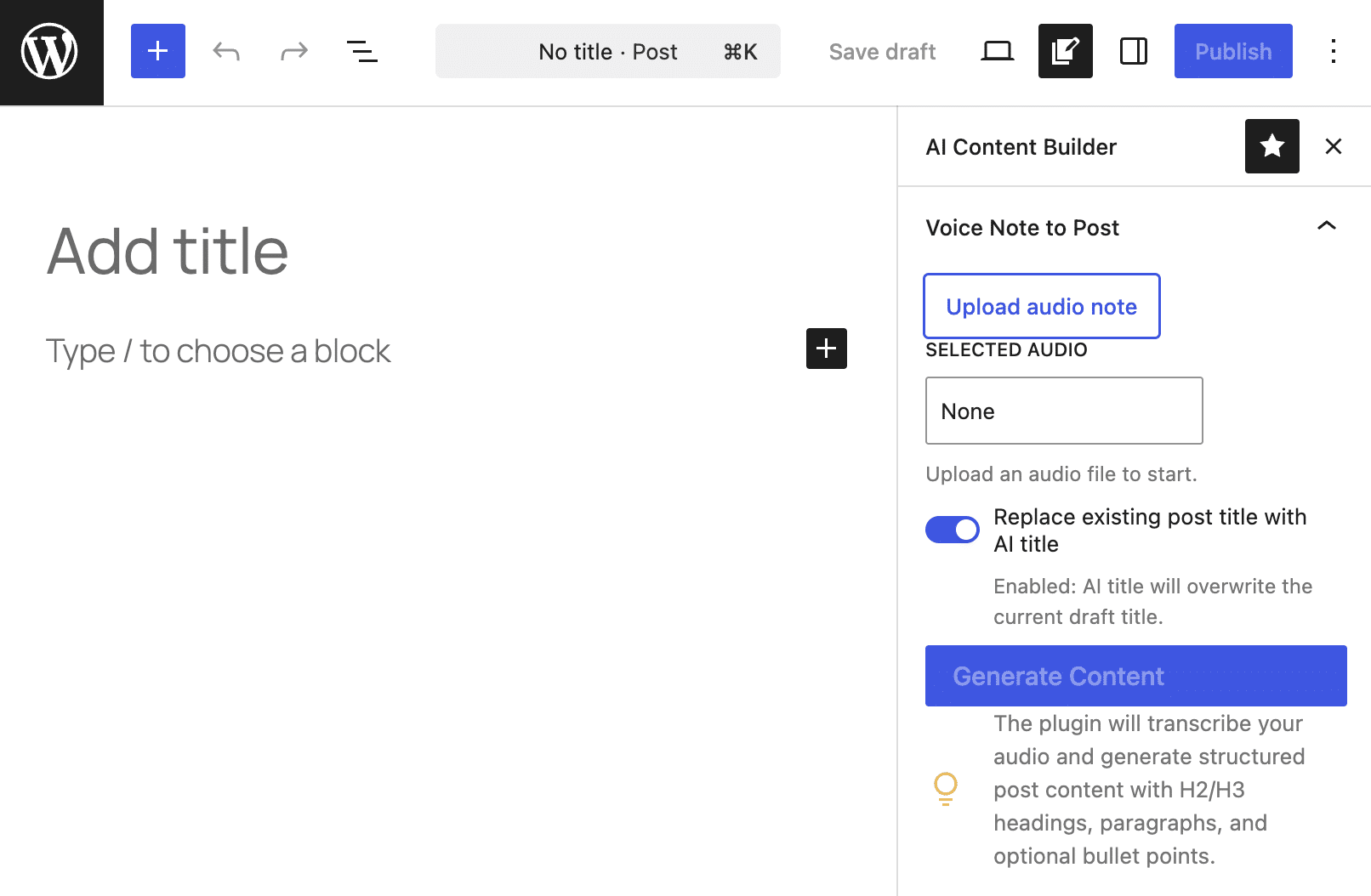
The Upload audio note button opens the WordPress media uploader, letting you upload a new audio file or select an existing one from your media library.
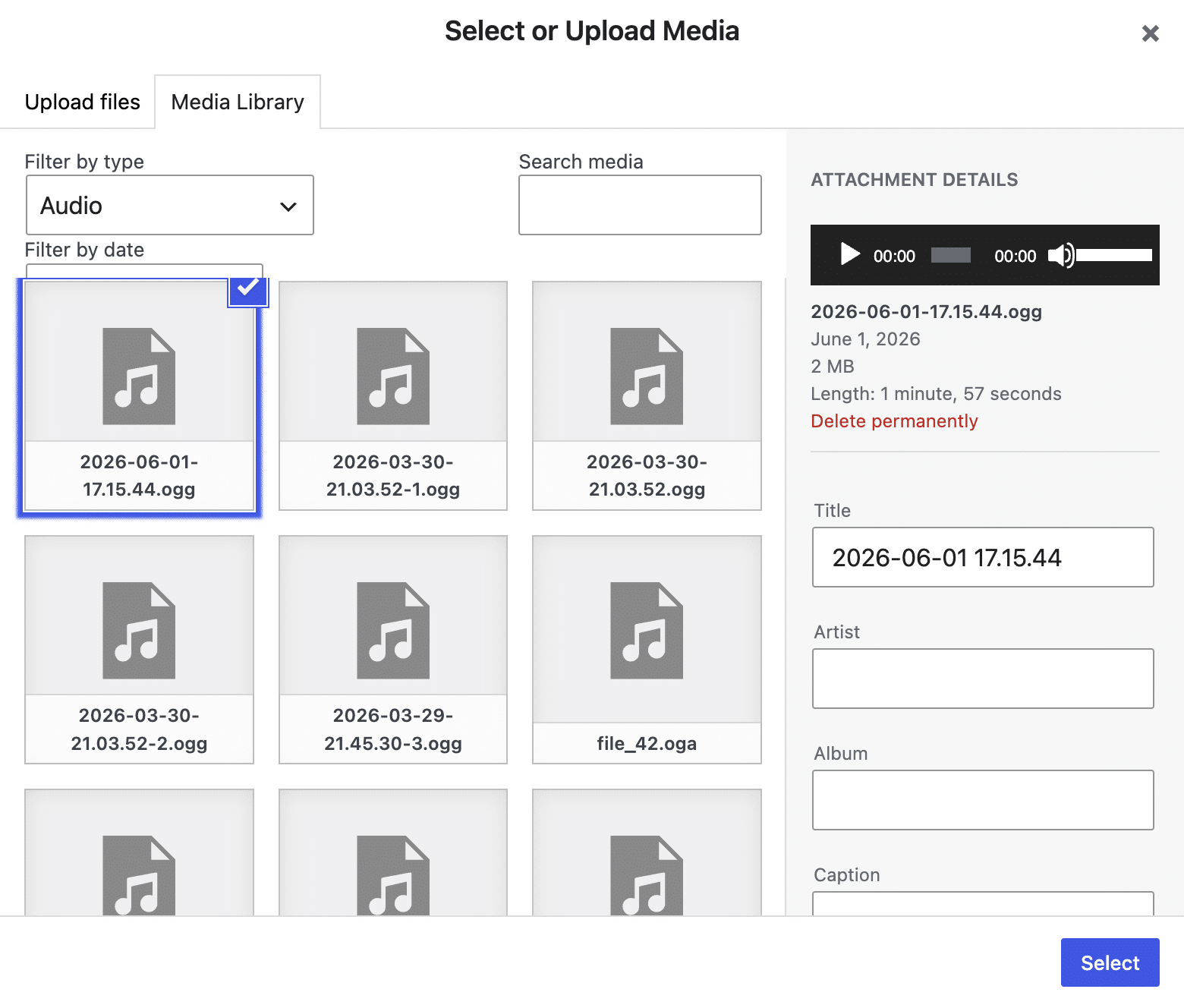
With the audio file loaded, the Generate Content button triggers an asynchronous request to your active AI Provider.
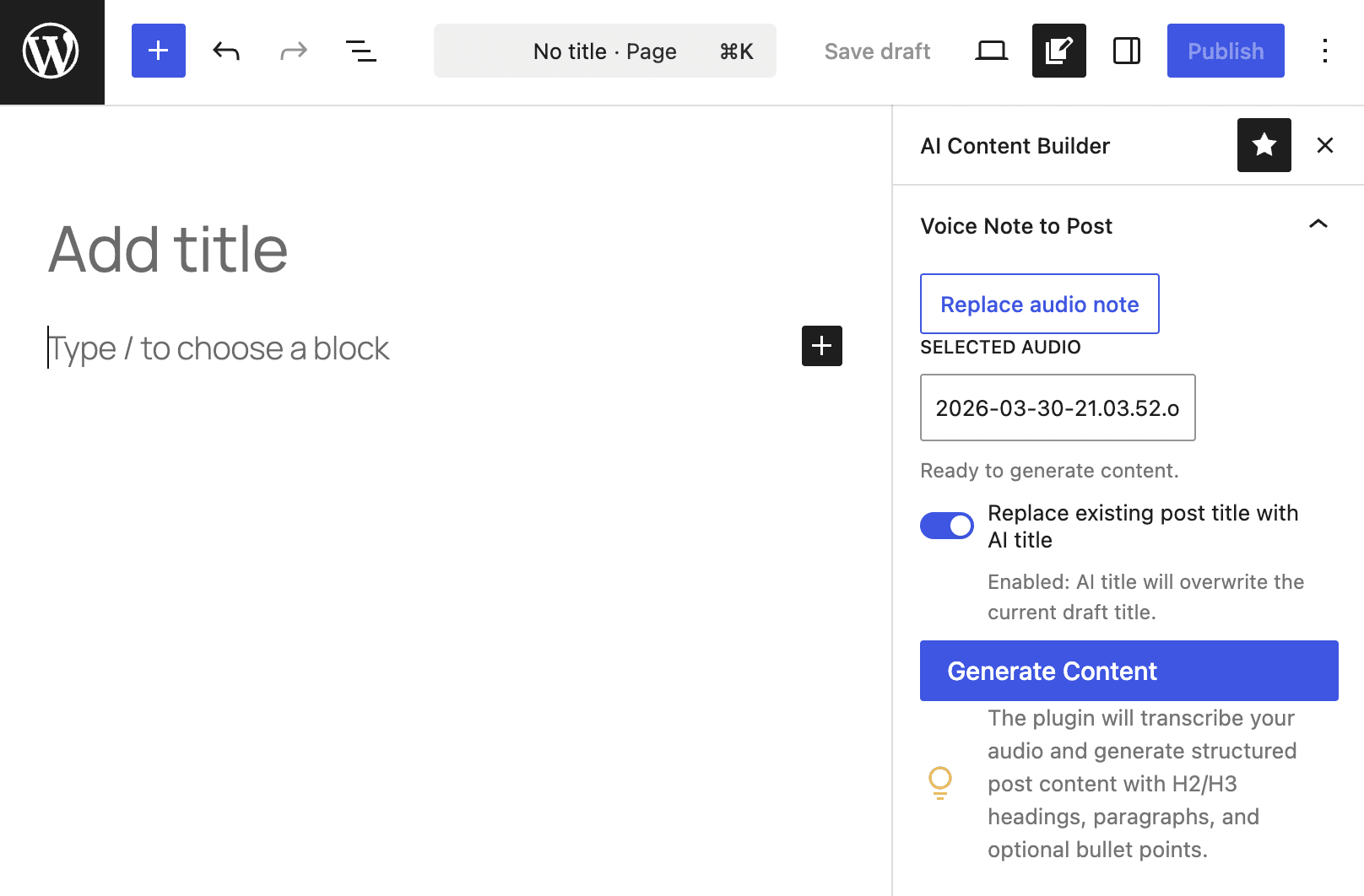
The image below shows the final post draft generated by the AI in just a few seconds.
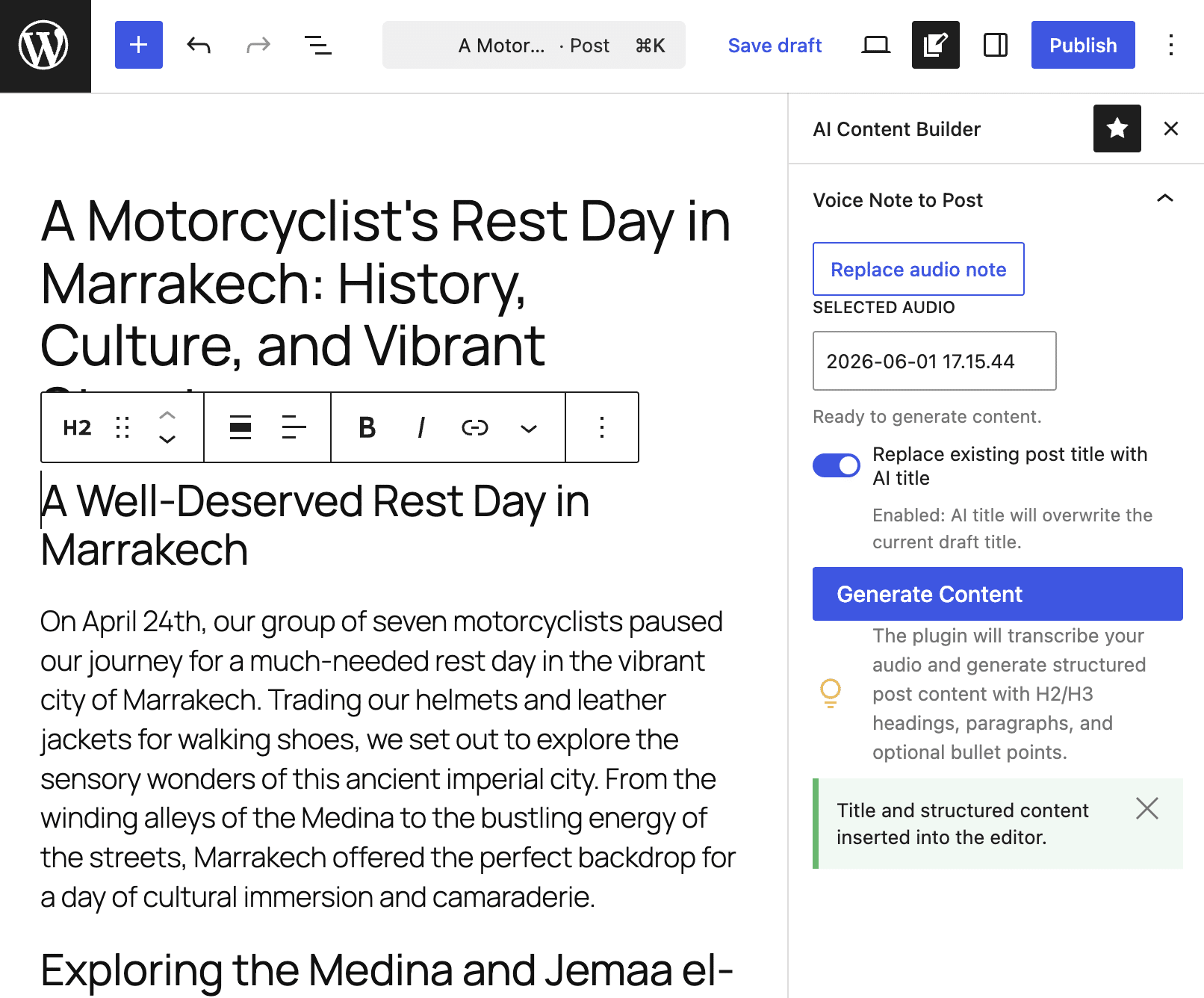
The resulting content is structured into native Gutenberg blocks, including paragraphs, headings, and lists.
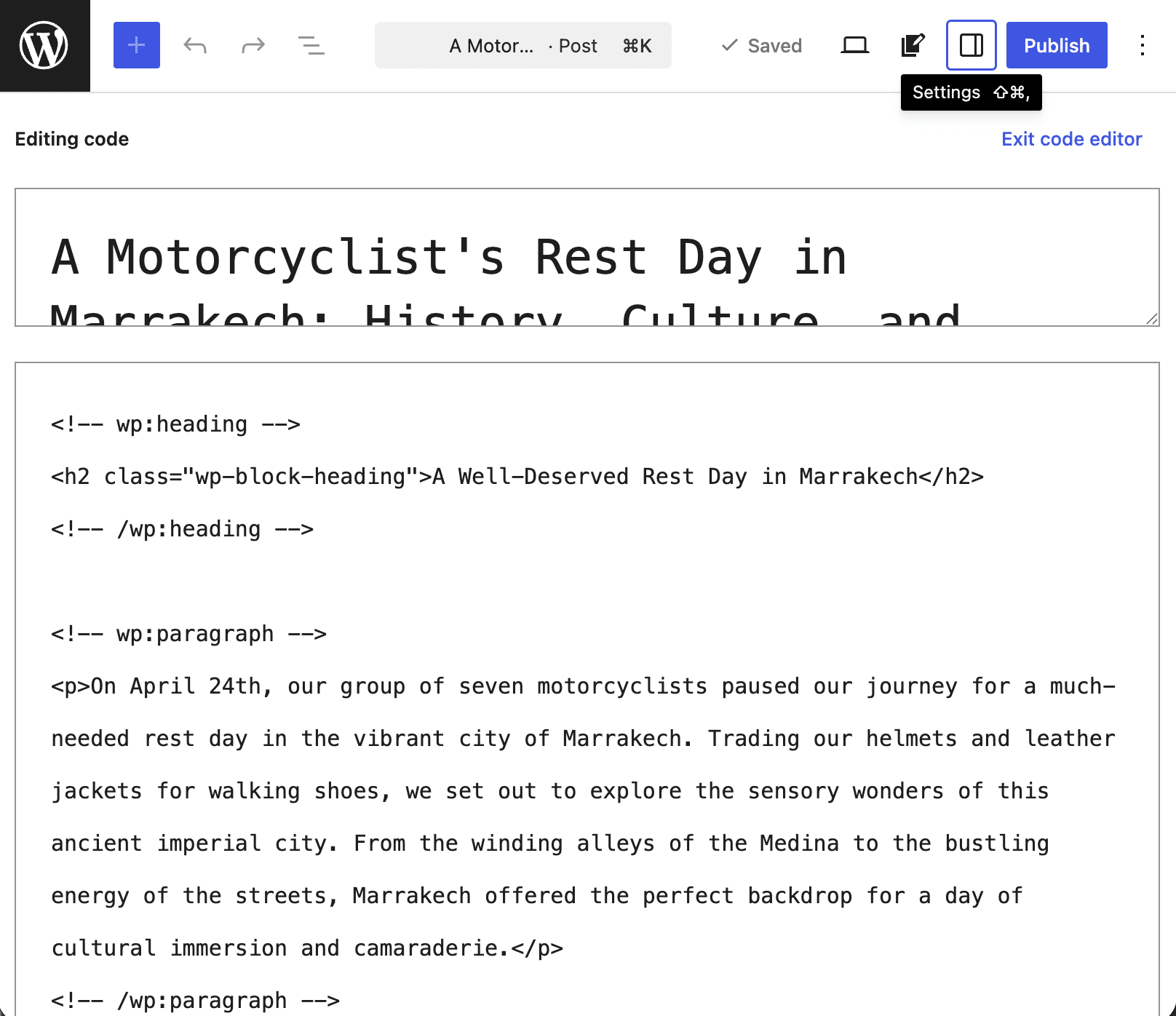
Now let’s dive into the plugin’s logic.
What you need for this plugin
Here are the basic requirements for building a WordPress plugin that hooks into the new AI architecture to generate your post content:
- WordPress 7.0+
- An API key for an AI provider that offers a model capable of speech-to-text conversion. In our example, we’ll be using Google AI.
- Your favorite IDE. For this plugin, we used VS Code.
- A solid understanding of WordPress and Gutenberg development, REST APIs, PHP, and JavaScript.
You don’t need to worry about Node.js, build processes, or importing external libraries because this plugin relies entirely on native WordPress core APIs. The result is a lightweight, secure plugin with zero technical debt.
Plugin structure and WordPress minimum version
The AI Content Builder plugin consists of just two files:
ai-content-builder.phpeditor.js.
The minimum required WordPress version is 7.0, so make sure you set it in the plugin’s header:
With that in mind, let’s take a look at the process of building an AI-powered plugin for WordPress.
The plugin’s data flow
Before we dive into the code, let’s take a look at how data flows from the WordPress backend (the block editor) through to the PHP server and the AI provider, and then back again.
1. From browser to server: Asynchronous REST call: the browser sends the audio ID to the plugin’s custom REST endpoint. To prevent the UI from freezing, we register a REST endpoint that allows asynchronous requests to the PHP server.
2. First AI pass: Speech-to-text transcription: the server intercepts the request, retrieves the audio from the database, and queries the AI client to extract the raw text transcription.
3. Second AI pass: Content structuring: The server sends the raw transcription back to the AI client and requests that it be formatted as a structured JSON object.
4. Data hydration and block generation: the JavaScript (JS) script receives the structured JSON object, normalizes it, and maps the fields to native Gutenberg blocks.
Now let’s look at the logic behind each phase.
1. Register a custom API endpoint
The first step in creating the AI Content Builder plugin is to register an API endpoint. This is essential because processing an audio file and generating a response can take several seconds (or even minutes) for the AI model. Registering a REST endpoint enables you to make asynchronous requests via the sidebar controls, preventing the UI from freezing.
Registering an API endpoint also enables you to make secure AI calls without exposing login credentials by leveraging the WordPress native authentication system.
The logic for registering and initializing the endpoint is handled in the plugin’s PHP file using the two class methods, init() and register_rest_routes().
public static function init(): void {

	// Register the custom REST endpoint used by the sidebar JS.
	add_action( 'rest_api_init', array( __CLASS__, 'register_rest_routes' ) );

	...
}
By hooking the function call into the rest_api_init hook, the plugin only registers the endpoint root when a REST API request is triggered. This improves performance by preventing unnecessary delays in page loading.
You can configure routes using the register_rest_routes() method as shown in the code below:
public static function register_rest_routes(): void {
	register_rest_route(
		self::REST_NAMESPACE,
		self::REST_ROUTE,
		array(
			'methods'             => WP_REST_Server::CREATABLE, // Alias for POST.
			'callback'            => array( __CLASS__, 'handle_generate_request' ),
			'permission_callback' => static function (): bool {
				// Reject unauthenticated or insufficiently privileged requests early.
				return current_user_can( 'edit_posts' );
			},
			'args'                => array(
				'audio_id' => array(
					'type'     => 'integer',
					'required' => true,
				),
			),
		)
	);
}
This method does the following:
- The
register_rest_route()function takes three parameters: the route namespace, the route itself, and a configuration array. WP_REST_Server::CREATABLEis an alias for the POST transport method, which is used to ensure maximum compatibility with the internal architecture of WordPress.permission_callbackis an anonymous function that restricts access to authenticated users who have permission to create and edit their own posts. WordPress then blocks the request before processing it and automatically returns a 401 Unauthorized or 403 Forbidden error in case of unauthorized access.argsis an optional array of additional parameters that can be used to modify the API response. It allows you to specify the data that the request to the endpoint must return.audio_idis an array of parameters that specifies the type of data that is required. If the returned data type is not an integer or is missing, the REST API stops execution and throws an error.
Finally, ensure the editor sidebar knows where to send the data. To do this, you use the wp_localize_script() function within the enqueue_editor_assets() method.
public static function enqueue_editor_assets(): void {
	...

	wp_localize_script(
		'ai-content-builder-editor',
		'AICBData',
		array(
			'restPath' => '/' . self::REST_NAMESPACE . self::REST_ROUTE,
			'nonce'    => wp_create_nonce( 'wp_rest' ),
		)
	);
}- The
wp_localize_script()function is primarily used to localize a registered script with data for a JavaScript variable, but here we use it to pass data from PHP to JavaScript via the globalAICBDataobject. restPathis the endpoint address; specifying it here allows you to avoid hardcoding it in the JavaScript file.noncesets a security token to prevent unauthorized access.
2. Accessing the AI Client to extract text from an audio file
The core of our plugin is the handle_generate_request() method. This method performs a sequence of tasks, beginning with security checks and concluding with the generation of post content to be injected into the block editor.
First, it verifies that the AI Client is available and that AI support has not been disabled on the site.
public static function handle_generate_request( WP_REST_Request $request ) {
	if ( ! function_exists( 'wp_ai_client_prompt' ) ) {
		return new WP_Error(
			'ai_client_unavailable',
			'WordPress AI Client is not available. This plugin requires WordPress 7.0+.',
			array( 'status' => 500 )
		);
	}

	if ( function_exists( 'wp_supports_ai' ) && ! wp_supports_ai() ) {
		return new WP_Error(
			'ai_disabled',
			'AI support is disabled on this site.',
			array( 'status' => 403 )
		);
	}
	...
}
In the event of a failure, the checks return a 500 or 403 error, respectively.
The next code block performs the following actions:
- Extracts the audio file ID from the request
- Ensures that the audio file ID is a positive integer
- Checks the file type
- Retrieves the MIME type
- Extracts and encodes the file content in Base64
$audio_id = absint( $request->get_param( 'audio_id' ) );
if ( ! $audio_id ) {
	return new WP_Error( 'invalid_audio_id', 'Invalid audio ID.', array( 'status' => 400 ) );
}

$attachment = get_post( $audio_id );
if ( ! $attachment || 'attachment' !== $attachment->post_type ) {
	return new WP_Error( 'audio_not_found', 'Audio attachment not found.', array( 'status' => 404 ) );
}

$mime_type = (string) get_post_mime_type( $audio_id );
if ( 0 !== strpos( $mime_type, 'audio/' ) ) {
	return new WP_Error( 'invalid_audio_type', 'Attachment must be an audio file.', array( 'status' => 400 ) );
}

$audio_path = get_attached_file( $audio_id );
if ( ! $audio_path || ! file_exists( $audio_path ) ) {
	return new WP_Error( 'audio_path_missing', 'Audio file path not found on server.', array( 'status' => 404 ) );
}

$audio_bytes = file_get_contents( $audio_path );
if ( false === $audio_bytes ) {
	return new WP_Error( 'audio_read_failed', 'Unable to read audio file.', array( 'status' => 500 ) );
}

$audio_base64 = base64_encode( $audio_bytes );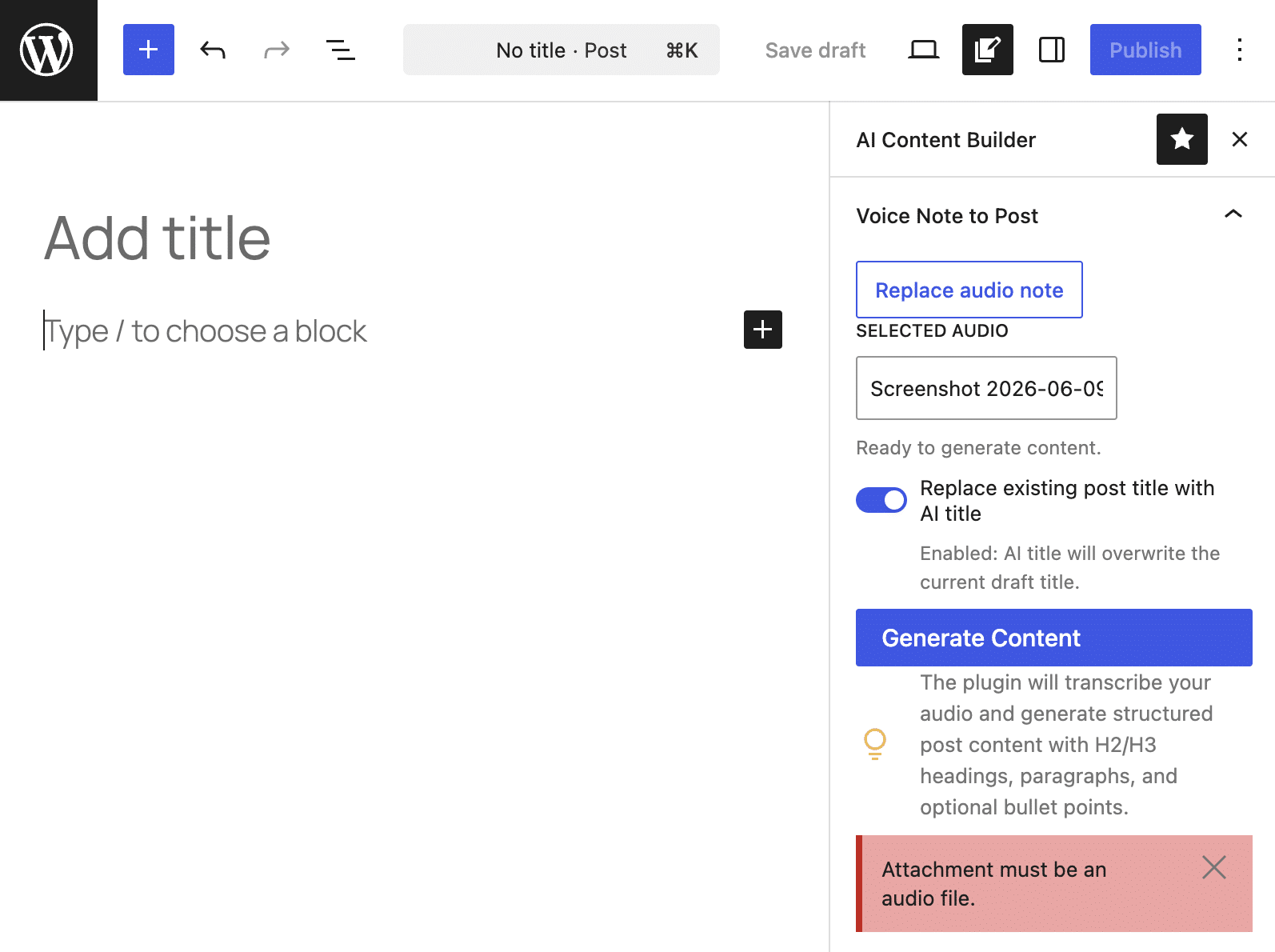
Thus, the binary file has been converted into a string that can be passed to the AI Client. We can now move on to extracting the text:
$output_language = self::get_output_language();

$transcription_builder = wp_ai_client_prompt(
	"Transcribe this voice note accurately into $output_language. Return plain text only."
)
	->with_file( $audio_base64, $mime_type )
	->using_temperature( 0.1 );

if ( ! $transcription_builder->is_supported_for_text_generation() ) {
	return new WP_Error(
		'no_supported_model',
		'No configured AI model can process this request. Configure a provider in Settings > Connectors.',
		array( 'status' => 400 )
	);
}

$transcript = $transcription_builder->generate_text();
Here is a breakdown of what the code above does.
get_output_language()is a static method defined elsewhere in the script that returns the site’s locale. (See GitHub.)wp_ai_client_prompt()initializes a new request by passing the main prompt.with_file()tells the AI Client that we are sending a multimodal request; it accepts the file content in Base64 and the MIME type.using_temperature()allows you to specify the level of determinism of the response. We set a low value to obtain a faithful transcription of the audio.- The
is_supported_for_text_generation()method checks whether the AI provider can generate text from the provided data; if the provider does not support multimodal input, the plugin halts and returns an error message. - The
generate_text()method initiates the HTTP request.
3. Converting the audio transcript into structured content
Now that we have the transcript, the plugin must communicate with the AI provider again to obtain a structured JSON response. For this, we need to define a structured array in JSON format.
$schema = array(
	'type'       => 'object',
	'properties' => array(
		'title'    => array( 'type' => 'string' ),
		'sections' => array(
			'type'  => 'array',
			'items' => array(
				'type'       => 'object',
				'properties' => array(
					'heading'    => array( 'type' => 'string' ),
					'level'      => array(
						'type' => 'integer',
					),
					'paragraphs' => array(
						'type'  => 'array',
						'items' => array( 'type' => 'string' ),
					),
					'bullet_points' => array(
						'type'  => 'array',
						'items' => array( 'type' => 'string' ),
					),
				),
				'required'   => array( 'heading', 'level', 'paragraphs' ),
			),
		),
	),
	'required'   => array( 'title', 'sections' ),
);
With this structure, the AI will respond with a JSON object containing a title and an array of sections. Each section must contain a heading, a heading level, at least one paragraph, and bullet points.
Now that the schema is defined, we can move on to configuring the second request to the AI client:
$structured_json = wp_ai_client_prompt(
	"Convert the following transcript into a concise, blog-ready draft in $output_language.n" .
	"Return JSON with a post title and body sections.n" .
	"Each section must have: heading, level (2 or 3), and paragraphs (array).n" .
	"If useful, include bullet_points (array) for short actionable lists.n" .
	"Use short, clear headings and readable paragraph text.nn" .
	"Transcript:n" . $transcript
)
	->using_system_instruction( "You are a professional WordPress content editor. Always write in $output_language (use appropriate spelling, grammar, and conventions for that language variant)." )
	->using_temperature( 0.4 )
	->as_json_response( $schema )
	->generate_text();

if ( is_wp_error( $structured_json ) ) {
	return $structured_json;
}
Let’s break down the key points of this code:
using_system_instruction()defines the model’s persona.using_temperature( 0.4 )sets a higher temperature value, giving the AI greater creative freedom to generate a response and produce more fluid, rich prose.as_json_response( $schema )instructs the client to provide the response in a structured format.- The plugin stops in case of an error.
The next step is to decode and sanitize the data.
$structured = json_decode( (string) $structured_json, true );

if ( ! is_array( $structured ) ) {
	return new WP_Error(
		'invalid_ai_json',
		'Could not parse structured AI response.',
		array( 'status' => 500 )
	);
}

$normalized = self::normalize_structured_post( $structured );

if ( '' === $normalized['title'] && empty( $normalized['sections'] ) ) {
	return new WP_Error(
		'empty_structured_content',
		'The AI provider returned empty structured content.',
		array( 'status' => 500 )
	);
}
In the code above:
- The function
json_decode()converts the JSON string into a PHP associative array. - If the JSON is malformed, the following check returns a 500 status code along with a clear error message.
- The static method
normalize_structured_post()sanitizes and normalizes the provider’s output before exposing it to JavaScript (see this function’s definition on GitHub).
The only thing left to do now is pass the resulting output to JavaScript to generate native Gutenberg blocks.
4. Generating Gutenberg-ready output
The next step is to map the JSON output to native Gutenberg blocks. This phase occurs on the client side and is handled by the editor.js file.
When the user selects an audio file, the following code is triggered:
function AIContentBuilderSidebar() {

	const [ audioId, setAudioId ] = useState( 0 );
	...

	const onSelectAudio = function ( media ) {
		if ( ! media || ! media.id ) {
			return;
		}
		setAudioId( media.id );
		setAudioLabel( media.title || media.filename || ( 'Audio #' + media.id ) );
		setNotice( null );
	};
	...
}
This code retrieves the ID of the recorded audio file from the WordPress database.
When the user clicks on the Generate Content button, the onGenerate() function uses apiFetch() to send a POST request to the API endpoint, including the audio ID, among other things.
const onGenerate = async function () {

	...

	try {
		const response = await apiFetch( {
			path: AICBData.restPath,
			method: 'POST',
			headers: {
				'X-WP-Nonce': AICBData.nonce,
			},
			data: {
				audio_id: audioId,
			},
		} );
		...
	}
	...
}awaitpauses the function temporarily to prevent the browser from freezing while waiting for the AI’s response.- Once received, the JSON object is stored temporarily in the
responsevariable.
The content of the response variable will be an object structured as follows:
{
	title: "Two Wheels to the Medina: ...",
	sections: [
		{
			heading: "A Well-Deserved Rest in the Red City",
			level: 2,
			paragraphs: [ "On April 24th, our group of seven motorcyclists..." ],
			bullet_points: []
		},
		{
			heading: "Diving into the Medina and Jemaa el-Fnaa",
			level: 2,
			paragraphs: [ "We spent the day exploring the historic Medina..." ],
			bullet_points: [
				"Navigating the vibrant, maze-like alleys of the ancient Medina",
				"Tasting traditional Berber tagines and Moroccan mint tea",
				"Shopping for handmade leather goods, spices, and lanterns in the souks"
			]
		},
		{...}
	],
	content: "Fallback plain text...",
	transcript: "Full transcript..."
}
This object provides the necessary data to create the blocks. However, the script may receive either a JSON string or JSON nested within an object. Therefore, an additional normalization step is needed before extracting the data for block generation:
const normalizedSections = normalizeSectionsPayload( response.sections );- The
normalizeSectionsPayload()function normalizes uncertainsectionspayloads into an array. (See code on GitHub.)
Next, the normalizedSections variable is passed as an argument to the function that converts the sections fields into native Gutenberg blocks:
const structuredBlocks = buildBlocksFromSections( normalizedSections );Below is an excerpt from the buildBlocksFromSections() function:
function buildBlocksFromSections( sections ) {
	if ( ! Array.isArray( sections ) ) {
		return [];
	}

	const blocks = [];

	sections.forEach( function ( section ) {
		if ( ! section || 'object' !== typeof section ) {
				return;
			}

			const heading =
				( 'string' === typeof section.heading )
					? section.heading.trim()
					: '';

			const level = ( 3 === section.level ) ? 3 : 2;

			if ( heading ) {
				blocks.push(
					createBlock( 'core/heading', {
						content: heading,
						level: level,
					} )
				);
			}

			...

		} );
	return blocks;
}
In the above code, the forEach() cycle loops through the data array, extracting section.heading and section.level to be used by the native createBlock() function.
For the mapping of section.paragraphs and section.bullet_points, please refer to the source code on GitHub.
Endless extension possibilities
The introduction of AI in WordPress opens up brand-new horizons for site admins and developers alike. While you previously had to build an entire network infrastructure from scratch just to inject AI features into your WordPress site, automating your editorial workflow and adding AI-powered features has now become remarkably straightforward.
The example plugin showcased in the second part of this article highlights just a single use case. However, it clearly demonstrates how you can now build tools that drastically simplify site management and content editing. Furthermore, this architecture unlocks advanced capabilities that were previously either too complex to implement or expensive.
And yet, we are only getting started. Artificial intelligence is an evolving reality that will undoubtedly trigger a massive wave of innovation.
Speaking of innovation… Have you tried Kinsta’s hosting yet? If you want to empower your website with the absolute best technology available today for WordPress, try Kinsta risk-free or contact our sales team to learn more.

Kinsta
Carlo is a passionate lover of webdesign and front-end development. He has been playing with WordPress for more than 20 years, also in collaboration with Italian and European universities and educational institutions. He has written hundreds of articles and guides about WordPress, published both on Italian and international websites, as well as on printed magazines. You can find him on LinkedIn.


