

Your recipes look incredible on Instagram. Your food photography has gotten seriously good. But your actual blog? It’s not doing your work justice. The layout feels generic, the recipe pages are clunky on mobile, and your gorgeous photos are getting lost in a theme that was clearly built for a tech startup — not a food blog.
Choosing the best WordPress theme for a food blog is a bit like picking produce at the farmers market — everything looks promising on the surface, but you won’t know if it’s actually good until you bring it home and start working with it. Some themes demo beautifully but fall apart once you start adding real content. Others look plain at first but turn out to be incredibly flexible once you customize them.
We’ve been building food blog themes at WPZOOM for over a decade — themes like Foodica, Cookely, and CookBook that thousands of food bloggers use every day. That means we know what works (and what breaks) from the inside. But this isn’t just a list of our own themes. Below is a curated list of 19 themes we genuinely recommend — including competitors we respect — with a mix of food-specific themes, powerful multipurpose options, and free themes for bloggers on a budget. For each one, we’ve included honest pros, cons, and a verdict so you can quickly find the right fit for your blog.
Key Takeaways
- Recipe cards with schema markup are essential for SEO. They’re what get you those rich snippets (star ratings, cook times, calorie counts) in Google search results. Your theme either needs built-in recipe cards or solid compatibility with a plugin like Recipe Card Blocks or WP Recipe Maker.
- Speed and mobile design aren’t optional. Most of your readers will be following recipes on their phone — often while cooking. A slow, hard-to-read theme means they’ll leave and Google will notice.
- Your photos need to be the star. Look for themes with clean layouts, full-width image support, and strong visual hierarchy. If the sidebar is competing with your food photos for attention, the theme isn’t right.
- Your theme is only one piece of the puzzle. Good hosting, proper SEO setup, reliable performance optimization, and regular backups all play a role in your blog’s success.
- You don’t need to spend money to start. Several excellent free themes (like Kale and Neve) can get you publishing recipes quickly. Upgrade to a premium theme when you’re ready to grow.
How We Evaluated These Themes
A pretty demo doesn’t mean much if the theme is slow or impossible to customize. We rate every theme on five key criteria, each scored out of 5:
Recipe-ready (out of 5): Does it include built-in recipe cards? Does it support schema markup — the code that tells Google “this is a recipe” so you can show up with rich snippets? If not built-in, does it work well with popular recipe plugins?
Visual appeal (out of 5): We eat with our eyes first, and so do your readers. Does the theme make your food photos look amazing? Is the design clean, modern, and not cluttered with widgets?
Speed & mobile (out of 5): How fast does it load? People follow recipes on their phones while cooking — a one-second delay can mean a lost reader. We test how each theme performs on mobile specifically.
Ease of use (out of 5): Can a non-technical blogger set this up and get something that looks close to the demo? Or does it require hours of configuration and code tweaking?
Monetization (out of 5): Does it support growth? We look for WooCommerce compatibility, ad placement zones, email list integration, and flexible layouts that won’t hold you back as your blog takes off.
Important: Switching themes can affect your layouts, widgets, and custom settings. Before experimenting with a new theme, always create a full backup of your site first.
Best WordPress Themes for Food Blogs
Price: $69/year (free Lite version available) | Recipe: 5/5 | Visual: 5/5 | Speed: 5/5 | Ease: 5/5 | Monetization: 4/5 | Overall: 4.8 / 5.0
Ideal use case: The food blogger who wants a purpose-built theme that’s ready to go out of the box — with recipe cards, multiple starter sites, and strong monetization from day one.
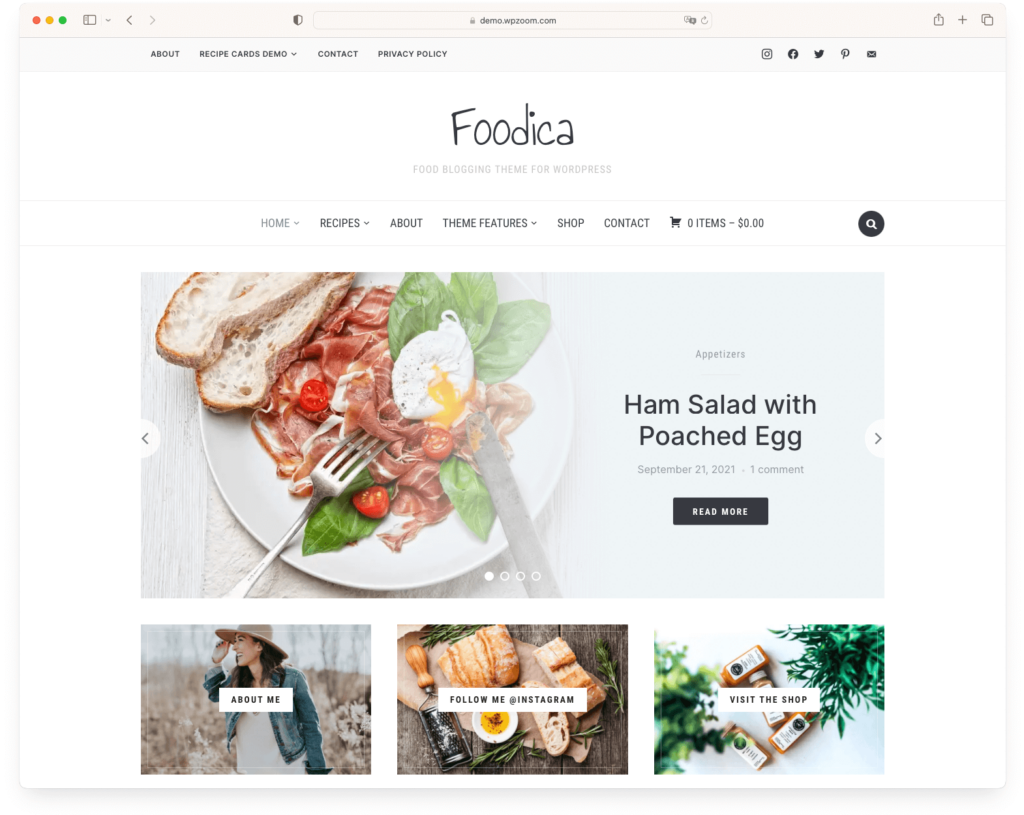
Foodica is one of the most established food blog themes in the WordPress ecosystem, and for good reason. It was designed from the ground up for recipe content. Unlike multipurpose themes where you have to bolt on food-related features, Foodica ships with built-in recipe index templates, native integration with Recipe Card Blocks (including schema markup for rich snippets), and a library of starter sites specifically designed for food blogs.

We originally built Foodica because every “food theme” at the time was just a generic blog theme with a food photo in the demo. We wanted something where the recipe index, the category layouts, and the ad zones were designed around how food bloggers actually work — not retrofitted. With the recent 5.0 update, we rebuilt the homepage entirely with blocks — no more slider scripts or widget overhead, just clean block markup that loads faster and gives you full control over your layout.
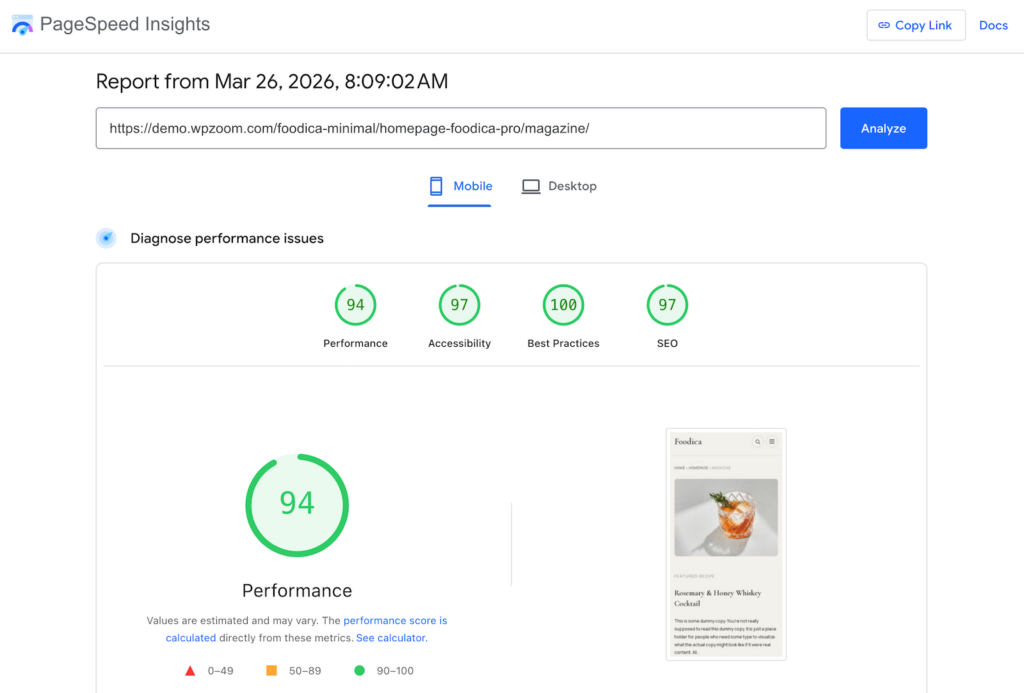
It’s the kind of theme where you can import a starter site, swap in your own photos and recipes, and have a professional-looking blog live within an afternoon.
There’s also a free Lite version if you want to test the waters before committing — a great option for bloggers just starting out.
Key features
- Ready-to-import starter sites designed specifically for food blogs
- Built-in recipe index templates and Recipe Card Blocks integration with schema markup
- Elementor page builder templates and custom widgets
- 10 predefined color schemes for quick brand customization
- Multiple ad zones and WooCommerce support for monetization
Pros
- Purpose-built for food blogs — not a generic theme with a food demo bolted on
- Recipe card support with schema markup means rich snippets in Google without extra plugins
- Multiple monetization options (ad zones, WooCommerce) built into the theme
- Free Lite version available for testing
Cons
- Some of the starter sites require the Pro version — the free Lite has fewer layout options
Verdict: If you want a theme that was built specifically for food blogging and don’t want to piece together recipe functionality from plugins, Foodica is one of the strongest choices available. The combination of recipe-specific features and monetization tools makes it especially good for bloggers who are serious about growing their audience.
Price: $69/year | Recipe: 5/5 | Visual: 5/5 | Speed: 4/5 | Ease: 4/5 | Monetization: 4/5 | Overall: 4.4 / 5.0
Ideal use case: The blogger who wants that polished, “food magazine” look without having to build it themselves. If you’re highly visual and want a stunning homepage from day one, this is it.
Cookely is gorgeous. There’s no other way to put it. It’s a magazine-style theme that looks like a high-end food publication right out of the box. The homepage layout features a beautiful slider for your best posts, structured content sections, and a clean navigation that makes browsing recipes a pleasure.
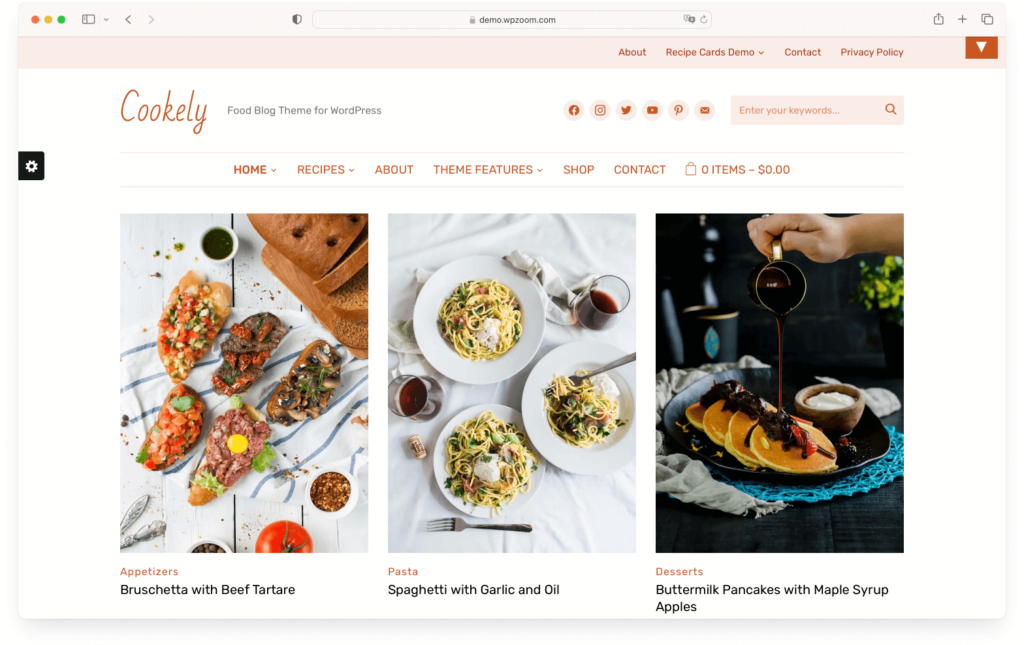
What makes Cookely special is the built-in Recipe Card Block for Gutenberg. You don’t need a separate recipe plugin — the theme handles it natively, complete with schema markup for Google rich snippets. Pair that with the Instagram footer bar, newsletter integration with MailChimp, and multiple ad zones, and you’ve got a theme that covers both content creation and monetization.
Key features
- Built-in Recipe Card Block for Gutenberg with schema markup support
- Magazine-style homepage with featured slider and content sections
- Instagram footer bar and MailChimp newsletter integration
- Five color schemes and mobile-optimized compact header
- Multiple ad zones for easy monetization
Pros
- Looks absolutely premium with minimal setup — one of the best-looking food themes available
- Built-in recipe cards mean no extra plugin needed
- Great structure for organizing large volumes of recipe content
Cons
- The magazine layout works best with a lot of content — if you only have 10 posts, it can feel sparse
Verdict: Cookely is our top pick if your primary goal is visual impact. It strikes an excellent balance between beauty and function. If you want your blog to look like a professional food magazine from day one, and you’ve got the content to fill those homepage sections, Cookely delivers.
Price: Premium (Genesis Framework required) | Recipe: 4/5 | Visual: 5/5 | Speed: 5/5 | Ease: 3/5 | Monetization: 5/5 | Overall: 4.4 / 5.0
Ideal use case: The serious food blogger who wants a rock-solid, professional foundation that will last for years. You value speed and clean code over drag-and-drop convenience.

Foodie Pro is legendary in the food blogging community. It runs on the Genesis Framework — known for being one of the fastest, most secure, and most SEO-friendly foundations in WordPress. If you’ve browsed successful food blogs, there’s a good chance several of them are running Foodie Pro or something built on Genesis.
The design is clean, minimalist, and timeless. It puts your content and photography front and center without visual clutter. It doesn’t include a built-in recipe card system, but it works beautifully with plugins like Recipe Card Blocks or WP Recipe Maker — which most professional food bloggers prefer anyway because plugins stay with you even if you switch themes later.
Key features
- Built on the Genesis Framework — famous for speed, security, and clean code
- Clean, minimalist design that puts your food photography first
- Pre-built Recipe Index page template
- Excellent ad placement zones and WooCommerce integration
Pros
- Blazing fast and incredibly lightweight — one of the fastest food blog themes you’ll find
- The minimalist design ages well and looks professional years later
- Highly optimized for both SEO and ad monetization
Cons
- The Genesis Framework has a learning curve — it’s not drag-and-drop like Elementor or the block editor
- No built-in recipe cards — you’ll need a recipe plugin (which is honestly fine, since standalone recipe plugins are often better)
- The design can feel too minimal if you want a flashy, magazine-style homepage
Verdict: If you’re willing to spend an afternoon learning how Genesis works, you won’t find a more professional, high-performance food blog theme. It’s an investment in your blog’s long-term future. Not the easiest to set up, but once it’s running, it’s rock-solid.
Price: $69/year | Recipe: 5/5 | Visual: 5/5 | Speed: 4/5 | Ease: 4/5 | Monetization: 4/5 | Overall: 4.7 / 5.0
Ideal use case: The culinary creative who wants an elegant, minimalist blog where photography takes center stage. Great for food stylists and photographers who want their images to do the talking.
Gourmand is all about visual simplicity. Where Cookely goes for the magazine look, Gourmand strips things back to let your photography breathe. The fully widgetized homepage gives you complete control over your layout, and the clean typography and generous whitespace create a reading experience that feels calm and intentional.
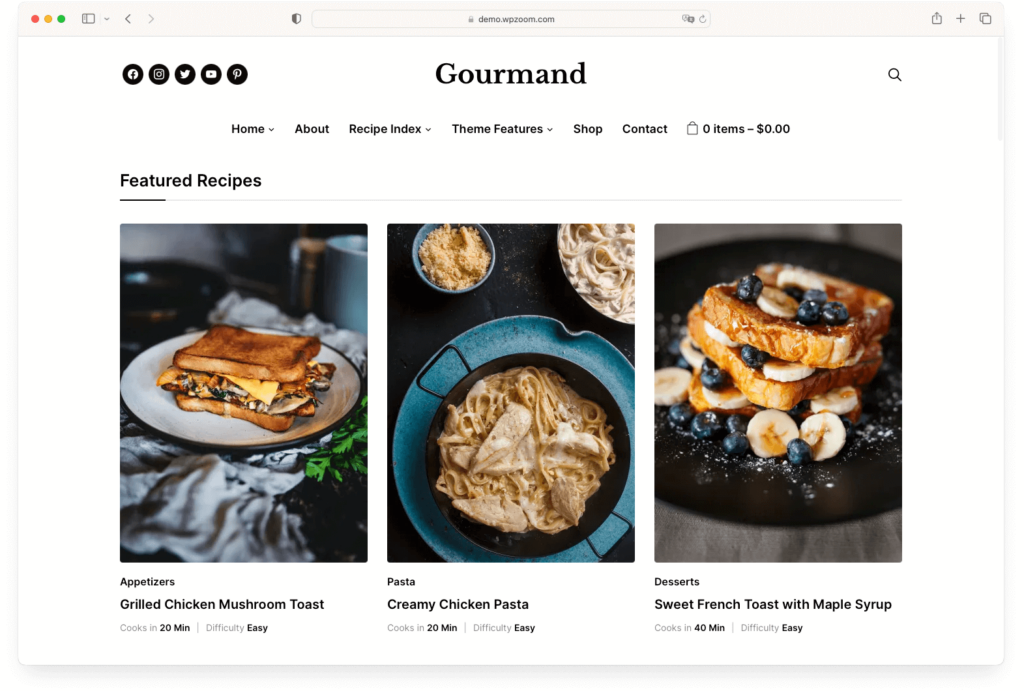
The theme includes custom recipe details fields for structured, easy-to-read recipe posts. It’s WooCommerce-ready if you want to sell cookbooks or kitchen products, and the featured area with layout variations gives you flexibility to spotlight seasonal content or popular recipes.
Key features
- Fully widgetized homepage for complete layout control
- Custom recipe details fields built into the theme
- Featured area with multiple layout variations
- WooCommerce-ready and responsive across all devices
Pros
- Beautiful, minimalist design that lets your food photography stand out
- Generous whitespace and clean typography create a premium feel
- Widgetized homepage means you can rearrange sections without touching code
Cons
- The minimalist approach means fewer built-in features compared to Foodica or Cookely
Verdict: If your food photography is your strongest asset and you want a theme that gets out of its way, Gourmand is a beautiful choice. It’s less feature-packed than Cookely but also less cluttered — and for a photography-heavy blog, that’s exactly the point.
Price: $69/year | Recipe: 4/5 | Visual: 4/5 | Speed: 4/5 | Ease: 4/5 | Monetization: 5/5 | Overall: 4.2 / 5.0
Ideal use case: Multi-author recipe sites or food bloggers who plan to scale with e-commerce. If you’re building a team or selling products alongside your recipes, CookBook handles both.
CookBook is where food content meets commerce. It’s built for bloggers who think beyond just publishing recipes — you might be running a multi-author site, selling cookbooks, or building a brand with affiliated products. The Elementor integration gives you visual drag-and-drop control, and the theme ships with ready-made templates that work well for both recipe content and shop pages.
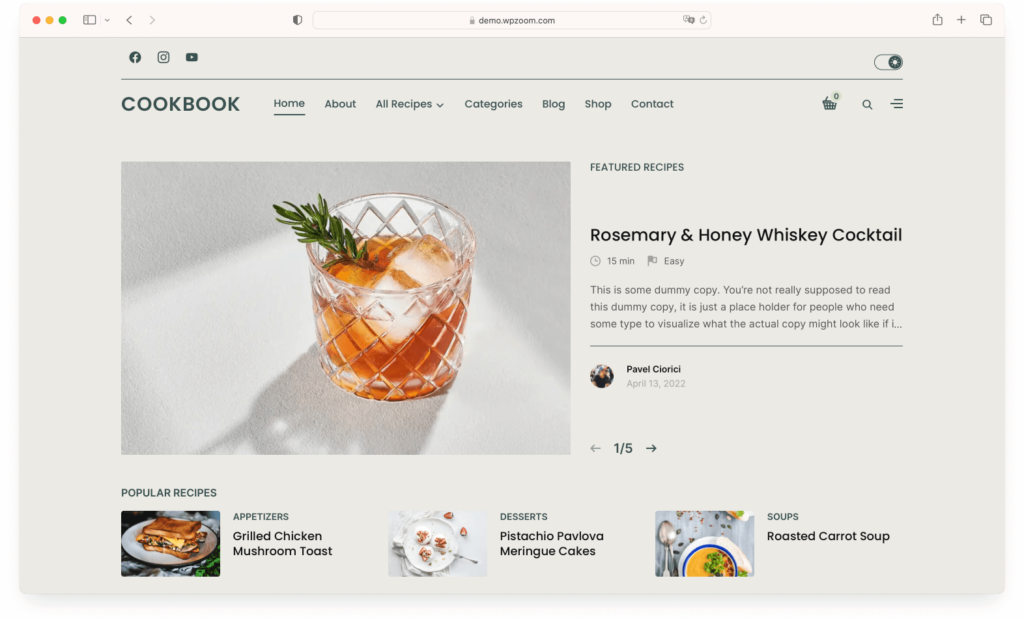
The recipe index with custom layouts helps readers browse your content by category, cuisine, or difficulty. And with multiple ad zones for banner placements and full WooCommerce integration, you’ve got real monetization options built right in. The theme also works with Gutenberg and Recipe Card Blocks, so your recipe posts can include structured data for Google rich snippets.
Key features
- Recipe index with custom layouts for organized content browsing
- Full Elementor integration with ready-made templates
- Multiple ad banner zones for monetization
- WooCommerce-ready for selling products and cookbooks
- Compatible with Recipe Card Blocks and Gutenberg
Pros
- Excellent for multi-author sites with structured recipe organization
- Strong monetization: ad zones, WooCommerce, and affiliate-friendly layouts
- Elementor makes page design visual and code-free
Cons
- Relies on Elementor for most customization — if you prefer the native block editor, Foodie Blocks or Cookely might be a better fit
Verdict: If you’re building more than a personal recipe blog — maybe a team-based food site or a blog with a shop — CookBook gives you the commercial infrastructure that simpler themes lack. It’s not the prettiest theme on this list, but it’s one of the most business-ready.
Price: Free (Pro from $69/year) | Recipe: 4/5 | Visual: 4/5 | Speed: 5/5 | Ease: 5/5 | Monetization: 5/5 | Overall: 4.6 / 5.0
Ideal use case: The blogger who wants total control over design. You want to drag-and-drop your way to a custom-looking site without writing a line of code, and you value speed above all else.
Astra isn’t a food blog theme — it’s a high-performance multipurpose theme that happens to work beautifully for food blogs. It’s one of the lightest, fastest themes on the market, and it comes with a huge library of “Starter Sites” that include several gorgeous food blog templates. Import one, customize it, and you’ve got a professional site in under an hour.
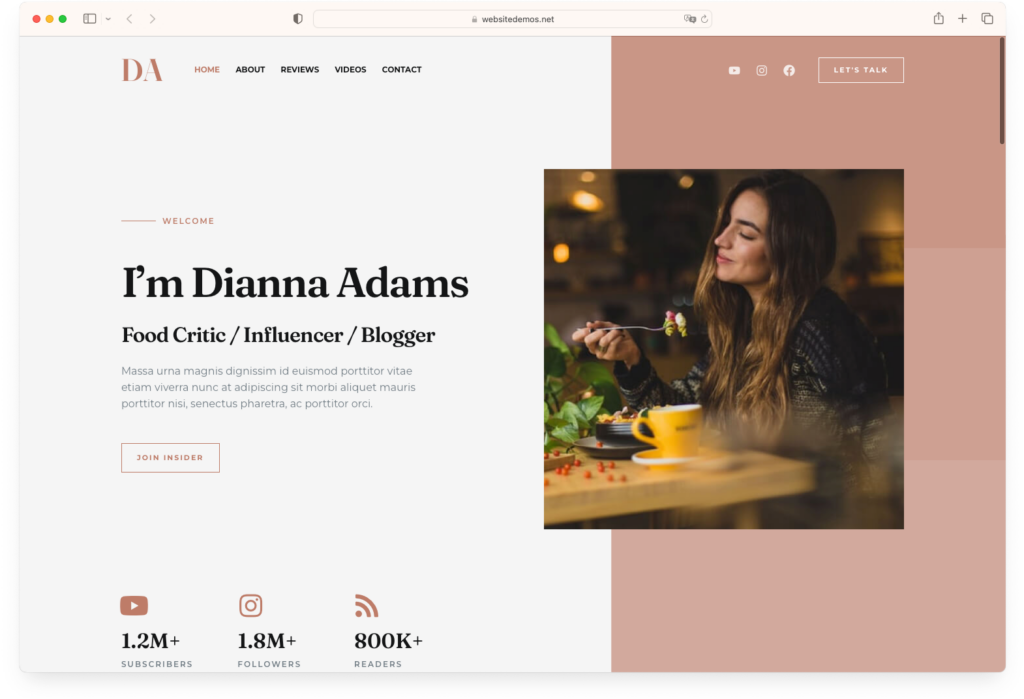
The deep integration with page builders like Elementor (and the native block editor) gives you total design flexibility. The free version is genuinely good — not a crippled teaser — and the Pro add-on unlocks even more layout options and customization. Astra doesn’t include built-in recipe cards, but it pairs perfectly with recipe plugins like WP Recipe Maker or Recipe Card Blocks. That’s actually an advantage: your recipes live in the plugin, so they survive a theme change.
Key features
- Incredibly lightweight — the core theme adds less than 50KB to your page
- Large library of starter sites, including food blog templates
- Works with Elementor, Gutenberg, and other page builders
- Full WooCommerce integration and excellent monetization options
Pros
- Unmatched speed — consistently one of the fastest WordPress themes in benchmarks
- Total design flexibility: if you can imagine it, you can build it
- The free version is genuinely usable, and Pro is reasonably priced
Cons
- No built-in recipe features — you’ll need a recipe plugin (which is fine, but it’s an extra step)
- The sheer number of customization options can feel overwhelming for beginners
- It’s a multipurpose theme, so it doesn’t feel “food-specific” out of the box like Foodica or Cookely
Verdict: Astra is my top recommendation for creative control. Import a food blog starter site, pair it with Recipe Card Blocks, and customize to your heart’s content. It’s the best combination of speed, flexibility, and value on this list — especially if you start with the free version.
Price: $89/year (Elegant Themes membership) | Recipe: 4/5 | Visual: 5/5 | Speed: 3/5 | Ease: 5/5 | Monetization: 5/5 | Overall: 4.4 / 5.0
Ideal use case: The visual-first blogger who thinks in terms of design and layouts. If you get frustrated by options panels and want to click, type, and drag your way to a beautiful site, Divi is made for you.

Divi is more than a theme — it’s a complete visual website builder. Its drag-and-drop editor is one of the most intuitive in WordPress: you click on text and type, drag columns to resize them, and see exactly what your visitors will see while you edit. No toggling between “edit mode” and “preview.” It’s the most “what you see is what you get” experience in WordPress.
The theme comes with a massive library of pre-built layouts, including many for food blogs and restaurants. You also get sliders, galleries, forms, and dozens of other modules built in. Plus, the Elegant Themes membership includes other themes and plugins, making it excellent value if you manage multiple sites.
Key features
- Industry-leading visual drag-and-drop page builder
- Massive pre-built layout library with food blog and restaurant templates
- Dozens of built-in modules: sliders, galleries, forms, testimonials, and more
- Elegant Themes membership includes additional themes and plugins
Pros
- The visual builder is incredibly intuitive — you can create unique, complex layouts with zero code
- Great value: one membership covers multiple sites plus bonus themes and plugins
- The design possibilities are virtually unlimited
Cons
- Speed is Divi’s biggest weakness. All those features add weight — you’ll need good hosting and a caching plugin to keep things fast
- No built-in recipe features — you’ll need a recipe plugin
- Divi creates “lock-in” — if you ever switch themes, you lose all the Divi-specific formatting
Verdict: If you’re a designer at heart and want maximum creative freedom, Divi is a dream. Just be prepared to invest some effort on the performance side — caching, image optimization, and good hosting will make the difference between a fast Divi site and a sluggish one. Not as fast as Astra or Foodie Pro, but far more visually flexible.
Price: $69/year | Recipe: 5/5 | Visual: 4/5 | Speed: 5/5 | Ease: 4/5 | Monetization: 4/5 | Overall: 4.4 / 5.0
Ideal use case: The food blogger who wants full creative control using WordPress’s native block editor — no page builder plugin required. If you like the Gutenberg approach and want a theme that fully embraces it, this is your pick.
Foodie Blocks is our bet on where WordPress is heading. We built it from scratch around Full Site Editing (FSE) — no Elementor dependency, no third-party page builder. You can customize everything — header, footer, templates, layouts — using the native WordPress block editor. Just WordPress, the way it was designed to work. It’s the lightest food theme we’ve ever shipped.
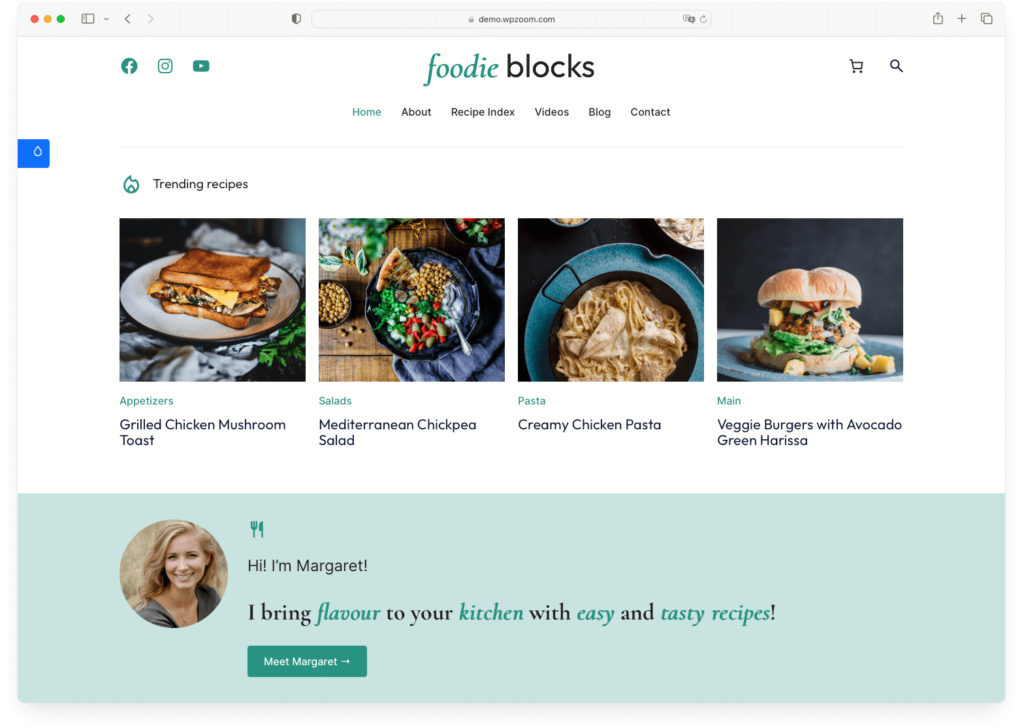
The theme ships with 15+ pre-built block patterns and integrates directly with Recipe Card Blocks for recipe posts with schema markup. Six customizable color styles let you brand it quickly, and because it’s a block theme (no heavy page builder), it’s noticeably fast.
Key features
- Full Site Editing support — customize every part of your site in the block editor
- 15+ pre-built block patterns for quick page design
- Native Recipe Card Blocks integration with schema markup
- 6 customizable color styles and WooCommerce compatibility
Pros
- No page builder plugin needed — everything runs through WordPress’s native editor
- Very fast and lightweight since there’s no heavy page builder overhead
- Built-in recipe card and nutrition facts blocks
Cons
- Full Site Editing is still relatively new in WordPress — the editing experience isn’t as polished as Elementor or Divi yet
- Fewer pre-built templates than Foodica or Cookely
Verdict: If you want to go all-in on WordPress’s native block editor and avoid page builder lock-in, Foodie Blocks is the food-specific theme to get. It’s fast, it’s clean, and it’s built for how WordPress is heading. Just know that FSE is still maturing, so the editing experience isn’t quite as smooth as established page builders.
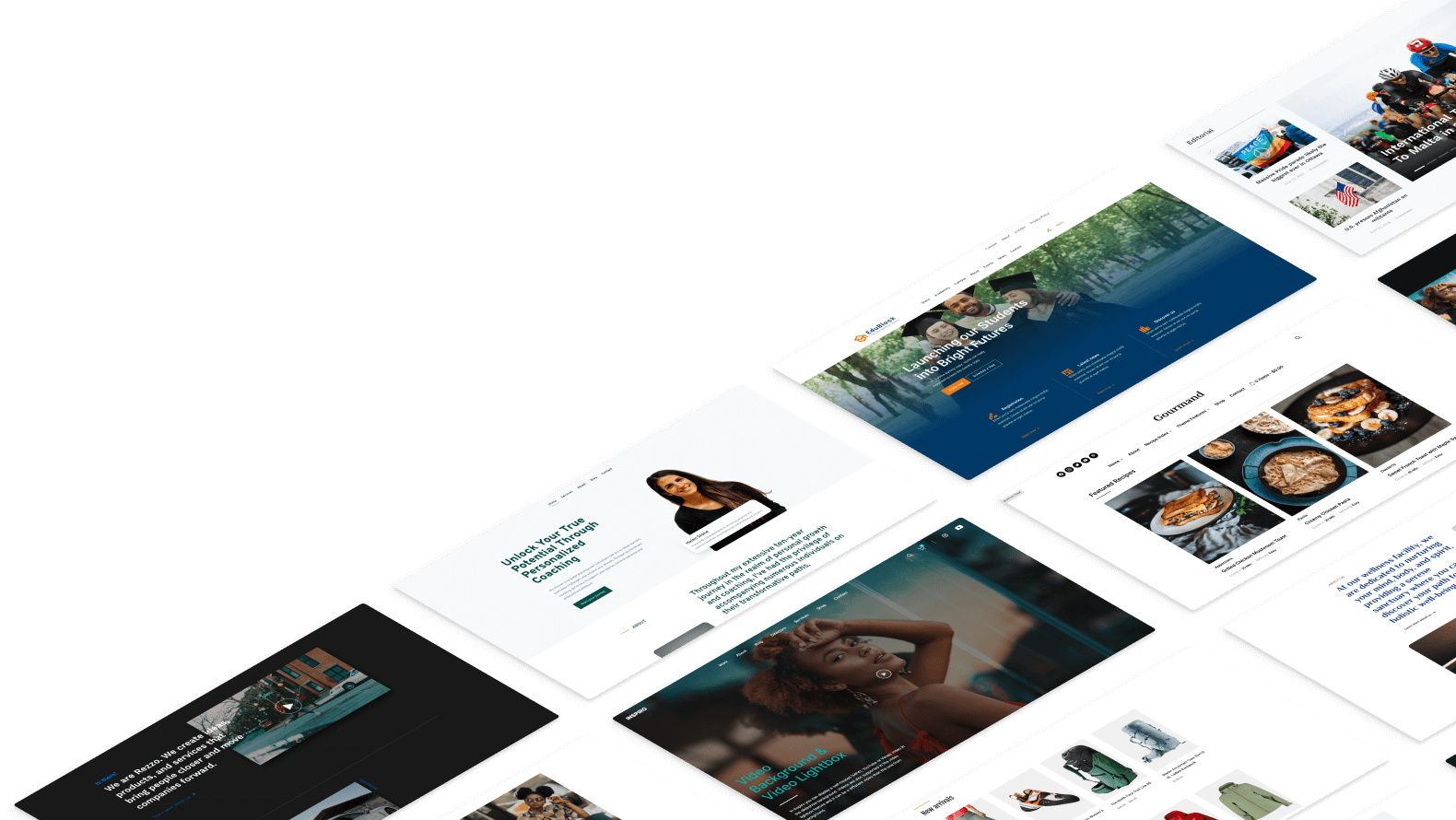
Upgrade Your Website with a Premium WordPress Theme
Find a theme that you love and get a 10% discount at checkout with the FLASH10 code
Price: $59/year (free version available) | Recipe: 5/5 | Visual: 4/5 | Speed: 4/5 | Ease: 5/5 | Monetization: 4/5 | Overall: 4.2 / 5.0
Ideal use case: The blogger who is 100% focused on recipes and wants all the food-specific features baked right into the theme — including video recipe support, print buttons, and recipe filtering.
Blossom Recipe Pro is perhaps the most feature-packed food blog theme on this list. It’s less of a blank canvas and more of a fully-equipped kitchen. The theme comes with an advanced recipe card that supports schema markup, video embeds, and even a “Print Recipe” button (which your readers will love). There’s a recipe filter and search system, built-in newsletter widgets, and dedicated ad placement areas.
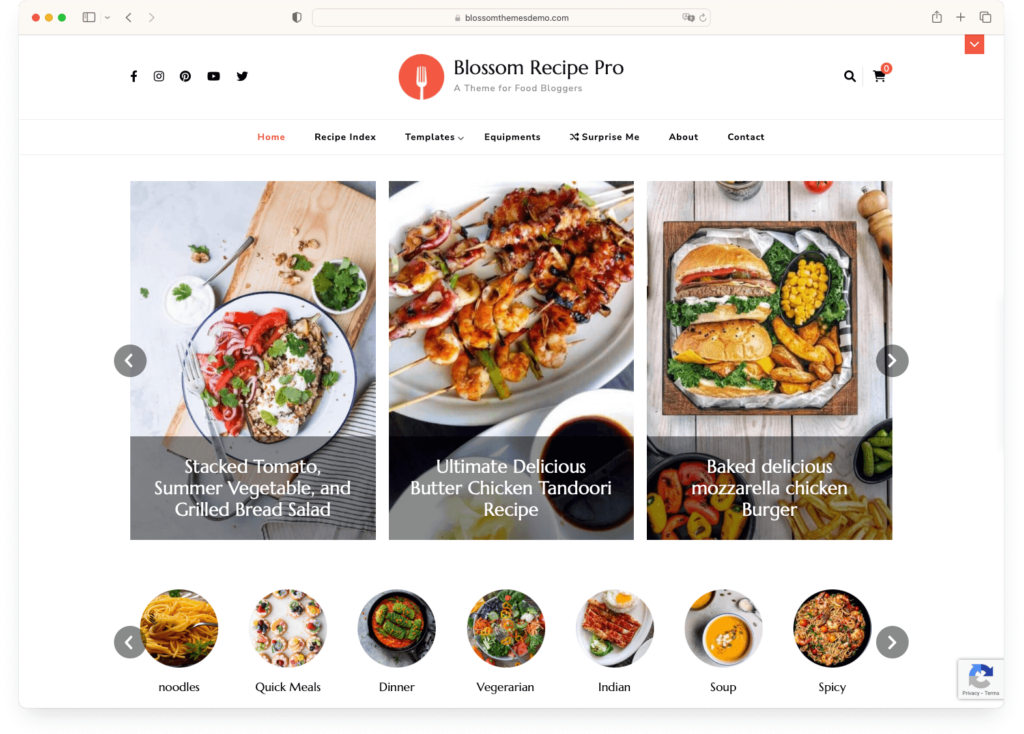
Setup is easy, the theme is GDPR-compliant out of the box, and it comes with VIP support. There’s also a popular free version if you want to start without spending anything.
Key features
- Advanced recipe card with schema markup, video support, and “Print Recipe” button
- Recipe filter and search system for easy content discovery
- Built-in newsletter and ad placement widgets
- GDPR-compliant with built-in SEO and speed optimization
Pros
- Packed with food-specific features — more built-in recipe tools than any other theme on this list
- Very easy to set up, even for beginners
- Free version available for testing before you buy
Cons
- The design is nice but not as refined or “premium-feeling” as Foodica, Cookely, or Foodie Pro
- Recipe features are tied to the theme — if you switch themes later, you’d need to migrate your recipe content to a plugin
Verdict: If you want to start publishing recipes immediately without fussing over plugins and configuration, Blossom Recipe Pro has more built-in food blog features than anything else on this list. The tradeoff is less design polish and theme-locked recipe content. But for a “just let me blog” experience, it’s hard to beat.
Price: $49/year | Recipe: 5/5 | Visual: 4/5 | Speed: 4/5 | Ease: 4/5 | Monetization: 3/5 | Overall: 4.0 / 5.0
Ideal use case: The recipe-focused blogger who wants a dedicated recipe plugin bundled with their theme and doesn’t want to figure out which recipe plugin to install separately.
Gourmet comes bundled with its own Gourmet Recipe Plugin, which means recipe management is deeply integrated into the theme from the start. You can choose between modern and classic recipe layouts, and the one-click demo import gets you up and running fast. It also integrates with Gutenberg blocks for flexible page design.
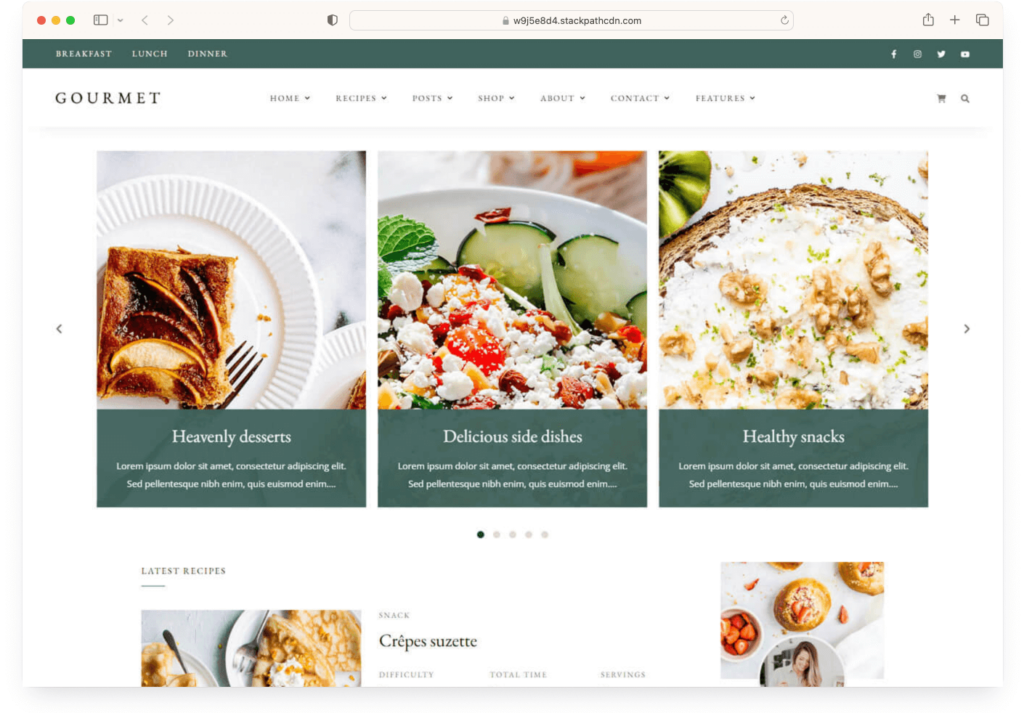
Key features
- Bundled Gourmet Recipe Plugin with modern and classic recipe layouts
- Full Gutenberg block integration
- One-click demo import for quick setup
- WooCommerce support for e-commerce
Pros
- The bundled recipe plugin means you get recipe management without shopping for a third-party solution
- Quick one-click demo import gets you a working site fast
Cons
- The bundled recipe plugin is less popular (and less frequently updated) than standalone options like WP Recipe Maker or Recipe Card Blocks
- Fewer customization options and starter sites compared to Astra or Foodica
Verdict: Gourmet is a solid choice if you want a theme and recipe system that work together out of the box. The tradeoff is a less widely-supported recipe plugin compared to the bigger names. A good mid-range option, though not as feature-rich as Blossom Recipe or as fast as Foodie Blocks.
Price: $39/year (excellent free version available) | Recipe: 3/5 | Visual: 4/5 | Speed: 4/5 | Ease: 5/5 | Monetization: 3/5 | Overall: 3.8 / 5.0
Ideal use case: The brand-new blogger who wants something beautiful, simple, and affordable. The free version of Kale is one of the best free food blog themes available — and Pro is a great next step.
Kale is one of the most popular free food blog themes for a reason: it’s clean, minimalist, and elegant. The design puts your photography front and center with beautiful fonts, a homepage slider, and featured post sections. It’s the kind of theme that looks premium even though it costs nothing.

The Pro version adds SEO-optimized recipe cards, a built-in recipe index, and multiple blog feed layouts. But even the free version is genuinely usable — just pair it with a recipe plugin like Recipe Card Blocks or WP Recipe Maker and you’re good to go.
Key features
- Clean, minimalist design with beautiful typography
- Homepage slider and featured posts section
- SEO-optimized recipe cards and recipe index (Pro version)
- Multiple blog feed layouts and fully responsive design
Pros
- The free version is genuinely good — one of the best starting points for new food bloggers
- Beautiful minimalist design that looks premium at any price point
- Super easy to get started — very low learning curve
Cons
- The free version has no built-in recipe features — you’ll definitely need a recipe plugin
- Limited monetization options compared to Foodica or CookBook, especially in the free tier
- The minimalist design means fewer layout options than feature-heavy themes
Verdict: Kale is our top recommendation for anyone starting a food blog on a budget. The free version gives you a beautiful, professional-looking blog from day one. Add a recipe plugin, start publishing, and upgrade to Pro when you’re ready for more features. Simple as that.
Price: Free (Pro from $69/year) | Recipe: 3/5 | Visual: 4/5 | Speed: 5/5 | Ease: 5/5 | Monetization: 4/5 | Overall: 4.2 / 5.0
Ideal use case: The speed-obsessed blogger who wants a lightning-fast free theme that can grow with them. Neve is one of the fastest WordPress themes available — period.
Neve is blazing fast. It consistently ranks at the top of WordPress speed benchmarks, and it loads in under a second on most hosting setups. For a food blog, where readers are waiting for your recipe to load while their pasta water boils, that speed matters more than you might think.
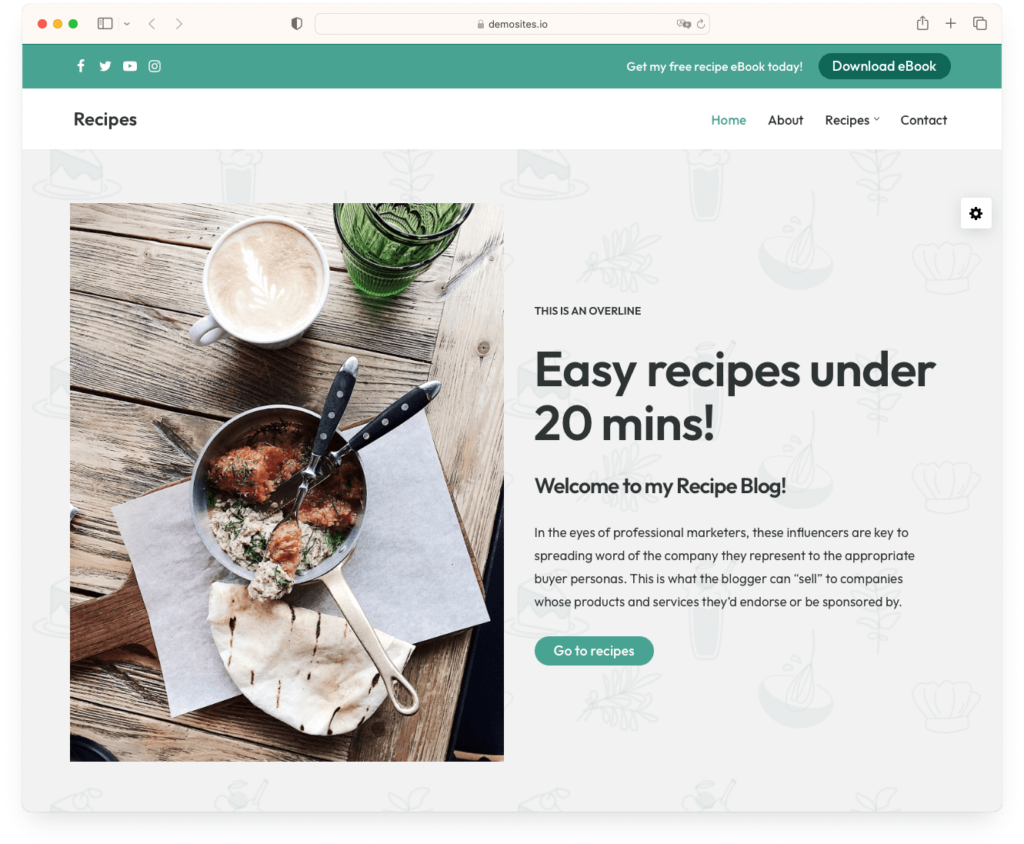
The free version is excellent — it’s not a stripped-down teaser. You get header and footer customization, layout options, and compatibility with every major page builder. The starter site library includes food and lifestyle blog templates that look polished and modern. Like Astra, Neve doesn’t include built-in recipe cards, so you’ll pair it with a recipe plugin.
Key features
- One of the fastest WordPress themes — loads in under a second
- Header and footer builder for layout customization
- Starter site library with food and lifestyle blog templates
- Works with Elementor, Gutenberg, and all major page builders
Pros
- Exceptional speed — arguably the fastest free theme you can get
- The free version is genuinely full-featured, not a teaser
- Clean, modern design with good page builder support
Cons
- No food-specific features at all — you’ll need a recipe plugin and some customization to make it feel like a food blog
- The food blog starter sites are decent but not as refined as purpose-built food themes
Verdict: If speed is your number one priority and you’re comfortable adding a recipe plugin, Neve is hard to beat. It’s free, it’s fast, and it won’t hold you back as your blog grows. A strong alternative to Astra if you want something equally lightweight with a different design approach.
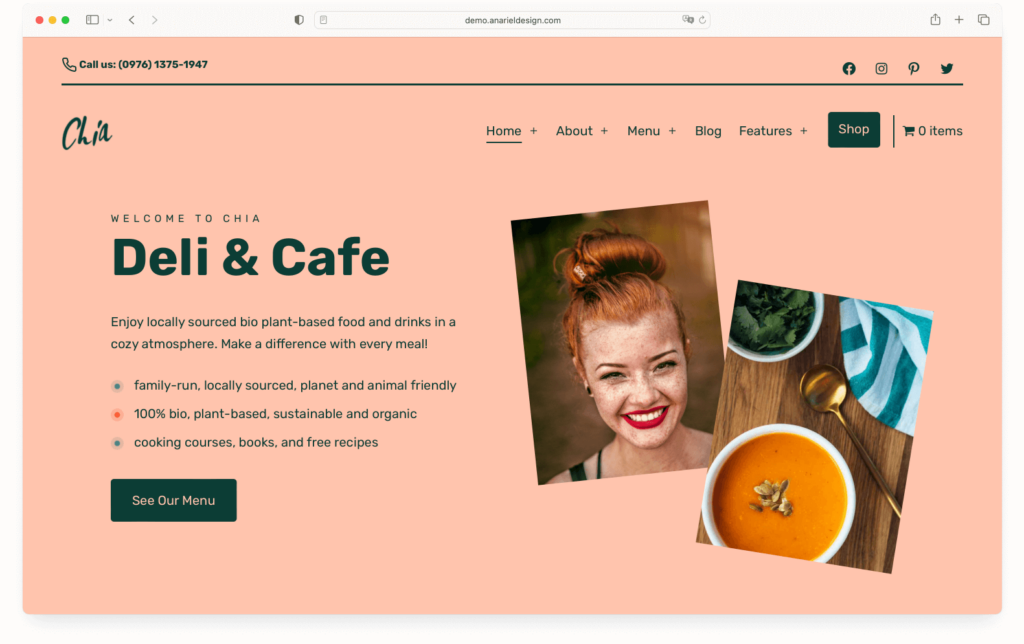
Price: €59/year | Recipe: 3/5 | Visual: 4/5 | Speed: 4/5 | Ease: 4/5 | Monetization: 3/5 | Overall: 3.6 / 5.0
Ideal use case: Cafés, delis, and food businesses that need a polished website with menu pages and WooCommerce — not just a recipe blog.
Chia is a bit different from the other themes on this list. While most entries here are built for recipe bloggers, Chia is designed for cafés, delis, and culinary businesses. It comes with beautifully designed food menu pages, WooCommerce integration for online ordering, and pre-built block patterns that make designing pages quick with the native WordPress editor.
Key features
- Beautifully designed food menu page templates
- Pre-built block patterns for quick page design with the block editor
- WooCommerce-ready for online ordering
- Mobile-friendly and retina-ready
Pros
- Perfect for food businesses — not just bloggers — with menu pages and e-commerce built in
- Works with the native block editor, no page builder plugin needed
Cons
- Not really designed for recipe content — if you’re a recipe blogger, Foodica or Blossom Recipe are better fits
- Priced in euros, which may be awkward for some buyers
Verdict: If you run a café, deli, or food business and need a website (not just a blog), Chia is a strong option. For pure recipe blogging, look elsewhere on this list — but for food businesses with a blog section, it hits the right balance.
Price: $39/year | Recipe: 3/5 | Visual: 4/5 | Speed: 4/5 | Ease: 4/5 | Monetization: 5/5 | Overall: 4.0 / 5.0
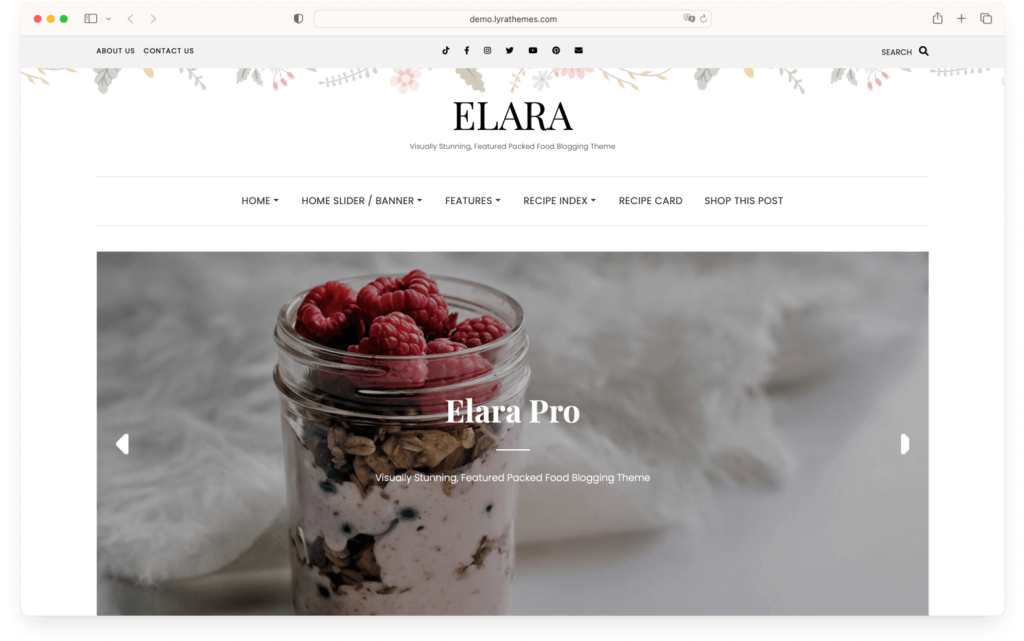
Ideal use case: The food blogger who wants to monetize through affiliate marketing and product referrals. If revenue is a priority from day one, Elara Pro’s built-in monetization tools are its standout feature.
Elara Pro’s biggest selling point isn’t its design (though it’s visually clean) — it’s the built-in monetization features. The “Shop This Post” feature lets you embed product and affiliate links directly within your recipe posts, and the affiliate referral options are more deeply integrated than what you’d get with most other themes.
Key features
- “Shop This Post” feature for embedding affiliate and product links in posts
- Built-in affiliate and product referral monetization tools
- Multiple content arrangement options for flexible layouts
- Fully responsive design across all devices
Pros
- Best-in-class monetization features for affiliate-focused food bloggers
- Affordable at $39/year
Cons
- No built-in recipe cards or schema markup — you’ll need a recipe plugin
- The design is clean but not as visually striking as Cookely or Gourmand
- Smaller theme community means fewer tutorials and third-party resources
Verdict: If affiliate income is central to your food blogging strategy, Elara Pro’s “Shop This Post” and referral tools give it an edge over themes that treat monetization as an afterthought. For pure recipe blogging, it’s not the strongest — but for revenue-focused bloggers, it’s a smart pick at a low price.
Price: $59/year | Recipe: 4/5 | Visual: 4/5 | Speed: 4/5 | Ease: 5/5 | Monetization: 3/5 | Overall: 4.0 / 5.0
Ideal use case: The non-technical blogger who wants a complete, worry-free setup with security, backups, and GDPR compliance bundled right in.
Cookery comes from the same team as Blossom Recipe, and it takes a similar “everything included” approach. What makes it different is the emphasis on site management: it ships with essential plugins for security, backup, and performance optimization. It’s also GDPR-compliant out of the box, which saves you from having to figure out cookie consent and data privacy on your own.
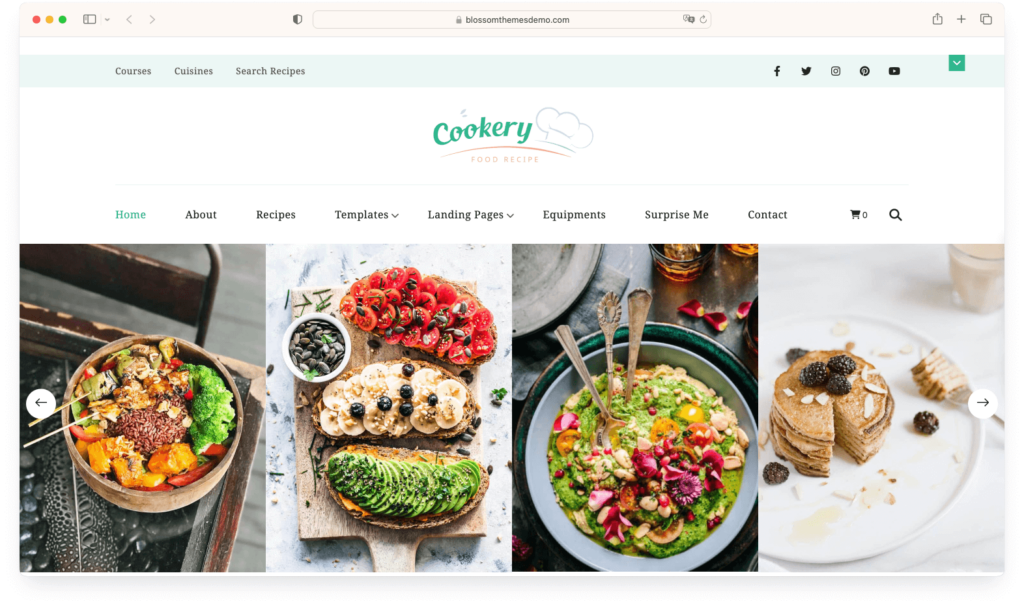
The customizable layout gives you control over your blog’s appearance, and the responsive design works well on mobile. It’s a good “set it and forget it” option for bloggers who don’t want to think about security plugins or GDPR compliance separately.
Key features
- Bundled essential plugins for security, backup, and performance
- GDPR-compliant out of the box
- Customizable layout with multiple design options
- Fully responsive for mobile browsing
Pros
- Includes security, backup, and performance plugins — less to configure yourself
- GDPR compliance handled for you, which is increasingly important
Cons
- Bundled plugins may conflict with plugins you already use — not ideal if you have an existing setup
- Not as visually distinctive as Cookely, Gourmand, or Foodie Pro — the design is functional rather than stunning
Verdict: Cookery is a practical, no-fuss option for bloggers who want the technical side handled for them. If you don’t want to think about security plugins, GDPR compliance, or performance optimization, Cookery bundles all of that. Just know that the design and recipe features aren’t as strong as dedicated food themes like Foodica or Blossom Recipe.
Price: $89/year | Recipe: 4/5 | Visual: 4/5 | Speed: 4/5 | Ease: 3/5 | Monetization: 3/5 | Overall: 3.6 / 5.0
Ideal use case: The blogger who wants structured recipe data with automatic JSON-LD schema markup for maximum SEO visibility — and doesn’t mind a higher price tag.
Recipe Blogger’s main selling point is its SEO-focused approach. It integrates directly with WP Recipe Maker and automatically generates JSON-LD metadata for your recipe posts. That’s the structured data that tells Google “this is a recipe” and helps you show up with rich snippets — star ratings, cook times, and calorie counts right in the search results.
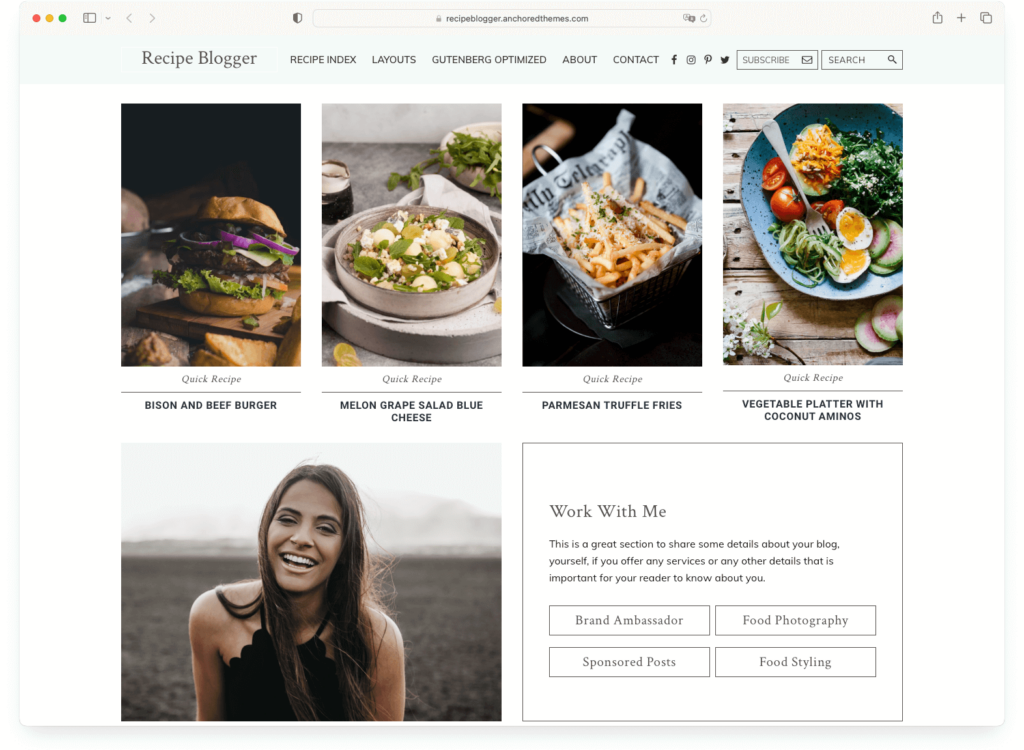
The design is clean and minimalist, with multiple layout options for customization. It’s a solid theme, though at $89/year it’s the most expensive on this list — and you can get similar schema functionality from free plugins paired with a cheaper theme.
Key features
- WP Recipe Maker integration with automatic JSON-LD schema markup
- Clean, minimalist design with multiple layout options
- Mobile-responsive across all devices
Pros
- Strong SEO focus with automatic JSON-LD generation for rich snippets
- Clean design that works well for photography-heavy content
Cons
- At $89/year, it’s the priciest theme on this list — and the feature set doesn’t justify the premium over Foodica or Astra
- You can get the same JSON-LD schema from free recipe plugins, making this less of a unique advantage
Verdict: Recipe Blogger is a competent theme with good SEO chops, but it’s hard to justify the $89/year price when themes like Foodica and Astra deliver more features for less money. Worth a look if you specifically want tight WP Recipe Maker integration, but not our first recommendation at this price point.
Price: $64/year | Recipe: 4/5 | Visual: 4/5 | Speed: 4/5 | Ease: 5/5 | Monetization: 3/5 | Overall: 4.0 / 5.0
Ideal use case: The blogger who loves variety and wants to experiment with different looks. With 12 pre-designed demos, TinySalt gives you more starting points than almost any other food theme.
TinySalt’s strongest feature is sheer variety. It ships with 12 pre-designed demos, each with a different layout and style. You can mix and match elements from different demos to create something unique. It also includes an instant search recipe index that helps readers find specific recipes quickly — a feature that becomes increasingly valuable as your content library grows.
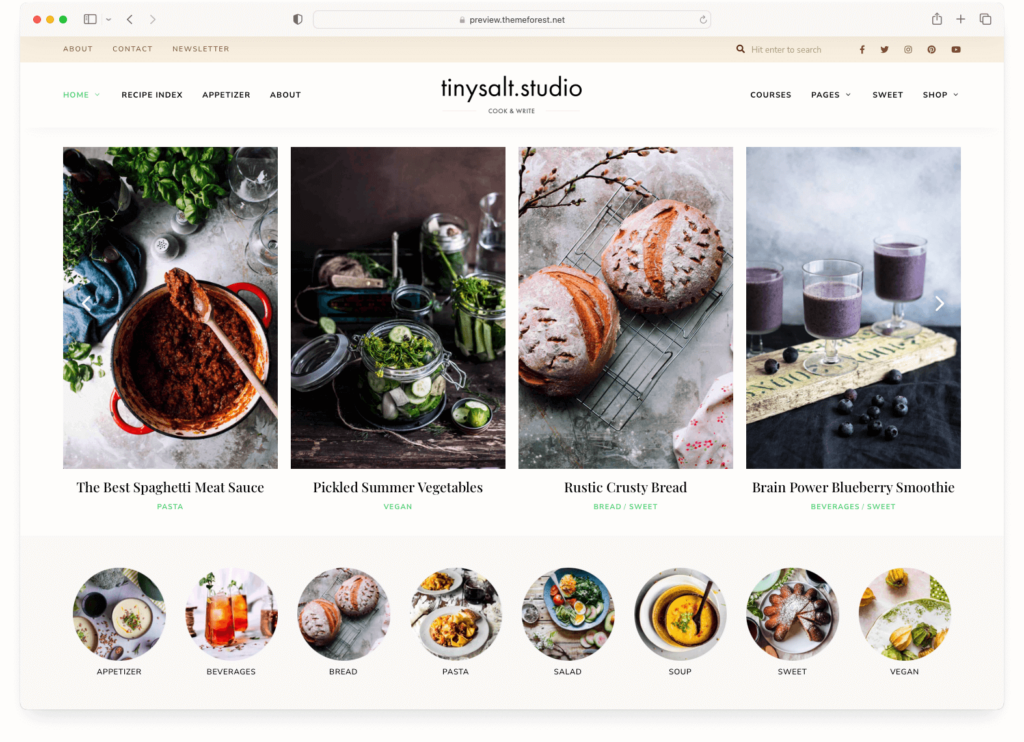
Integration with WP Recipe Maker keeps your recipes organized and structured, and the theme receives regular updates for WordPress compatibility.
Key features
- 12 pre-designed demos with mix-and-match flexibility
- Instant search recipe index for quick content discovery
- WP Recipe Maker integration for structured recipe management
- Regular updates for WordPress compatibility
Pros
- 12 demo options give you more starting points than most food themes
- The instant search recipe index is a great UX feature for content-heavy blogs
Cons
- Sold on ThemeForest, which means support and updates depend on the developer renewing their item — less guaranteed than themes from established theme shops
- Some demos look dated compared to modern food blog designs from Foodica or Cookely
Verdict: TinySalt is a solid mid-range option, especially if you want lots of demo variety and a good recipe search feature. The ThemeForest distribution model is its main weakness — make sure to check recent update history before purchasing.
Price: Free (Pro from $54/year) | Recipe: 3/5 | Visual: 4/5 | Speed: 4/5 | Ease: 5/5 | Monetization: 5/5 | Overall: 4.2 / 5.0
Ideal use case: The food blogger who plans to sell products alongside their content. OceanWP’s WooCommerce integration is among the deepest of any free theme — making it ideal if you’re combining a recipe blog with an online shop.

OceanWP is a popular multipurpose theme that’s especially strong on the e-commerce side. Its WooCommerce integration goes deeper than most themes — with features like a floating add-to-cart bar, quick view popups, and custom cart pages. If you’re a food blogger who also sells spice blends, cookware, or digital products, OceanWP handles both the blog and the shop well.
The free version is comprehensive, and the demo library includes food and lifestyle templates. Like Astra and Neve, you’ll need a recipe plugin — but the ecommerce features more than compensate if selling is part of your plan.
Key features
- Deep WooCommerce integration with advanced shop features
- Comprehensive free version with food and lifestyle demo sites
- Compatible with all major page builders
- Lightweight and fast with good mobile responsiveness
Pros
- Best WooCommerce integration of any free theme — floating cart, quick view, custom checkout
- Generous free version that’s genuinely useful, not a teaser
- Strong page builder compatibility for design flexibility
Cons
- No food-specific features — requires a recipe plugin and some customization work
- Not as fast as Neve or Astra, especially with many extensions active
Verdict: If you’re planning to combine food blogging with e-commerce, OceanWP’s WooCommerce features give it an edge over Astra and Neve. For pure recipe blogging without a shop, the other free themes on this list are better fits.
Price: $69/year | Recipe: 4/5 | Visual: 4/5 | Speed: 3/5 | Ease: 4/5 | Monetization: 4/5 | Overall: 3.8 / 5.0
Ideal use case: The food blogger who wants a theme with a built-in recipe management system and doesn’t want to rely on a third-party plugin for recipe organization.
Foodsy takes a different approach to recipe content: instead of relying on a separate recipe plugin, it includes its own recipe management system with customizable ingredient lists, cooking steps, and recipe categorization. The touch-friendly sliders work well on mobile, and WooCommerce integration gives you e-commerce capability.
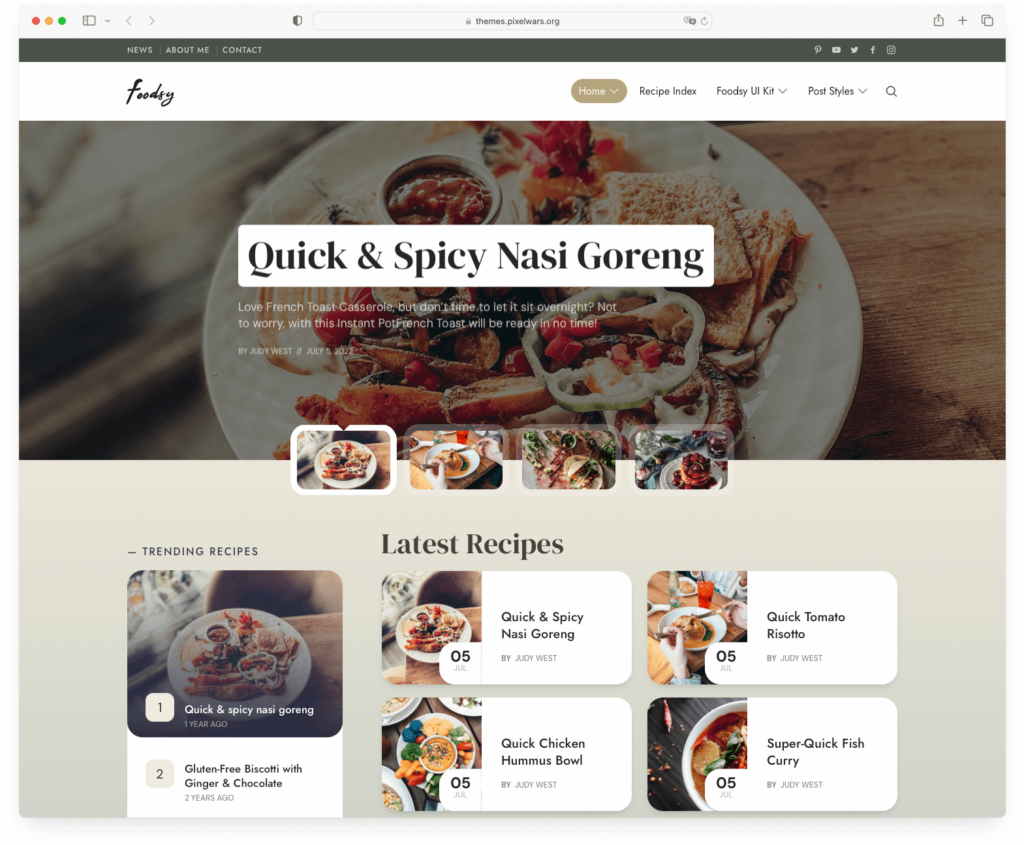
Key features
- Built-in recipe management system with ingredients, steps, and categories
- Touch-friendly sliders for mobile browsing
- WooCommerce integration for e-commerce
- Retina-ready responsive design
Pros
- Self-contained recipe system means fewer plugins to manage
- Touch-friendly design works well for readers cooking with their phones
Cons
- Sold on ThemeForest — same update/support caveats as TinySalt
- The built-in recipe system locks your content to the theme — switching themes means migrating all your recipes
- Not as fast or lightweight as block-based themes like Foodie Blocks or Neve
Verdict: Foodsy is a decent option if you want recipe management built into your theme. But the theme-locked recipe content and ThemeForest distribution are real drawbacks. For most food bloggers, a fast theme paired with a standalone recipe plugin (which survives theme changes) is the more future-proof approach.
Comparison Table
Here’s a quick-reference comparison of all 19 themes to help you narrow down your choices:
| Theme | Price | Best For | Overall | Free Version? |
|---|---|---|---|---|
| Foodica PRO | $69/yr | All-in-one food blogging | 4.8 | Yes (Lite) |
| Cookely | $69/yr | Magazine-style food blogs | 4.7 | No |
| Foodie Pro | Premium | Professional, speed-focused | 4.4 | No |
| Gourmand | $69/yr | Photography-heavy blogs | 4.6 | No |
| CookBook | $69/yr | Multi-author & e-commerce | 4.4 | No |
| Astra | Free/$69 | Total design control | 4.6 | Yes |
| Divi | $89/yr | Visual drag-and-drop design | 4.4 | No |
| Foodie Blocks | $69/yr | Block editor enthusiasts | 4.4 | No |
| Blossom Recipe | $59/yr | Feature-packed recipe sites | 4.2 | Yes |
| Gourmet | $49/yr | Bundled recipe plugin | 4.0 | No |
| Kale Pro | $39/yr | Budget-friendly beginners | 3.8 | Yes |
| Neve | Free/$69 | Maximum speed | 4.2 | Yes |
| Chia | €59/yr | Cafés and food businesses | 3.6 | No |
| Elara Pro | $39/yr | Affiliate monetization | 4.0 | No |
| Cookery | $59/yr | Worry-free setup | 4.0 | No |
| Recipe Blogger | $89/yr | SEO-focused recipe content | 3.6 | No |
| TinySalt | $64/yr | Demo variety seekers | 4.0 | No |
| OceanWP | Free/$54 | Blog + shop combo | 4.2 | Yes |
| Foodsy | $69/yr | Built-in recipe management | 3.8 | No |
What Really Makes a Food Blog Theme Great?
Beyond the individual theme reviews above, there are four things that separate a good food blog theme from one that’ll hold you back. Understanding these will help you evaluate any theme — including ones not on this list.
1. Recipe Cards with Schema Markup
If you’ve ever searched for a recipe on Google and seen those results with star ratings, cook times, calorie counts, and a photo right in the search listing — that’s schema markup at work. Schema is structured data embedded in your pages that tells Google “this is a recipe” and provides specific details it can display in search results. These are called “rich snippets,” and they dramatically increase your click-through rate.
Your theme doesn’t necessarily need schema built in. Many food bloggers use a standalone recipe plugin (like Recipe Card Blocks or WP Recipe Maker) that handles recipe cards and schema independently of the theme. In fact, using a plugin is often the smarter choice — your recipe content survives even if you change themes later. What your theme does need is solid compatibility with these plugins so the recipe cards display cleanly within your layout.
2. Mobile-First Design
Think about how people actually use recipe blogs. They’re standing in the kitchen, phone propped against the backsplash, hands covered in flour, trying to read step 4. If your theme loads slowly on mobile or the text is tiny and hard to read, they’ll leave — and Google notices when visitors bounce quickly.
Mobile design for food blogs isn’t just “responsive” (scales to fit the screen). It means fast load times on cellular connections, readable text without pinching to zoom, easy-to-tap buttons and links, and a layout that doesn’t require horizontal scrolling. When evaluating any theme, test the demo on your phone first — that’s where most of your readers will be.
3. Photography-First Visuals
Food blogging is inherently visual. Your photos are the main attraction — they’re what stops someone from scrolling, what makes someone click on your recipe, and what gets pinned on Pinterest. A great food blog theme understands this and gives your images room to breathe.
Look for themes with full-width image support, clean layouts without cluttered sidebars, strong visual hierarchy (your hero image shouldn’t compete with a widget for attention), and support for high-resolution retina displays. The theme’s design should frame your food photography, not compete with it.
4. Room to Grow (Monetization)
If your food blog takes off, you’ll want ways to earn from it — whether through display ads, affiliate links, sponsored content, an online shop, or selling your own digital products. A theme that locks you into a basic blog layout with no ad zones, no WooCommerce support, and no flexibility to add opt-in forms will become a bottleneck.
You don’t need every monetization feature on day one, but you want a theme that supports them when you’re ready. WooCommerce compatibility, designated ad placement areas, email newsletter integration, and a flexible layout that can accommodate sponsored content are all worth checking for — even if you’re not using them yet.
So, Which Food Blog Theme Should You Choose?
There’s no single “best” theme for every food blogger — it depends on where you are and what you need. Here’s how to decide:
If you’re just starting out and want something free: Start with Foodica Lite (beautiful and simple) or Neve (blazing fast). Add a recipe plugin like Recipe Card Blocks and start publishing. You can always upgrade later.
If you want a purpose-built food blog theme that’s ready out of the box: Foodica PRO is our top recommendation — it has recipe cards, starter sites, monetization tools, and a free Lite version to test with. Cookely is the pick if visual impact is your priority.
If you want total creative control and maximum speed: Astra gives you the best combination of performance, flexibility, and value. Pair it with a recipe plugin and a page builder for a fully custom site.
If you’re building a serious food blogging business: Foodica PRO or Foodie Pro both provide the professional foundation, SEO optimization, and monetization options you’ll need as you grow.
If you’re running a food business (café, deli, or shop): Chia for a restaurant/café site, or OceanWP if e-commerce is a big part of what you do.
Whatever you choose, remember: the theme is just the starting point. Great content, consistent publishing, proper SEO, and strong food photography matter more than any theme ever will.
Frequently Asked Questions
What is recipe schema and why does my food blog need it?
Recipe schema is structured data (code) embedded in your recipe pages that tells Google exactly what’s on the page — the recipe name, cook time, ingredients, nutrition info, and ratings. When Google reads this data, it can display “rich snippets” in search results: those eye-catching cards with star ratings, photos, and cook times. Blogs with recipe schema typically get significantly more clicks from search results than those without it.
Do I need a recipe plugin, or does my theme handle it?
It depends on the theme. Food-specific themes like Foodica, Cookely, and Blossom Recipe include built-in recipe cards with schema markup. Multipurpose themes like Astra, Neve, and Divi don’t — you’ll need a recipe plugin like Recipe Card Blocks or WP Recipe Maker. Many experienced food bloggers actually prefer using a plugin because your recipes survive even if you switch themes later.
Will I lose my recipes if I change WordPress themes?
If your recipes are stored in a standalone recipe plugin (like Recipe Card Blocks or WP Recipe Maker), they’ll survive a theme switch completely intact. If your recipes are built into the theme itself (like with Blossom Recipe or Foodsy), switching themes will likely break how they display — and you’ll need to migrate that content. This is why many bloggers recommend using a recipe plugin separate from your theme.
What’s the difference between a free and premium food blog theme?
Free themes like Kale, Neve, and Astra’s free version give you a solid foundation with basic customization. Premium themes typically add more starter sites, advanced layout options, priority support, monetization features (ad zones, WooCommerce integration), and sometimes built-in recipe tools. For a brand-new blog, free themes are a smart starting point. Upgrade to premium when you hit a limitation you can’t work around.
Can I use a page builder like Elementor for a food blog?
Absolutely. Page builders like Elementor give you visual, drag-and-drop control over your page layouts — no coding required. Many themes on this list (Foodica, CookBook, Astra, Divi) integrate directly with page builders. The tradeoff is that page builders add some weight to your site, which can affect speed. If you go this route, use a caching plugin and optimize your images to keep things fast.
How do I make my food blog load faster?
Start with a fast theme (Astra, Neve, Foodie Pro, and Foodie Blocks are among the fastest). Then: compress your images before uploading (food photos can be huge files), use a caching plugin like WP Super Cache or LiteSpeed Cache, choose quality hosting, and consider a CDN for serving images globally. Speed improvements compound — fixing even two of these can make a noticeable difference.
What’s the best free WordPress theme for a food blog?
For pure food blogging, Kale (free version) is the most popular free food-specific theme — it’s beautiful, simple, and works great with recipe plugins. If you want a multipurpose theme with better speed, Neve is the fastest free option. Astra‘s free version gives you the most customization options. Foodica Lite is worth trying if you want food-specific features from a free theme.
How important is mobile design for a recipe blog?
Extremely important. Most food blog traffic comes from mobile devices, and many readers are literally cooking while reading your recipes on their phone. Google also uses mobile-first indexing, meaning it primarily evaluates your mobile site for rankings. A food blog theme that looks great on desktop but is clunky on mobile is a serious handicap for both readers and SEO.
Should I choose a food-specific theme or a multipurpose theme?
Food-specific themes (Foodica, Cookely, Blossom Recipe) get you up and running faster with built-in recipe features. Multipurpose themes (Astra, Divi, Neve) offer more design flexibility and typically better speed, but require a recipe plugin for food-specific functionality. If you’re a beginner, a food-specific theme saves time. If you want maximum control and don’t mind configuring a recipe plugin, multipurpose themes are more flexible long-term.
Browsing WPZOOM’s food blog themes specifically? View our full collection →


