


You open your analytics dashboard and notice traffic has dropped, conversions have dipped, or page load times have increased. The reports clearly show that something shifted, but they rarely explain why.
Google Analytics might show fewer sessions. Performance tools may flag slower page loads. Uptime monitoring can confirm that the site is still online. Each tool reveals part of the picture, but none of them explain what actually caused the change.
Most analytics platforms focus on outcomes. They track surface-level metrics such as traffic, engagement, and performance scores. These numbers help you understand trends, but they don’t show what’s happening inside the WordPress application or the server environment powering the site.
In other words, they describe the symptoms without diagnosing the cause. To understand why issues happen, you need visibility into the system itself. That’s where operational data becomes important.
In this article, we explore why traditional analytics tools often stop at surface-level reporting, which types of data actually reveal root causes, and how hosting-level visibility can change how WordPress performance and reliability are managed.
The difference between outcome analytics and operational analytics
Most analytics tools measure what visitors experience on the surface. These are often referred to as outcome analytics.
Outcome analytics track metrics such as traffic levels, engagement, page load times, and search performance. Platforms like Google Analytics and many performance testing tools fall into this category. They help you understand how people interact with your site and whether those experiences improve or decline over time.
This type of data is useful for spotting trends and evaluating marketing performance. What it doesn’t reveal is what’s happening inside the WordPress application or the server environment powering the site.
Operational analytics focus on the system behind the website. Instead of measuring visitor outcomes, they track signals such as request patterns, server workload, caching behavior, database performance, and application errors. These metrics show how the site behaves behind the scenes.
When performance drops or reliability issues appear, outcome analytics show the result. Operational analytics help explain the cause. Troubleshooting WordPress effectively usually requires visibility into both layers.
Why traditional analytics tools stop at the symptom
Most analytics platforms are designed to report outcomes rather than diagnose systems. They show what visitors experienced, how pages performed, and whether the site stayed online. That data is useful for tracking trends and evaluating performance, but it rarely explains what caused a change.
When performance drops or errors occur, these tools typically highlight the symptom rather than the underlying issue. The reason becomes clearer when you look at the type of data they collect.
They measure user behavior, not system behavior
Tools like Google Analytics focus on visitor activity. They track metrics such as page views, session duration, bounce rates, and conversion paths. These reports show how people move through your site, which pages attract attention, and where users drop off.
This insight is valuable for marketing and content decisions. However, it reveals very little about how WordPress or the server handled those requests.
Analytics tools also filter many known bots, but still struggle to identify sophisticated automated traffic. Crawlers, scrapers, and other bots can still appear as sessions or page views, which means spikes in activity don’t always represent genuine user demand.
From the outside, the site may appear busy or slow. What these metrics rarely show is what the server is actually doing to handle those requests.
Performance metrics show results without context
Performance testing tools measure how quickly pages appear and respond for visitors. Metrics like Largest Contentful Paint (LCP), Time to First Byte (TTFB), and frameworks like Core Web Vitals help you monitor how fast a site feels from the visitor’s perspective.
When these numbers worsen, they indicate that something has changed. However, performance metrics rarely identify the reason. A higher TTFB or slower LCP could result from many underlying issues, including heavy database queries, inefficient plugins, traffic spikes, cache layers being bypassed, or limited server resources.
The report shows the slowdown, but it usually doesn’t reveal which component caused it.
Monitoring tools focus on uptime alone
Many monitoring tools focus primarily on availability through uptime checks.
Uptime monitoring verifies that a site is reachable and responding to requests. This helps detect full outages and confirm whether the service is online.
However, uptime is a blunt metric. A site can remain technically online while still delivering slow responses, intermittent errors, or degraded performance. These issues often appear long before a complete outage occurs.
Because uptime monitoring focuses on availability rather than system behavior, it provides limited insight into the conditions that lead to slowdowns or failures.
Why troubleshooting WordPress performance often turns into a guessing game
When analytics tools only show symptoms, troubleshooting becomes a process of elimination.
You see the effect first: slower pages, lower conversions, or a sudden spike in server response times. But because most dashboards don’t show what the infrastructure is doing, the real cause remains hidden.
Site owners often end up jumping between several tools trying to piece together a theory. Analytics platforms show traffic changes, performance tools highlight slower load times, and uptime monitors confirm the site is still online. Each tool reveals a small piece of the picture, but none provide the full explanation.
In practice, WordPress performance issues often come down to a handful of common scenarios:
- Traffic spikes overwhelming PHP threads: WordPress generates pages dynamically. When too many requests arrive at once, available PHP threads become saturated, causing requests to queue and load times to increase.
- Inefficient database queries introduced by a plugin update: A plugin update or new feature can add poorly optimized queries that suddenly increase database load.
- Cache layers failing to serve frequently requested pages: When caching stops working properly or gets bypassed, the server must rebuild pages repeatedly instead of serving cached versions.
- Bots generating excessive requests: Automated traffic from crawlers, scrapers, or malicious bots can create large volumes of requests that strain server resources. In many analytics platforms, this traffic still appears in dashboards as visits or sessions, which can make traffic spikes look legitimate even when they aren’t driven by real users.
- Background tasks consuming server resources: Scheduled tasks, imports, backups, or indexing processes can quietly consume CPU and memory in the background.
Without visibility into server behavior, identifying the root cause usually involves trial and error. Teams disable plugins, review logs, or run performance tests while trying to isolate the issue. In many cases, solving the problem requires developer investigation simply because the available analytics tools don’t show what the system is actually doing (or being subjected to).
What true diagnostic analytics look like in WordPress hosting
Operational analytics focus on how a WordPress site behaves behind the scenes. Instead of reporting only what visitors experienced, they track how the application and infrastructure respond to real traffic in real time.
This kind of visibility turns analytics into a troubleshooting tool. When performance changes, the data can point directly to the underlying cause rather than leaving teams to investigate blindly.
Several types of metrics are particularly useful when diagnosing WordPress performance issues.
Request volume and traffic patterns
Request data shows how many requests the server processes and when those requests occur. Traffic rarely arrives in a perfectly steady flow. Spikes during product launches, marketing campaigns, or search engine crawls can quickly increase demand on the server.
Seeing request patterns makes it easier to understand whether a slowdown is tied to a surge in legitimate traffic or to automated requests generated by bots and crawlers.
PHP threads usage
WordPress relies on PHP to generate dynamic pages. Each incoming request requires a PHP thread to process the code and deliver the page.
When demand exceeds the available threads, requests begin to queue. Visitors may experience slower load times even though the site remains technically online.
Analytics that track PHP thread usage make these bottlenecks visible, showing when the application approaches or reaches its processing limits.
Cache efficiency
Caching plays a major role in WordPress performance. When pages are cached, the server can deliver them instantly without running WordPress or querying the database.
Operational analytics that show cache hit and miss ratios reveal whether caching is working as expected. A sudden increase in cache misses often indicates that dynamic requests are being generated unnecessarily, which can increase server load and slow down page delivery.
Error tracking and response codes
Server response codes and error logs provide another important layer of diagnostic data.
Monitoring HTTP responses like 500 errors, along with PHP warnings or application errors, can quickly reveal failing processes. In many cases, these signals point directly to a misbehaving plugin, theme conflict, or script that’s causing the issue.
Why hosting-level analytics reveal causes instead of symptoms
Front-end analytics tools show what visitors experience after a page loads. Hosting analytics look at what’s happening inside the system before those results appear in user-facing metrics.
Because they observe the infrastructure itself, hosting-level analytics can connect changes in site performance to the activity that caused them.
This visibility makes several things much easier to identify.
- Correlating traffic spikes with server resource usage: When traffic increases suddenly, server resources like CPU, memory, or PHP threads may become saturated. Hosting analytics make it possible to see whether rising demand directly aligns with performance slowdowns.
- Identifying when uncached requests increase processing load: If cached pages stop serving correctly, the server has to generate each page dynamically. Analytics that track cache behavior can reveal when uncached requests start consuming more processing power.
- Detecting slow PHP execution or database issues: Some performance issues originate from inefficient code or database queries. Infrastructure-level metrics help surface slow execution patterns that wouldn’t appear in standard analytics dashboards.
- Spotting bot traffic or malicious requests earlier: Automated traffic can generate large volumes of requests long before it becomes obvious in visitor reports. Hosting analytics make it easier to recognize unusual traffic patterns and respond before performance degrades.
With this level of visibility, analytics move beyond just being reporting tools and actively let you know which component of the system changed, so you can investigate the cause directly.
Reframing analytics as an operational tool
Many organizations treat analytics primarily as a marketing tool. Teams use dashboards to track campaigns, monitor SEO performance, and analyze how visitors interact with the site.
Those insights are valuable, but analytics can serve a much broader role.
When analytics include system-level visibility, they become part of the operational toolkit used to manage the health and performance of a WordPress site. Instead of only measuring outcomes, the data helps teams understand how the application and infrastructure behave under real-world conditions.
This kind of operational insight helps teams:
- Diagnose performance issues quickly
- Understand infrastructure limits
- Detect issues before they become outages
- Make informed scaling decisions
When analytics provide this level of system visibility, they become part of the day-to-day management of a WordPress environment and not just another set of reporting dashboards to glance at periodically.
How managed hosting analytics provide deeper visibility
Modern managed hosting platforms increasingly provide analytics that go beyond basic uptime and traffic reporting. Instead of showing only surface-level metrics, they expose how the infrastructure supporting a WordPress site behaves under real traffic conditions.
This kind of visibility helps teams connect user-facing issues to what’s happening inside the system.
Useful hosting-level analytics often include data such as:
- Request and bandwidth trends: Shows how traffic levels change over time and how many requests the server processes during peak periods.
View bandwidth usage in MyKinsta. - Cache performance data: Reveals whether pages are being served from cache efficiently or if dynamic requests are increasing processing load.

Get cache performance insights in MyKinsta. - PHP threads activity: Indicates how heavily WordPress is using available PHP threads and whether requests are starting to queue.

Get an understanding of PHP threads activity in MyKinsta. - Database usage patterns: Highlights query activity and database load, which can reveal inefficient code or plugin behavior.

View the top requests by server bandwidth in MyKinsta. - Response code monitoring: Tracks HTTP status codes to surface errors or failing processes before they escalate into larger issues.

Track HTTP status codes to see errors before they cause larger issues. - Geographic traffic distribution: Helps identify where requests originate and whether unusual traffic patterns may be affecting performance.

Identify geographic traffic distribution in MyKinsta.
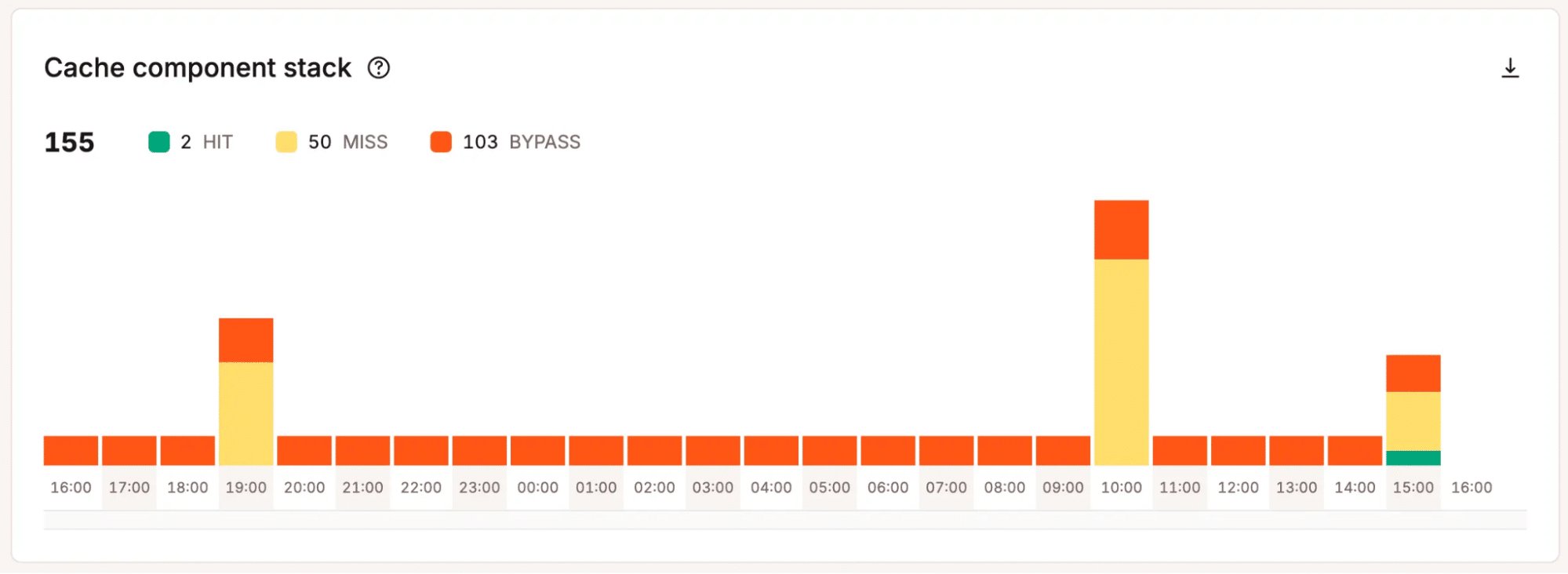
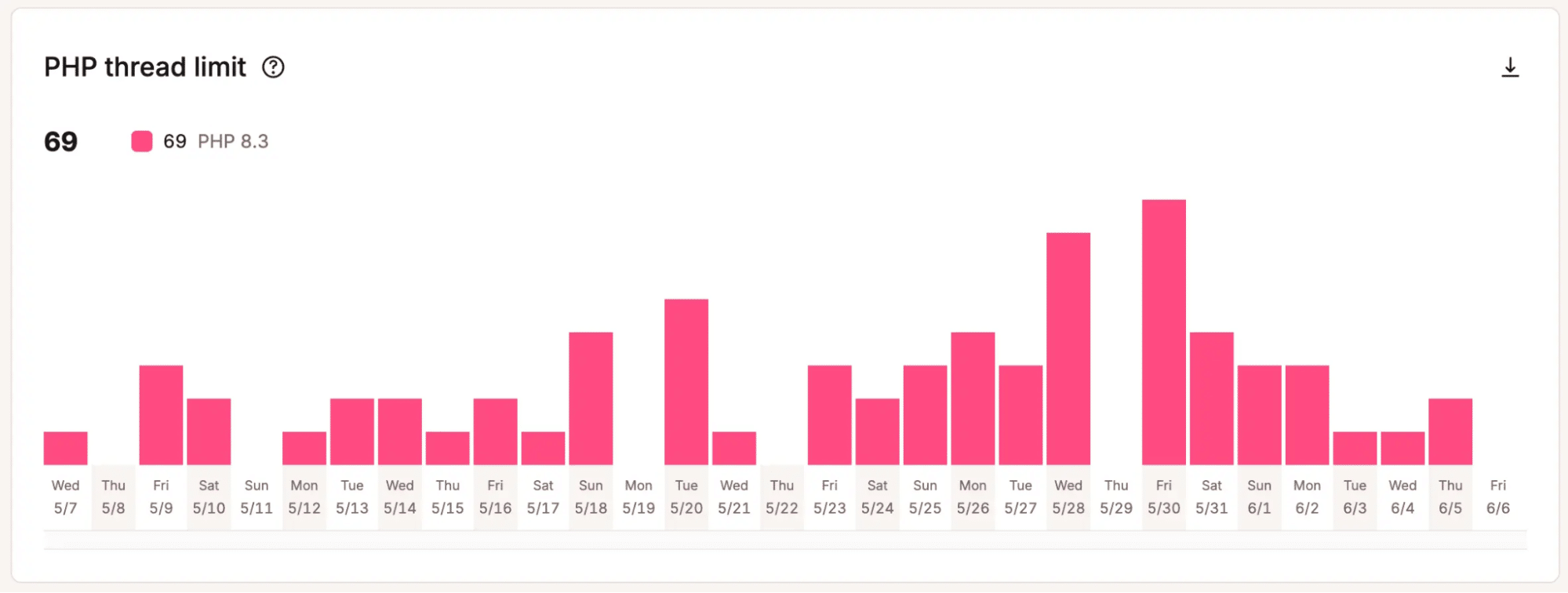
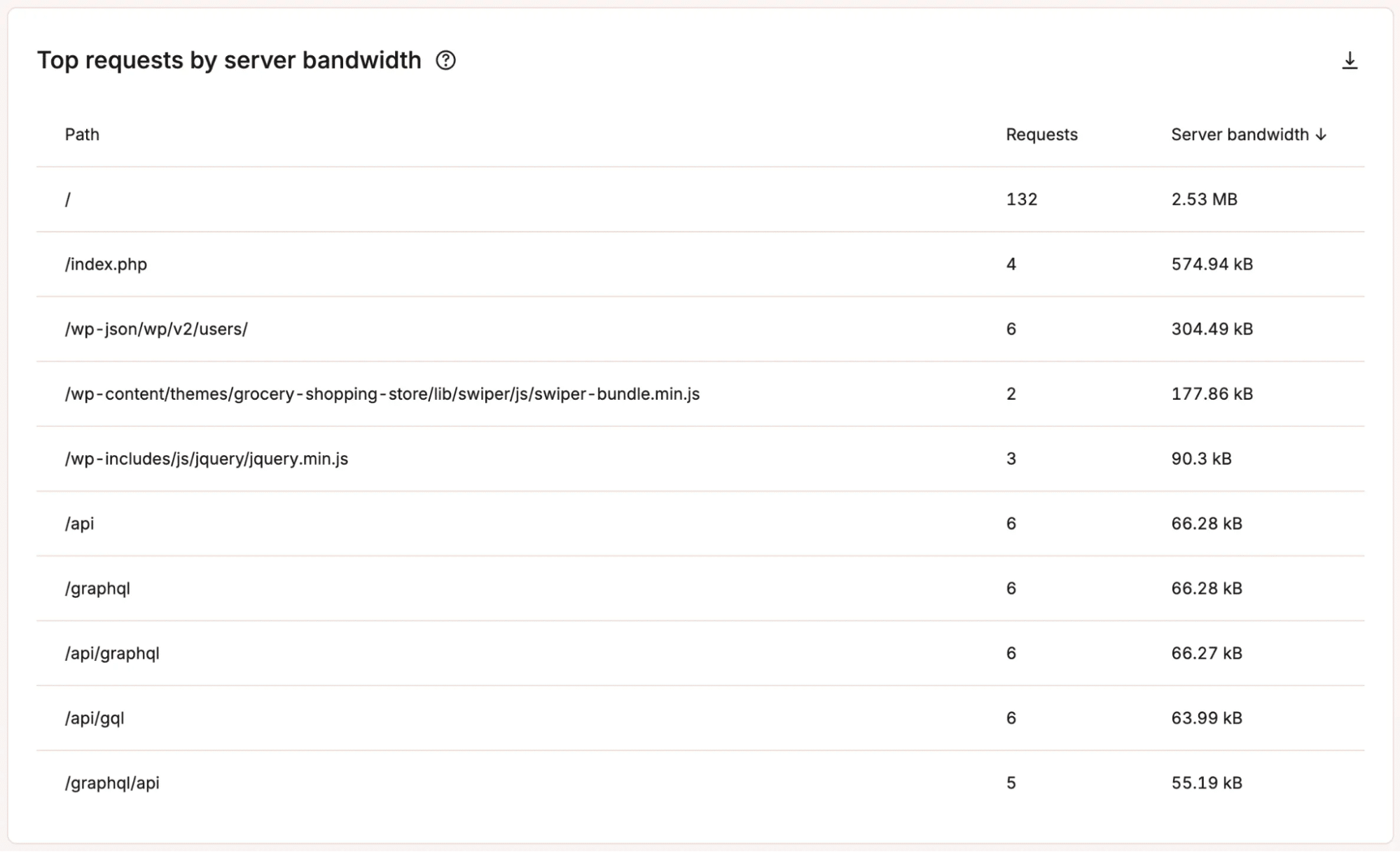
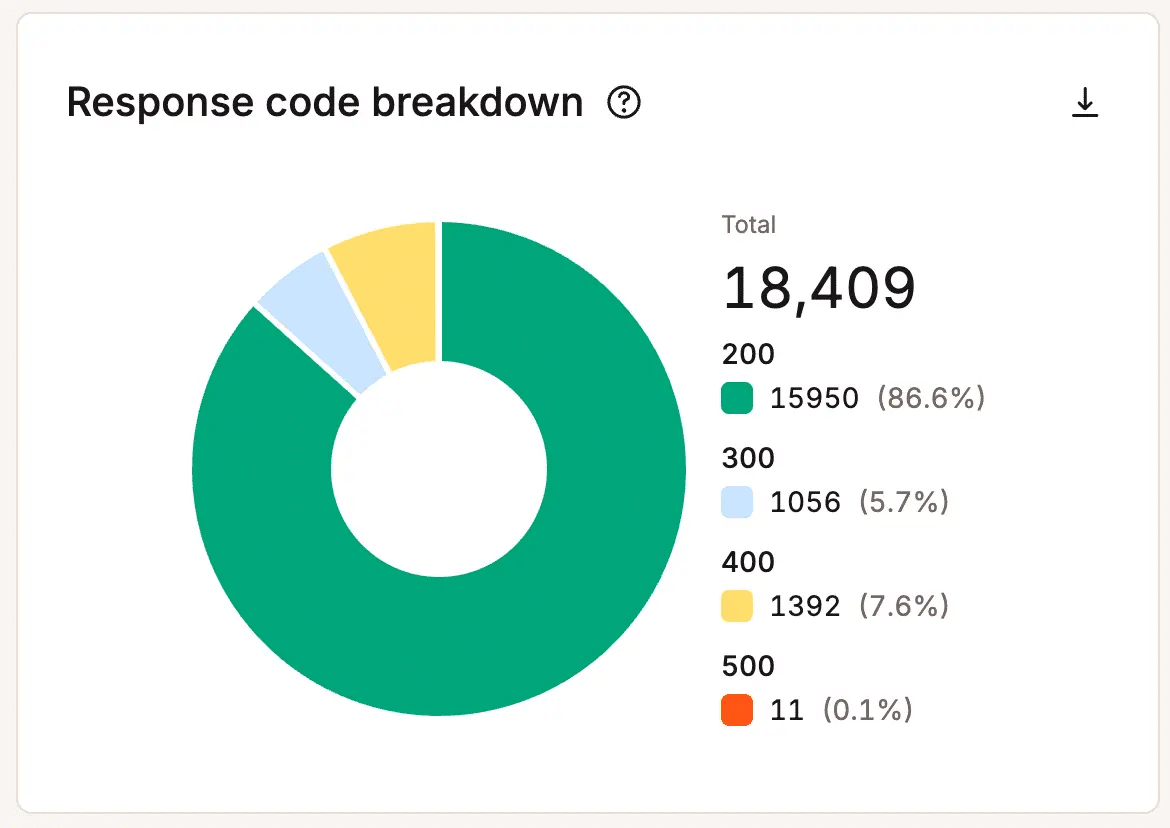
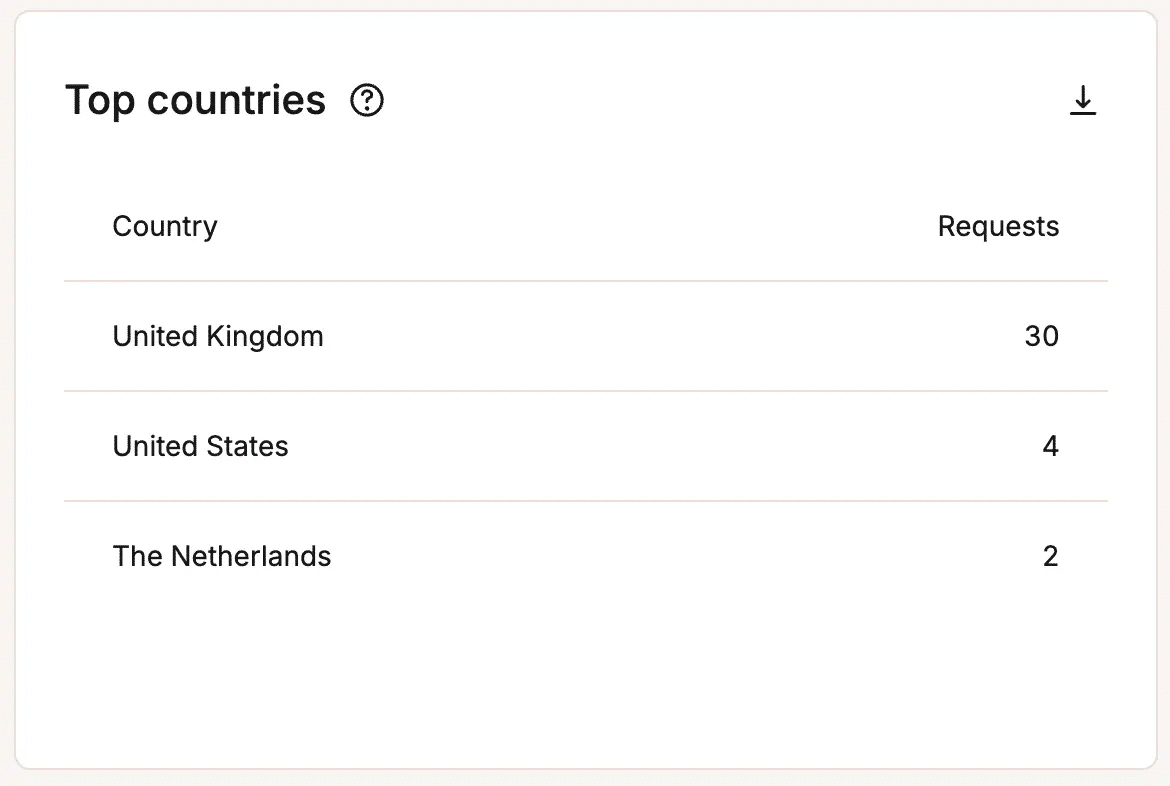
The MyKinsta dashboard is designed around this kind of infrastructure-level visibility. Instead of treating hosting as a black box, it surfaces operational metrics that reveal how a WordPress site interacts with the underlying platform.
You can see more of these analytics in our documentation. Site owners and development teams can move beyond surface-level reporting and start diagnosing performance changes directly within the hosting environment.
Knowing what happened isn’t enough
Most analytics tools are excellent at showing results. But when performance drops or reliability issues appear, those reports only tell part of the story.
Platforms like Kinsta make this kind of insight easier to access. The analytics available in the MyKinsta dashboard expose how a WordPress site behaves at the infrastructure level, giving developers, agencies, and site owners clearer visibility into performance and reliability.
If you want analytics that explain not just what happened but why, take a closer look at Kinsta’s managed WordPress hosting plans. There’s never been a better time than now to take control of your site’s operations.

Kinsta
Joel is a Frontend developer working at Kinsta as a Technical Editor. He is a passionate teacher with love for open source and has written over 300 technical articles majorly around JavaScript and it’s frameworks.


