


Every sprint starts with a board full of tickets and a team that needs somewhere clean to work. For agencies running client WordPress projects on two-week cycles, this means creating a staging environment in MyKinsta before the first ticket is picked up.
This takes a few minutes, but it’s the kind of task that falls through the cracks because it looks trivial.
The Kinsta API can remove that step. When a sprint starts in Jira, you can set up a webhook that triggers an event in middleware, which then reads the payload, maps it to a Kinsta site, and calls the API to create a new staging environment.
Why agencies should automate environment provisioning
Creating an environment after you plan a sprint means opening MyKinsta, finding the right client site from a list of dozens, creating and naming an environment, and then returning to Jira. While this isn’t complicated, it does have to happen at the right time, every time, and for every client project running.
Skipping it means a team starts work in the last sprint’s environment. From there, changes accumulate on top of each other, and when there’s a bug, isolating it is more like archaeology than debugging.
What you need before you start
To connect the Kinsta API and Jira, you need a Kinsta account with at least one WordPress site in an existing environment, a Jira Cloud account with administrator access to configure webhooks, and Node.js installed locally.
To authenticate with the Kinsta API, navigate to [Your company] > Company settings > API Keys in MyKinsta and click Create API Key.
Next, give the key a name, set an expiry duration, and click Generate. The key is a one-time display, so note it down before you move on.
You put this in a .env file at the project root alongside your Kinsta company ID, which you can find under Company settings > Billing Details:
KINSTA_API_KEY=your_api_key_here
KINSTA_COMPANY_ID=your_company_id_hereGet your Jira and Kinsta site IDs
You need the Kinsta site ID for each client project in the automation. This is a UUID that Kinsta assigns at site creation. It appears in the MyKinsta URL when you open a site or by polling GET /sites call once your API key is in place:
https://my.kinsta.com/sites/details/fbab4927-e354-4044-b226-29ac0fbd20ca/…On the Jira side, you need the numerical board ID for each project you want to connect. It appears in the URL (here as 2):
https://your-domain.atlassian.net/jira/software/projects/SCRUM/boards/2This is the same value Jira includes in the sprint_started webhook payload as originBoardId. The mapping of board IDs to site IDs lives in your .env file:
BOARD_ID_CLIENT_A=2
SITE_ID_CLIENT_A=fbab4927-e354-4044-b226-29ac0fbd20ca
BOARD_ID_CLIENT_B=5
SITE_ID_CLIENT_B=44b5a6d1-c83f-4b0e-9a1c-2e7dbc903fa1
Also, for local development, Jira cannot reach localhost directly. Ngrok can be used to expose a local port to the internet with a temporary public URL, which you can use as your webhook endpoint during development. Once you have a deployed middleware address, you can replace it.
How to automate sprint environment provisioning with Jira and the Kinsta API
This integration runs across two systems. In Jira, a webhook fires when a sprint starts and delivers the event payload to your middleware. For Kinsta, the middleware reads the board ID from the payload, resolves it to a site ID using the config map, and calls the Kinsta API to create a plain staging environment named after the sprint.
1. Register a Jira webhook for sprint events
Jira Cloud gives you two ways to register a webhook. The simpler option for most teams is through the Jira UI. The Settings > System option is within the top right-hand menu:
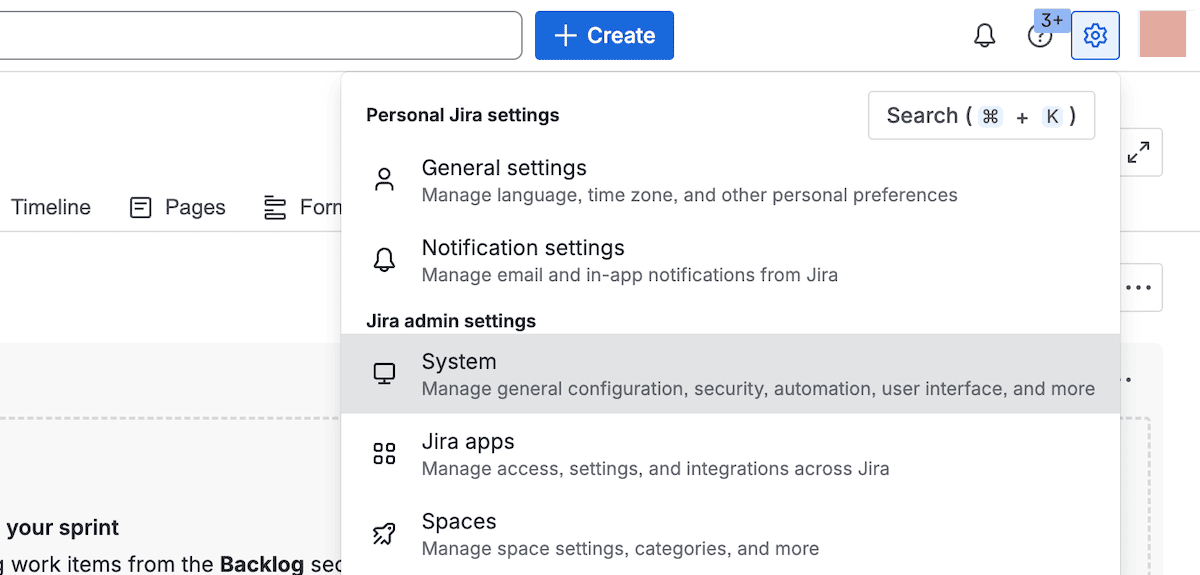
From there, choose Advanced > WebHooks, then click Create a WebHook:
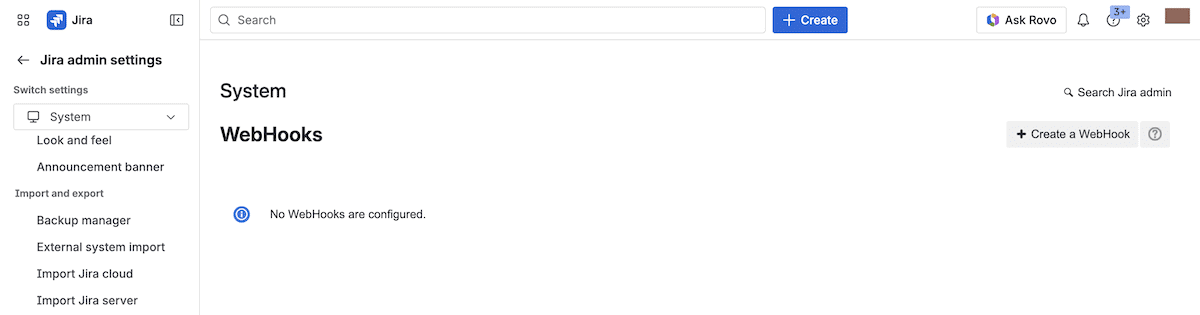
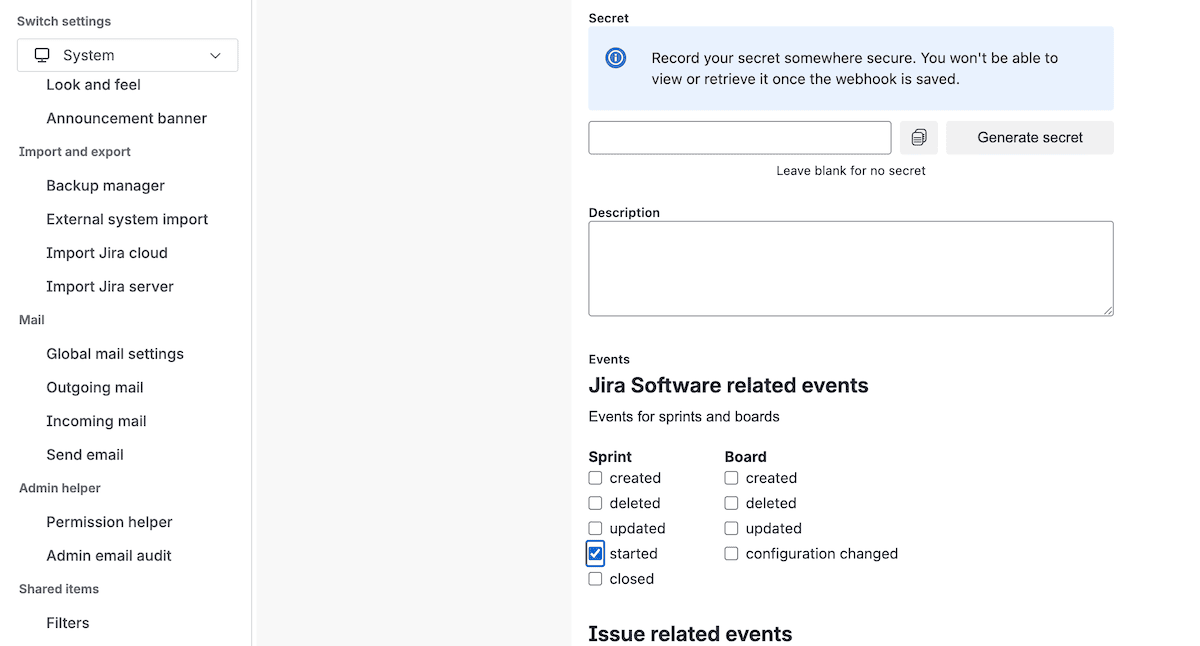
Here, enter a name, paste in a middleware URL with /sprint appended (a dummy option is fine for now), and under Events select Sprint > started. This creates an admin webhook, which fires for every sprint_started event across your entire Jira instance.
The second option is the REST API, using POST /rest/webhooks/1.0/webhook. This works well when webhook registration is part of a deployment script:
curl -X POST
  https://your-domain.atlassian.net/rest/webhooks/1.0/webhook
  -u [email protected]:your-api-token
  -H 'Content-Type: application/json'
  -d '{
    "name": "Sprint provisioning webhook",
    "url": "https://your-middleware-url.com/sprint",
    "events": ["sprint_started"],
    "filters": {},
    "excludeBody": false
  }'
Calling PUT /rest/webhooks/1.0/webhook/refresh adds an extension to the 30-day time to expire for the webhook. When Jira fires sprint_started, the payload arrives at your endpoint as a JSON POST with the following structure:
{
  "timestamp": 1705431600000,
  "webhookEvent": "sprint_started",
  "sprint": {
    "id": 15,
    "self": "https://your-domain.atlassian.net/rest/agile/1.0/sprint/15",
    "state": "active",
    "name": "Sprint 12",
    "startDate": "2026-02-02T00:00:00.000Z",
    "endDate": "2026-02-27T00:00:00.000Z",
    "originBoardId": 2,
    "goal": "Complete payment processing improvements"
  }
}
The middleware uses sprint.originBoardId to look up the Kinsta site ID and sprint.name to name the new environment: every sprint_started event within your Jira instance reaches the endpoint. The board ID lookup in the config map is what scopes the automation to the right client project and ignores everything else.
2. Build the middleware endpoint
With the webhook in place, you should next initialize a new Node.js project and install Express.js alongside dotenv:
npm init -y
npm install express dotenv
express handles the routing and request parsing, while dotenv loads your .env file. You need to create app.js to set up the server. Here’s the complete file:
// app.js
const express = require('express');
const crypto = require('crypto');
require('dotenv').config();
const app = express();

// Raw body parser on the /sprint route enables HMAC signature verification
app.use('/sprint', express.raw({ type: 'application/json' }));
app.use(express.json());

const KinstaAPIUrl="https://api.kinsta.com/v2";
const headers = {
  'Content-Type': 'application/json',
  Authorization: `Bearer ${process.env.KINSTA_API_KEY}`
};

// Board ID to Kinsta site ID config map
const siteConfig = {
  [process.env.BOARD_ID_CLIENT_A]: process.env.SITE_ID_CLIENT_A,
  [process.env.BOARD_ID_CLIENT_B]: process.env.SITE_ID_CLIENT_B,
};

function verifyJiraSignature(req) {
  const signature = req.headers['x-hub-signature'];
  const secret = process.env.JIRA_WEBHOOK_SECRET;
  if (!signature || !secret) return false;
  const expected = 'sha256=' + crypto
    .createHmac('sha256', secret)
    .update(req.body)
    .digest('hex');
  return crypto.timingSafeEqual(
    Buffer.from(signature),
    Buffer.from(expected)
  );
}

app.post('/sprint', async (req, res) => {
  if (!verifyJiraSignature(req)) {
    return res.status(401).json({ message: 'Invalid signature' });
  }

  const body = JSON.parse(req.body);
  const { webhookEvent, sprint } = body;

  if (webhookEvent !== 'sprint_started') {
    return res.status(200).json({ message: 'Event ignored' });
  }

  const boardId = String(sprint.originBoardId);
  const siteId = siteConfig[boardId];

  if (!siteId) {
    console.log(`No site configured for board ${boardId}`);
    return res.status(200).json({ message: 'Board not mapped' });
  }

  // Kinsta API calls added in the steps below
  res.status(200).json({ message: 'Received' });
});

app.listen(3000, () => console.log('Middleware running on port 3000'));
To protect the endpoint, you generate a secret key during the webhook setup. Jira makes this optional during setup, but it’s practically essential for a secure instance.
Endpoint security
Jira signs each payload and includes the result in the X-Hub-Signature header as sha256=. You add the secret to your .env file alongside the other credentials:
JIRA_WEBHOOK_SECRET=your_webhook_secret_hereThe verification function lives in app.js and uses Node’s built-in crypto module. It reads the signature from the request header, computes the expected HMAC against the raw request body, and uses timingSafeEqual to compare them in a way that prevents timing attacks. Here’s the relevant portion of app.js:
const crypto = require('crypto');

function verifyJiraSignature(req) {
  const signature = req.headers['x-hub-signature'];
  const secret = process.env.JIRA_WEBHOOK_SECRET;
  if (!signature || !secret) return false;
  const expected = 'sha256=' + crypto
    .createHmac('sha256', secret)
    .update(req.body)
    .digest('hex');
  return crypto.timingSafeEqual(
    Buffer.from(signature),
    Buffer.from(expected)
  );
}
This function is the first thing called inside the POST /sprint route handler. If verification fails, the middleware returns 401 immediately, and nothing else runs:
app.post('/sprint', async (req, res) => {
  if (!verifyJiraSignature(req)) {
    return res.status(401).json({ message: 'Invalid signature' });
  }

  const body = JSON.parse(req.body);
  // …rest of the handler
});
The route uses express.raw() on the /sprint path because verifyJiraSignature needs it to compute the HMAC. Once verification passes, JSON.parse(req.body) gives the same result express.json() would have.
3. Authenticate with the Kinsta API and retrieve site environments
All requests to the Kinsta API use Bearer token authentication: the headers constant in app.js handles that for every request in the application. The require('dotenv').config() line at the top ensures the key loads from .env before anything else runs, so it never appears in the source code itself.
Kinsta uses environment IDs rather than site IDs for the provisioning endpoint, so you should add a getEnvironmentId function below the headers constant:
const getEnvironmentId = async (siteId) => {
  const resp = await fetch(
    `${KinstaAPIUrl}/sites/${siteId}/environments`,
    { method: 'GET', headers }
  );
  const data = await resp.json();
  return data.site.environments[0].id;
};
This calls GET /sites/{siteId}/environments and returns the ID of the first (i.e., live) environment in the response. If a site uses multiple environments and you need to target a specific one, match against the environment name rather than taking the first result.
4. Create a plain staging environment using the Kinsta API
With the site and environment IDs resolved, the middleware calls POST /sites/{siteId}/environments/plain to create the sprint environment. You do this through a createSprintEnvironment function below getEnvironmentId:
const createSprintEnvironment = async (siteId, sprintName) => {
  const resp = await fetch(
    `${KinstaAPIUrl}/sites/${siteId}/environments/plain`,
    {
      method: 'POST',
      headers,
      body: JSON.stringify({
        display_name: sprintName,
        is_premium: false
      })
    }
  );
  const data = await resp.json();
  return data;
};
display_name appears in MyKinsta, whereas using sprint.name from the Jira payload directly means each environment in the dashboard matches the sprint it belongs to. The is_premium flag determines whether Kinsta provisions this as a standard or premium staging environment. Setting it to false creates a standard environment.
When the request reaches Kinsta, it returns 202 Accepted with an operation_id rather than a completed environment:
{
  "operation_id": "environments:add-plain-54fb80af-576c-4fdc-ba4f-b596c83f15a1",
  "message": "Adding plain environment in progress",
  "status": 202
}
Kinsta’s async processing avoids a blocked request thread while the provisioning completes. The operation_id is what you pass to the endpoint to track progress. Next, update the POST /sprint route to call both functions in sequence:
app.post('/sprint', async (req, res) => {
  if (!verifyJiraSignature(req)) {
    return res.status(401).json({ message: 'Invalid signature' });
  }

  const body = JSON.parse(req.body);
  const { webhookEvent, sprint } = body;

  if (webhookEvent !== 'sprint_started') {
    return res.status(200).json({ message: 'Event ignored' });
  }

  const boardId = String(sprint.originBoardId);
  const siteId = siteConfig[boardId];

  if (!siteId) {
    console.log(`No site configured for board ${boardId}`);
    return res.status(200).json({ message: 'Board not mapped' });
  }
try {
    const envId = await getEnvironmentId(siteId);
    const result = await createSprintEnvironment(siteId, sprint.name);
    res.status(200).json(result);
  } catch (err) {
    console.error(err);
    res.status(500).json({ message: 'Environment creation failed' });
  }
});
Using the try block is cleaner than relying on multiple if statements. However, keep the Jira signature verification at the top of the file as it needs to run before any other code.
5. Poll the operation status and confirm provisioning
To track completion, poll GET /operations/{operation_id} until the status returns as 200 using a pollOperation function below createSprintEnvironment:
const pollOperation = async (operationId, intervalMs = 5000, maxAttempts = 12) => {
  for (let attempt = 0; attempt < maxAttempts; attempt++) {
    await new Promise(resolve => setTimeout(resolve, intervalMs));
    const resp = await fetch(
      `${KinstaAPIUrl}/operations/${operationId}`,
      { method: 'GET', headers }
    );
    const data = await resp.json();
    if (data.status === 200) {
      console.log(`Environment ready: ${operationId}`);
      return data;
    }
    if (data.status >= 400) {
      throw new Error(`Operation failed: ${data.message}`);
    }
  }
  throw new Error('Operation timed out after maximum attempts');
};
The loop waits five seconds between each attempt and covers up to a minute of provisioning time. While 200 signals completion, any 4xx status indicates a failure to investigate.
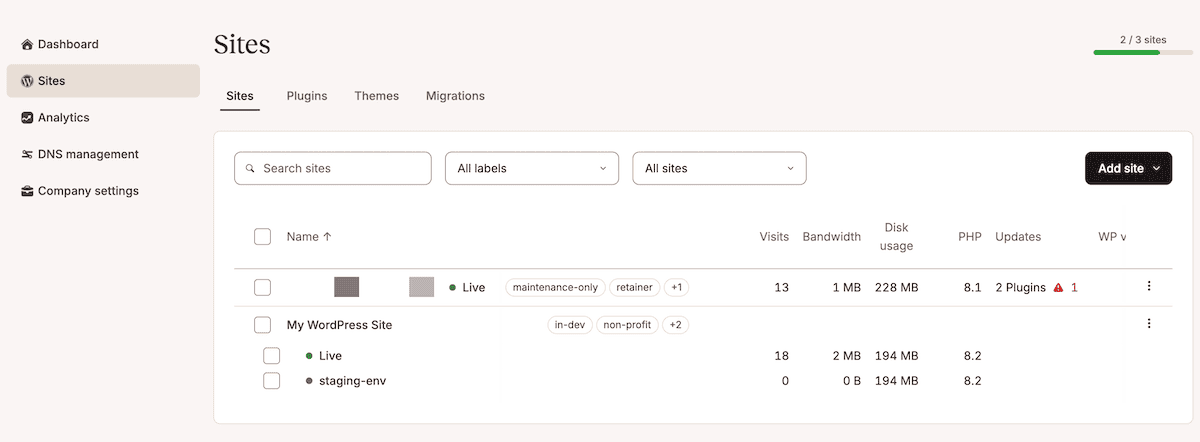
If you run all of this with node app.js and start a sprint in Jira, the environment should appear in MyKinsta within a minute or two.
Keep your agency ahead of the sprint
This integration provisions a clean, named plain staging environment within MyKinsta based on starting a sprint in Jira. The webhook fires, the middleware resolves the board ID to a site, the Kinsta API handles the rest, and the team picks up their tickets with an environment that is already waiting for them.
When the middleware is ready to go live, Sevalla is a straightforward deployment target. You push the project to a Git provider, connect the repo, add the environment variables, and update the Jira webhook URL to the live address.
What’s more, Kinsta’s Agency Partner Program is ideal for agencies that manage multiple client projects. It gives you dedicated support, co-marketing opportunities, and the kind of infrastructure partnership that supports the automation layer you’re building on top of the Kinsta API.

Kinsta
Joel is a Frontend developer working at Kinsta as a Technical Editor. He is a passionate teacher with love for open source and has written over 300 technical articles majorly around JavaScript and it’s frameworks.


