


Individual WordPress site management takes time. For agencies handling dozens or even hundreds of sites, tasks like creating environments, clearing caches, adding domains, or restoring backups can quickly pile up. The team slows down as a result of the repetitive loop.
And this is the typical pattern for many:
- New client onboarded → dev sets up WordPress manually, adds domains, and configures plugins
- Someone pushes a deploy → the team has to log in and clear the caches by hand
- A client reports a bug → malware team checks the logs manually, and maybe the site is rolled back via backup
None of these tasks is difficult, but doing them repeatedly eats into time that should be invested in more important work.
That’s why Kinsta offers not just a clean, intuitive dashboard, but also the Kinsta API to automate the routine tasks your agency handles every day.
Let’s explore some WordPress management tasks agencies automate with the Kinsta API.
Create and clone WordPress sites
Installing a new WordPress site is probably the most common thing your team does. At the early stage of running your agency, it won’t feel like a big deal, as you may be spinning up only five to 10 sites a week. But as you grow, it changes. You hit opportunities like Black Friday or a major client rollout where you need to launch dozens of sites in a few days.
At that point, doing it manually doesn’t scale. You either slow down, hire and train more people (which costs time and money), or you automate it.
With the Kinsta API, you can wire this into your internal tool or dashboard so that creating a new WordPress site becomes as simple as clicking a button.
Let’s say someone signs up on your agency site and pays. You could have a script that takes the signup form results and calls the API to create a fresh WordPress site with your base theme.
This isn’t theoretical. The API already has everything you need:
If you manage many sites, this will shave hours off your setup process every week.
Manage domains programmatically
This one’s a no-brainer if you’re handling client sites at scale.
Agencies regularly add or change domains, maybe during onboarding or a full rebrand. If you are a large agency, you may want to cut the time it takes to click through MyKinsta to add domains, verify DNS, and set up SSL.
With the Kinsta API, you can move all of this into an automated workflow.
Here’s a common real-world scenario: A new client signs up. You already have their domain name and DNS set in your CRM. Your internal system verifies DNS records point to Kinsta (maybe using a DNS lookup behind the scenes), and the moment that’s confirmed, it calls the API to:
- Attach the domain
- Set it as the primary domain
- Upload custom SSL if needed
You could even have a Slack notification that says “✅ clientdomain.com has been attached and SSL is active.”
Another scenario: Let’s say you are rebranding 20 client sites in bulk. To update each environment with new domains, switch them over, and apply SSL automatically, queue all domain changes and loop through the API rather than updating each one by hand.
Some of the endpoints that enable this are as follows:
This is more than just a nice-to-have. This type of automation literally saves hours and eliminates human error for agencies that perform this task five to ten times per week.
If you want to go further, you can even expose this control in your own internal dashboard. Click “Assign Domain,” choose the site and domain, and your app calls the Kinsta API.
Manage backups: list, restore, or download
Sometimes a deployment can fail, plugins misbehave, or a client can report an issue on the live site. With MyKinsta, you already have reliable backups available. But when you’re managing multiple sites and need to move fast, it helps to have backup control plugged directly into your workflow.
That’s where the API comes in. Agencies are wiring this into their deployment pipelines so that:
- A manual backup is created just before a deploy
- If something goes wrong, a restore is triggered automatically
- Teams don’t have to leave Slack or their dashboard to roll back a site
For example, you can set up a Slack command like:
/restore site-name to yesterdayThis would call your internal service, which then triggers the restore endpoint. Or imagine a one-click “Quick Restore” button in your internal tool, and the API brings the site back to a stable state without having to log into MyKinsta.
Here’s what’s possible with the available endpoints:
The API gives your team the option to act fast, especially in high-pressure moments.
Bulk update plugins and themes
We wrote a guide that explained how to build a simple tool using the Kinsta API to bulk-check and update outdated plugins across multiple WordPress sites from a single dashboard.
That same idea still works today, even though Kinsta now offers automatic plugin and theme updates as a premium add-on (which, by the way, also runs visual tests and auto-rollbacks).
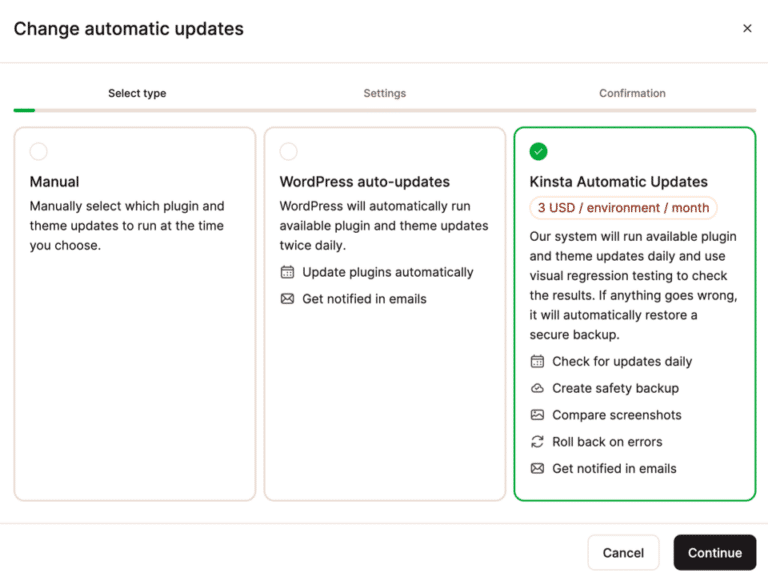
But if your team wants a different type of control, the API provides that freedom. You could show all plugins across your client sites in one view, highlight the outdated ones, and let your devs pick which ones to update.
Maybe let your QA team mark some for testing before pushing updates to production. You can also clean up bloat by filtering out inactive plugins and removing them directly.
The plugins endpoint returns real details like:
{
  "name": "akismet",
  "title": "Akismet Anti-Spam",
  "status": "active",
  "version": "1.0.0",
  "update": "available",
  "update_version": "1.0.1"
}
With that info, you can build whatever logic you want:
- Show plugin counts per site
- Detect version drift
- Trigger updates across multiple environments
- Or even build a Slack bot that replies with “this site has 4 outdated plugins” and a button to fix it
So, even though the new add-on solves plugin management for most teams, the API opens up a whole new level of visibility and custom automation that might suit your work style.
Clear cache, restart PHP, push to live
The clear cache and restart PHP endpoints are among the top three most-used in the Kinsta API, and it’s easy to see why.
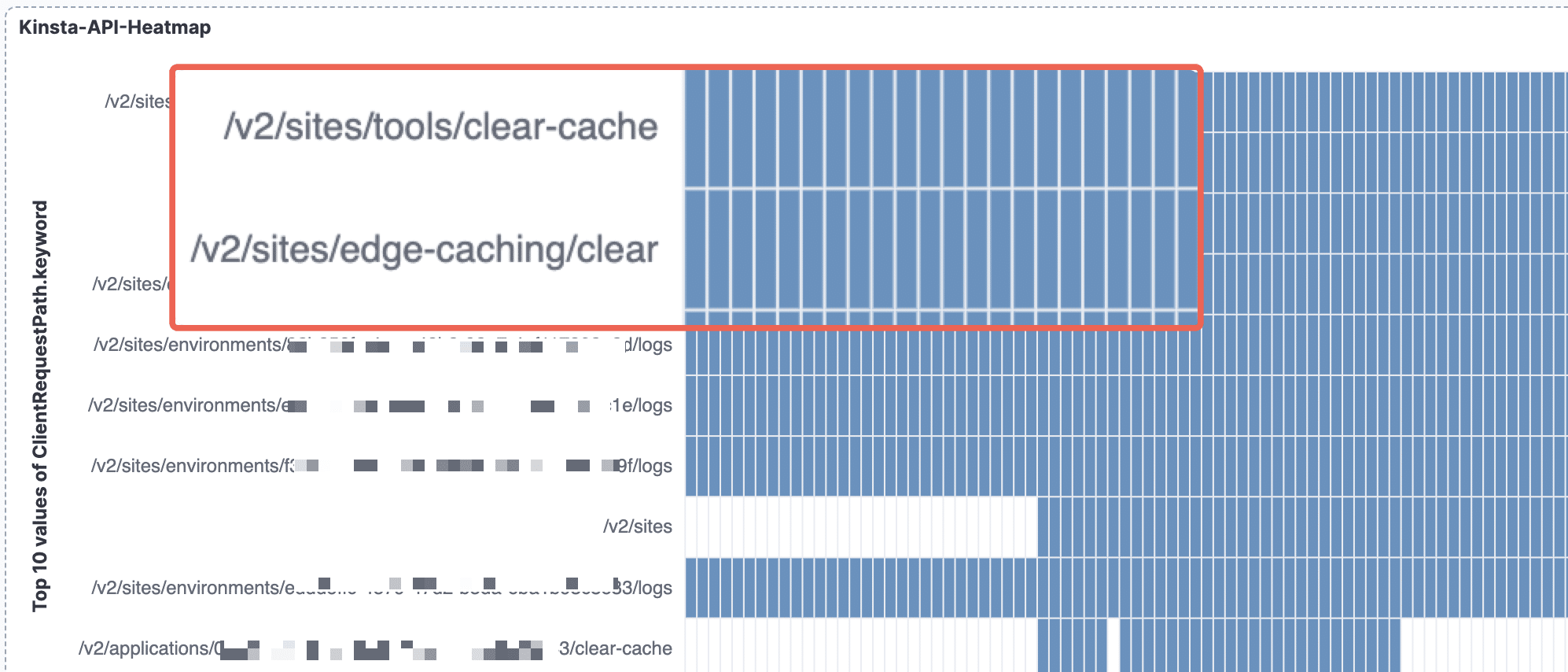
Right after a deploy, clearing caches is usually step one. Same for restarting PHP when things act up. These aren’t “fancy” operations. They’re just the kind of tasks your team does frequently. So they’re also the kind of things that should be automated.
If your team already uses Git over SSH to deploy to Kinsta, you can integrate these API calls directly into your CI pipeline, perhaps through GitHub Actions. Without a user logging into MyKinsta, everything resets itself with a single clean push.
Here’s an example pipeline:
name: Deploy to Kinsta and clear cache

on:
  push:
    branches:
      - main

jobs:
  deploy:
    runs-on: ubuntu-latest

    steps:
      - name: Checkout code
        uses: actions/checkout@v4

      - name: Deploy through SSH
        uses: appleboy/[email protected]
        with:
          host: ${{ secrets.KINSTA_SERVER_IP }}
          username: ${{ secrets.KINSTA_USERNAME }}
          password: ${{ secrets.KINSTA_PASSWORD }}
          port: ${{ secrets.KINSTA_PORT }}
          script: |
            cd /www/your-site/public
            git fetch origin main
            git reset --hard origin/main

      - name: Clear Kinsta cache
        run: |
          curl -X POST https://api.kinsta.com/v2/environments/${{ secrets.KINSTA_ENV_ID }}/tools/clear-cache
          -H "Authorization: Bearer ${{ secrets.KINSTA_API_KEY }}"
          -H "Content-Type: application/json"

      - name: Restart PHP
        run: |
          curl -X POST https://api.kinsta.com/v2/environments/${{ secrets.KINSTA_ENV_ID }}/tools/restart-php
          -H "Authorization: Bearer ${{ secrets.KINSTA_API_KEY }}"
          -H "Content-Type: application/json"
This is simple, but powerful. You can go even further:
- Add a “Clear Cache” button to your internal admin panel
- Trigger cache clearing via Slack, using a bot command like
/cache-clear client-name - Include cache clearing and PHP restart as part of your staging-to-live deploy flow
And if you’re using the Push to Live endpoint, things get even more interesting. You don’t need to push everything, as the API supports selective file pushing using push_files_option: 'SPECIFIC_FILES'.
So you can tailor your deploys to only push plugin or theme changes:
{
  "source_env_id": "54fb80af-576c-4fdc-ba4f-b596c83f15a1",
  "target_env_id": "54fb80af-576c-4fdc-ba4f-b596c83f15a1",
  "push_db": true,
  "push_files": true,
  "run_search_and_replace": true,
  "push_files_option": "SPECIFIC_FILES",
  "file_list": [
    "wp-content/plugins",
    "wp-content/themes",
    "wp-content/uploads"
  ]
}
This is the kind of stuff that makes your devs breathe easier and keeps things snappy for your clients.
Access logs for monitoring or debugging
As an agency, your team manages many client sites. You already know that by the time a client says, “The site is down,” it’s usually been broken for a while.
That’s where the logs endpoint comes in. Instead of waiting for complaints from your clients, you can pull logs directly via the API and display them in your internal dashboard. Even better, set up a simple alert system that pings your team in Slack or email when something looks off.
You don’t need to open MyKinsta every time someone reports a 500 error. Just fetch the latest error or access logs, parse the output, and display the results where your team already works.
You just need the environment ID and the type of log you want, such as error, access, or kinsta-cache-perf. You can also limit the number of lines returned:
curl -i -X GET
  'https://api.kinsta.com/v2/sites/environments/{env_id}/logs?file_name=error&lines=1000'
  -H 'Authorization: Bearer '
You’ll get a plain string of log content back. From there, you can build out whatever fits your workflow:
- Show the most recent error logs for each client site in your agency dashboard
- Highlight 500s, slow queries, or failed cron jobs
- Trigger alerts when error spikes happen
- Let your devs type
/show-logs client-xin Slack and instantly view live output
That’s the kind of visibility that saves you from “uh oh” moments during client calls.
Real example: How Sod uses the API to manage 400+ sites
If you’re wondering whether real agencies are using the Kinsta API this way, they are.
Take Straight Out Digital (Sod), a full-service agency in Melbourne, Australia, managing more than 400 WordPress sites. When their client list exploded, the manual way of doing things just couldn’t keep up. So they built internal tools on top of the Kinsta API to automate everything from site provisioning to plugin updates.
They use it to:
- Spin up new sites automatically when onboarding clients
- Clone existing setups without logging into the dashboard
- Run bulk plugin checks and updates across their whole portfolio
- Trigger alerts when errors show up in logs
- Stay ahead of issues without waiting on client tickets
They still use MyKinsta daily, but the API helps them avoid the repetitive work. In their own words:
The Kinsta API has enabled us to develop internal tools that automate crucial processes like site provisioning and perform bulk operations across our websites, saving us considerable time and effort,” says Sod Development Lead Pete Brundle.
This is proof that these workflows aren’t theoretical. Agencies like Sod are already using them, and the company has scaled past 400 sites because of it.
Summary
If you’re running an agency with multiple WordPress sites, the Kinsta API isn’t just a nice-to-have. It’s how you buy back time.
Whether you plug it into your CI pipeline, trigger actions from your internal tools, or just want to make life easier for your devs, the pieces are already there. You don’t need to rebuild your process from scratch. You just need to wire in the parts that slow your team down the most.
And as we’ve seen with agencies like Sod, the payoff compounds as you scale.
Explore the Kinsta API documentation to see what’s possible, generate your API key in MyKinsta, and dive into step-by-step tutorials on building Slack bots, deploying via Git, and more!

Kinsta
Joel is a Frontend developer working at Kinsta as a Technical Editor. He is a passionate teacher with love for open source and has written over 300 technical articles majorly around JavaScript and it’s frameworks.


