


Developers who run complex WordPress builds often find themselves weighing a familiar question: Is managed hosting actually faster and more reliable than running your own VPS setup?
It’s a fair debate. After all, VPS solutions promise complete control, while managed hosting claims to take the heavy lifting off your plate.
This article tests those claims by breaking down benchmarking methodology, comparing real-world performance data, and examining trade-offs between DIY and managed hosting.
We show how Kinsta stacks up against the traditional VPS route and why every millisecond of performance matters when client satisfaction and agency efficiency are on the line.
Benchmarking methodology for WordPress performance
When comparing managed hosting against a DIY VPS, benchmarks need to be more than surface-level speed tests. Developers demand rigorous, transparent criteria that can withstand scrutiny.
That’s why this benchmarking approach looks at multiple dimensions of performance, not just a single number. Here are some key performance indicators you should pay attention to when conducting this sort of comparison.
Time to First Byte (TTFB)
This metric captures how long it takes for the server to respond to the initial request. A low TTFB signals that the hosting environment is tuned for responsiveness at the server and network level.
According to web.dev, a good TTFB is anything under 800 milliseconds or 0.8 seconds.
For agencies managing multiple client sites, even a 100ms delay can compound into noticeable slowdowns across projects.
Core Web Vitals
There are several components that make up Core Web Vitals. Here’s a quick look:
These aren’t just technical numbers. They’re real-deal signals Google uses in rankings, and they directly affect how “fast” a site feels to end users.
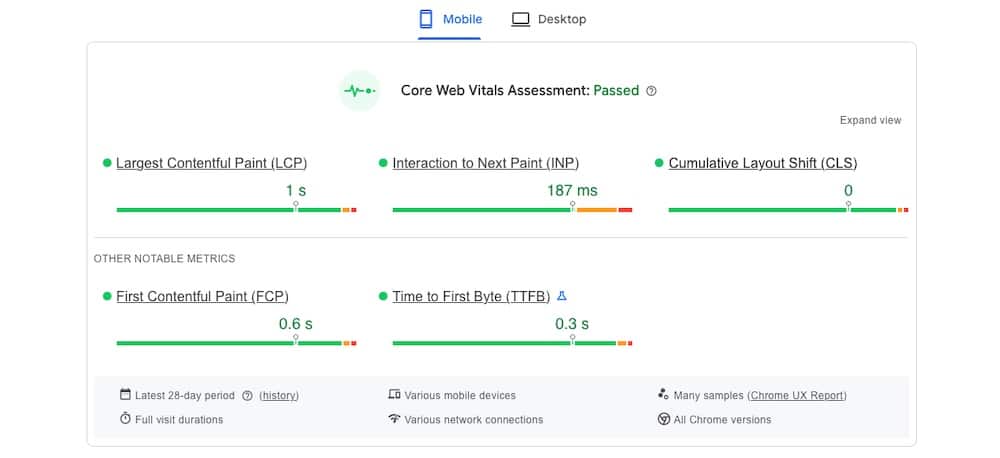
Take a look at the following sample Core Web Vitals test. Running google.com through PageSpeed Insights shows it has a good rating for all key metrics, including LCP, INP, CLS, FCP, and TTFB.
Uptime and error rates
Beyond speed, reliability is critical. Tracking uptime percentages and HTTP error rates shows whether the environment can consistently serve pages without interruption. For client-facing agencies, every minute of downtime can translate into lost revenue and strained relationships.
Load handling under traffic spikes
Synthetic load tests simulate hundreds or thousands of simultaneous visitors. This reveals how well the hosting setup can scale under pressure, whether during a seasonal promotion, viral campaign, or sudden traffic surge.
Ensuring fairness in testing
Benchmarks are only meaningful if the playing field is level. To avoid skewed results, the testing setup mirrors real-world production environments as closely as possible:
- Identical WordPress versions: Both Kinsta and VPS setups run the same WordPress core version to ensure feature parity.
- Same plugins and themes: A common plugin stack and theme are used, since performance can vary depending on code execution.
- Controlled traffic simulation: Tools like k6 simulate realistic user behavior, including concurrent sessions, page navigation, and form submissions.
- Environment parity: VPS and Kinsta servers are configured with the same PHP versions, database versions, and memory allocations where possible. This isolates hosting architecture as the primary variable.
By taking these steps, the benchmarks represent an honest side-by-side comparison. Developers can see how fast each environment performs under light usage, but also how stable and scalable it is when pushed to its limits.
DIY VPS vs Kinsta’s managed hosting for WordPress
Many developers gravitate toward DIY VPS hosting because it promises absolute control.
You choose the provider, configure the stack, fine-tune caching, and decide how resources are allocated. That freedom comes with a price, as you need to set up, constantly tune, and handle never-ending maintenance.
What DIY VPS requires
Running WordPress on a self-managed VPS means becoming the sysadmin as well as the developer. Typical responsibilities include:
- Installing and configuring the web server (Nginx/Apache), PHP, and MySQL or MariaDB.
- Setting up caching layers manually, whether through server modules, reverse proxies, or plugins.
- Monitoring uptime and resource usage with third-party tools.
- Applying security patches and OS updates to keep the server hardened.
- Scaling resources during traffic spikes either by provisioning more power or spinning up new instances.
This gives developers precise control, but it also consumes valuable hours that could otherwise be spent building features, optimizing UX, or shipping client projects.
How Kinsta approaches performance
Kinsta takes a different route by building on a high-performance global network and next-generation server infrastructure. Instead of spending time configuring servers, developers get speed and stability out of the box:
- Containerized architecture: Each WordPress site runs in an isolated LXD container with dedicated resources, preventing noisy-neighbor issues common on shared setups.
- Automatic caching layers: Server-level caching (including edge caching and object caching options) is pre-configured, so performance gains don’t depend on plugin setup.
- Built-in CDN integration: Cloudflare’s enterprise-level CDN is included, bringing content closer to end users worldwide.
- Auto-scaling for surges: Sites can handle sudden traffic spikes thanks to container isolation, Cloudflare edge caching, and flexible plan upgrades without downtime. Even if you exceed resource limits, your site stays online, with transparent overage handling.
Benchmark outcomes
When we talk about performance, the most compelling numbers come from real customer migrations. Over a three-month span, we measured more than 3,200 sites moving to Kinsta from other providers, including VPS hosts. On average, those sites loaded 20% faster immediately after migrating.
That kind of improvement doesn’t require code changes or redesigns. It comes from what’s under the hood:
- Next-generation virtual machines that provide faster compute power right out of the box.
- A premium global network that delivers traffic across one of the fastest backbones worldwide.
- Built-in Cloudflare CDN coverage across 300+ locations, included with every plan at no extra cost.
- Edge Caching that cuts the time needed to serve cached WordPress HTML by more than 50% on average.
These measurable gains are what clients experience the moment they move from a DIY VPS to Kinsta.
Lightning-fast load handling under stress
When pushed hard in load tests by Hosting Step, Kinsta delivered an average response time of just 27 ms, landing in the “elite handling” category. That means during traffic spikes, the site remains responsive, even when under heavy concurrent load.
Sub-second render times, even on mobile
Users in independent tests reported page render times around 800 ms on desktop and approximately 1.2 seconds on throttled 4G mobile connections, even with default WordPress themes. This level of responsiveness naturally supports stronger Core Web Vitals metrics like LCP and FID
This might seem like a lot of numbers, but the reality is these test results indicate an infrastructure that translates into results:
- A sharper TTFB means quicker initial fetches, which helps power faster page load times even before caching or CDN kicks in.
- Elite-level load handling reduces the risk of dropped requests or sluggishness during flash traffic events.
- Sub-second LCP render speeds directly impact user satisfaction, bounce rates, and even SEO, especially important when performance is part of your clients’ value proposition.
In short, while you can optimize a DIY VPS to approach these levels, doing so takes serious engineering resources and continual maintenance. Kinsta delivers these upgrades out of the box, giving your team back precious development time without sacrificing performance or reliability.
The trade-offs: time, performance, and reliability
The real difference between DIY VPS hosting and Kinsta isn’t captured only in speed tests. It’s about the hidden costs developers pay in time and energy.
A self-managed VPS gives you full control over the stack, from web server configurations to database tuning, but it also makes you the sysadmin. Every patch, upgrade, and performance adjustment is another task on your plate. Monitoring uptime, applying security fixes, and troubleshooting outages can quickly turn into late nights and lost billable hours.
Kinsta removes that constant overhead by shifting infrastructure management to its own engineering team. Developers keep control of their sites, but no longer have to worry about whether a traffic surge will overload the server or whether yesterday’s missed update left the system vulnerable. Proactive monitoring, automated daily backups, and guaranteed malware cleanup all happen in the background.
The result is an environment where reliability is built in, freeing agencies from the maintenance grind and giving them more hours to invest in client work.
Why developer-led agencies benefit from managed infrastructure
For agencies led by developers, the key question is whether managed hosting will limit their workflow.
With Kinsta, it doesn’t. SSH access, WP-CLI, Git integration, Redis support, and staging environments are all standard, making it easy to work with the same professional-grade toolchain you’d configure on a VPS.
That access unlocks advanced scenarios that agencies regularly tackle. Headless WordPress projects can run smoothly on top of Kinsta’s infrastructure, with fast API responses supporting decoupled front ends. WooCommerce stores benefit from Redis object caching, which keeps transactions responsive during heavy sales periods. Large multisite networks run in isolated containers, avoiding the resource conflicts that can derail DIY setups.
The following case studies illustrate the impact.
Neuralab doubled site speed after moving from AWS
Neuralab, a digital agency managing around 200 WordPress and WooCommerce projects, migrated from AWS to Kinsta to improve performance and simplify operations. After the switch, their sites consistently loaded twice as fast, with measurable gains in both front-end responsiveness and backend workflows.

Their developers also noted that load times improved by about one second across the board, a result they credited to Kinsta’s optimized infrastructure and built-in caching layers. This gave Neuralab’s team the freedom to focus more on development and less on managing infrastructure.
NCVVO achieved faster editing and error-free stability
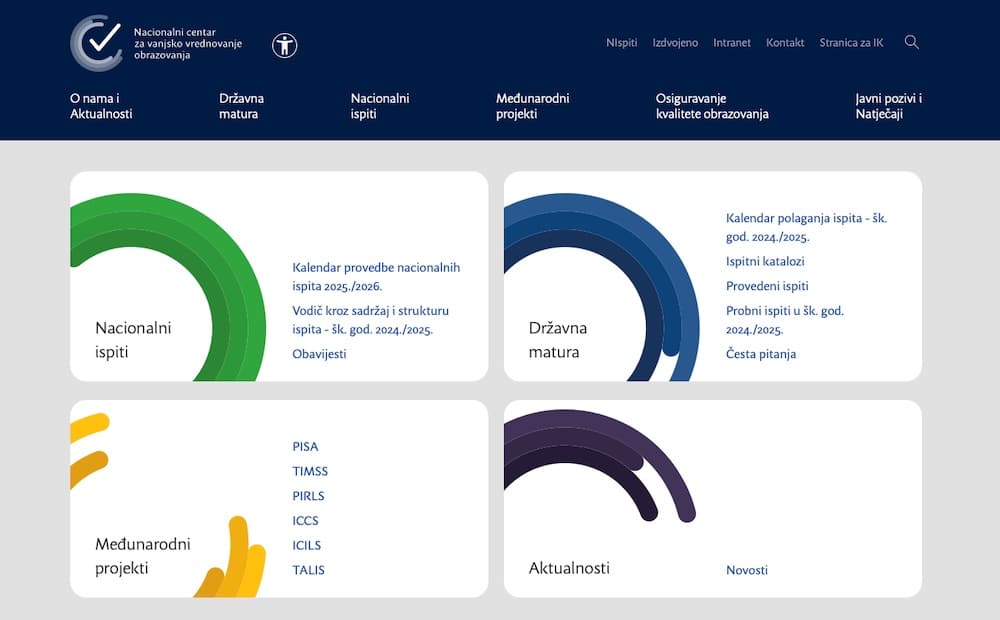
NCVVO, the Croatian National Center for External Evaluation of Education, needed a hosting provider that could support high-traffic periods during national exams. Prior to Kinsta, they struggled with stability issues and slow back-end performance.
After migrating, their WordPress admin became ten times faster, allowing staff to publish and manage content with ease. They also recorded an error-free month of intensive updates, showing a 0 percent rate of HTTP 500 errors. Public-facing sites improved as well, with faster page load times delivering a more stable experience for students and educators during peak demand.
Summary
Benchmarking shows that Kinsta’s managed hosting for WordPress consistently outperforms DIY VPS setups in speed, reliability, and scalability.
What makes Kinsta especially valuable for developer-led teams is that none of the expected control is lost. You still get the same command-line access, staging environments, and advanced tools you’d use on a VPS, but without the time sink of patching, monitoring, and firefighting server issues.
For agencies managing multiple complex sites, the advantage is clear: Kinsta delivers high performance and developer freedom while removing infrastructure headaches. Now’s a great time to consider WordPress agency hosting for your client sites.

Kinsta
Senior Editor at Kinsta, WordPress Web Developer, and Content Writer. Outside of all things WordPress, I enjoy the beach, golf, and movies. I also have tall people problems.


