


Black Friday is one of the busiest shopping weekends of the year for WooCommerce stores. It’s also one of the most stressful. A sudden wave of shoppers can push your site to its limits, causing slow load times, errors at checkout, and even complete downtime.
Instead of locking yourself into a more expensive hosting plan just to cover a few high-traffic days, you can temporarily scale up your site’s power by increasing PHP threads and memory with Kinsta’s PHP performance add-on.
This ensures your store can handle more simultaneous requests, keep plugins running smoothly, and prevent checkout bottlenecks when traffic surges.
In this guide, we examine why Black Friday traffic can overwhelm WooCommerce sites, how the PHP performance add-on addresses these issues, and the steps to get it running smoothly in MyKinsta.
Why Black Friday traffic causes downtime
When a WooCommerce store experiences a surge of visitors, two key resources are usually the first to run out: PHP threads and memory.
PHP thread limits
Think of each PHP thread as a checkout lane. Every thread can only process one request at a time, whether that’s adding a product to the cart, running a plugin function, or completing payment.
If you don’t have enough threads to handle the sudden spike in activity, requests pile up. That leads to long wait times, stuck checkouts, and frustrated shoppers.
Memory limits
Themes, plugins, and third-party integrations all consume memory. Under heavy traffic, that usage balloons. Once your site maxes out its available memory, pages slow to a crawl, requests time out, and in the worst cases, the site crashes.
When these memory limits are reached, the problems are hard to miss:
And while the traffic surge only lasts a few days, the damage can linger. Slow or broken checkouts cost immediate revenue and leave a bad impression that can hurt long-term customer loyalty.
The upside here is you don’t need to permanently upgrade your hosting plan just to survive Black Friday. Temporary scaling allows you to expand PHP threads and memory only when it really matters.
A smarter way to handle holiday traffic surges
Instead of overspending on a bigger hosting plan you don’t really need, Kinsta’s PHP performance add-on gives you a smarter, more flexible way to scale. It’s designed for moments like Black Friday, when a sudden surge in traffic can push your WooCommerce store to the edge.
Here’s why it works so well:
- Scales PHP threads and memory on demand. With just a few clicks in MyKinsta, you can increase the number of PHP threads to handle more simultaneous requests and raise memory limits to keep plugins and dynamic features running smoothly under load.
- Activate it only when needed. The add-on can be activated only for the Black Friday weekend or any other sales event, and then rolled back once traffic levels return to normal.
- Pay only for what you use. Because billing is prorated, you only pay for the time the add-on is active. That means no long-term plan upgrades, no wasted resources, and no surprise costs after the sale ends.
This performance add-on lets you match your hosting power to your busiest shopping days without committing to a permanent change. It’s a fast and affordable way to keep your WooCommerce store stable when demand increases suddenly.
How to turn on the add-on in MyKinsta (step-by-step)
Activating the PHP performance add-on is straightforward. You don’t need to make complicated server settings adjustments or wait for support to assist. It’s all handled inside your MyKinsta dashboard.
Here’s how to do it.
Step 1: Log in to MyKinsta
After signing in, head to your dashboard. You should see a list of the sites you currently host with Kinsta.
Step 2: Select your site
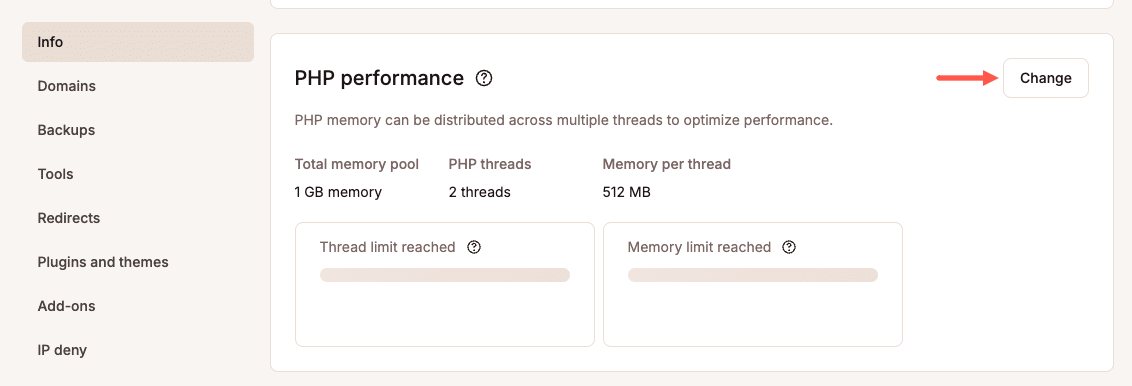
Select the appropriate site, then click Info > PHP performance. Next, click Change on the right-hand side of the screen:
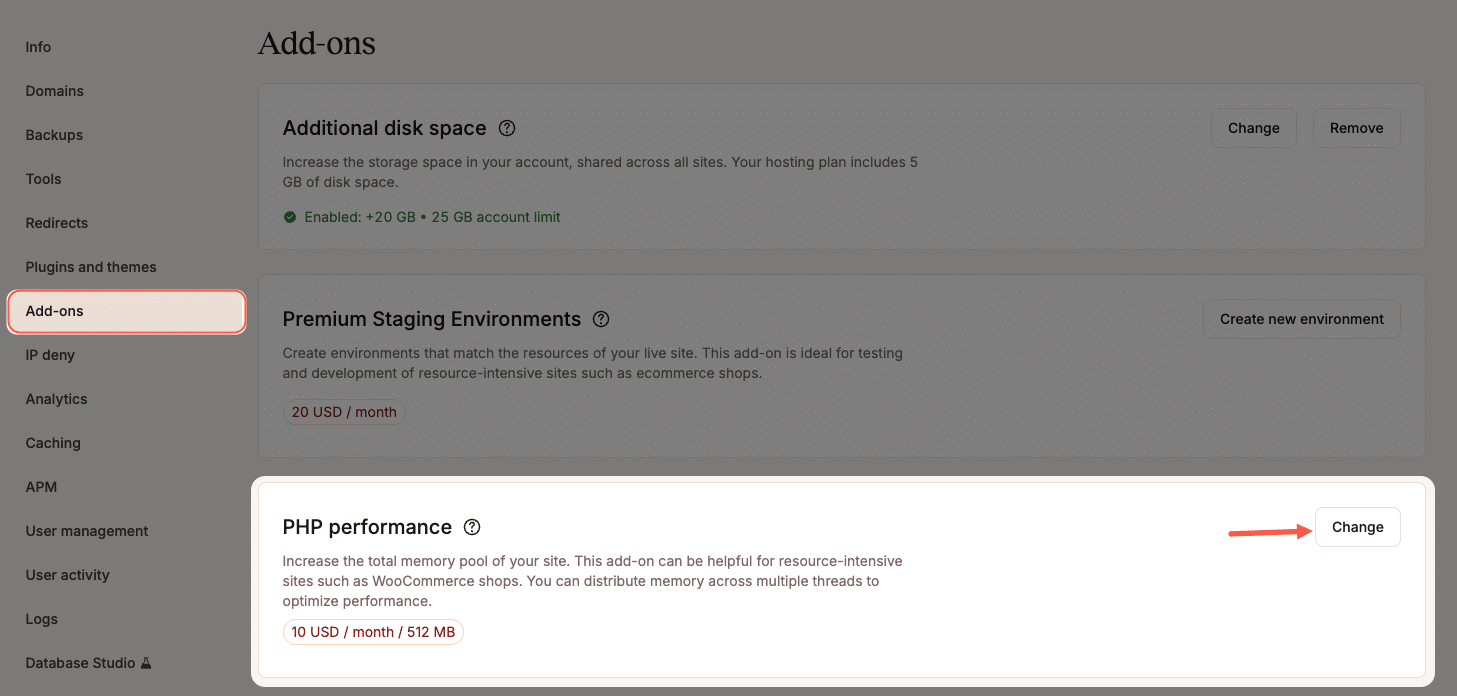
Alternatively, you can go to Add-ons and click “Change” next to PHP performance.
In either case, you can then upgrade your performance settings.
Step 3: Adjust threads and memory
Inside the add-on settings, you’ll see controls to increase PHP threads and memory. Use these sliders to set the right balance for your expected traffic.
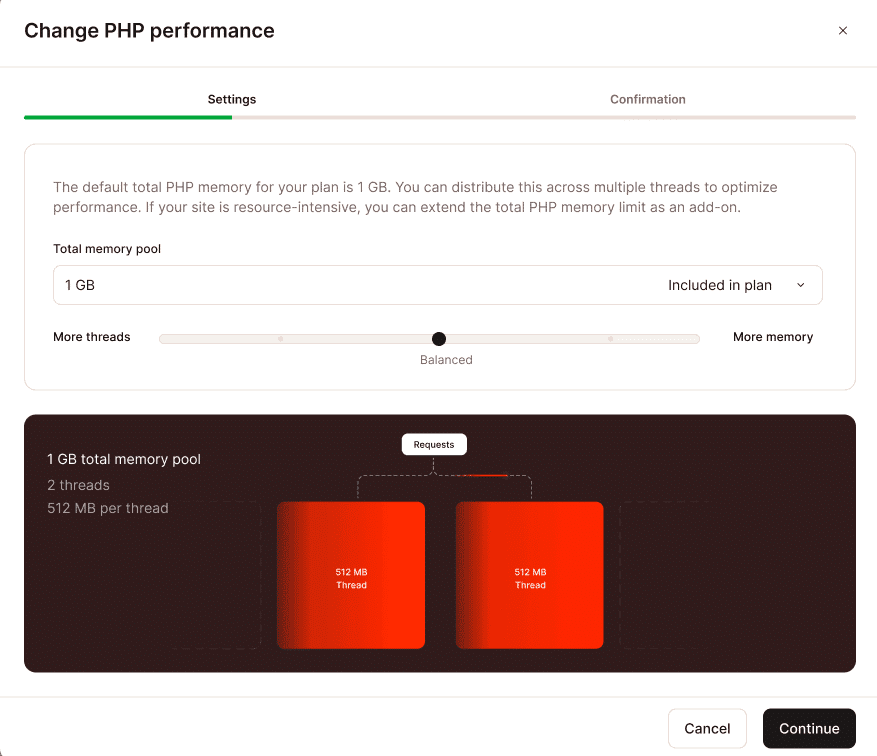
For a detailed breakdown of how threads and memory are distributed across different pool sizes, refer to our documentation.
Step 4: Save and confirm changes
Click Continue, and the adjustments take effect almost immediately. There’s no downtime while scaling up.
Step 5: Roll back after the sale
Once the Black Friday rush is over, return to the same settings and remove the add-on. Your site will revert to its normal resource levels, and billing will cease immediately.

The entire process takes just a few minutes, providing you with the flexibility to prepare for heavy traffic without complicating your hosting setup or incurring unnecessary expenses.
What this looks like in a WooCommerce store
Picture a WooCommerce shop that normally processes 50 orders per hour on a steady day. When Black Friday hits, that number can easily triple. Or more! Suddenly, you’ve got hundreds of people browsing products, adding items to their carts, and trying to check out at the same time.
Without scaling prior to the surge in traffic, this store is likely to experience:
- PHP threads max out. Every new checkout request has to wait its turn, creating a backlog that feels like standing in line at the register.
- Pages crawl or stall. As requests pile up, customers see slow load times or gateway timeouts.
- Errors appear. 500 errors or frozen checkout forms disrupt the flow, leaving shoppers uncertain whether their order has gone through.
- Sales slip away. Frustrated buyers abandon carts and head to competitors, leaving revenue on the table.
With scaling, the outcome will be much different:
- Additional PHP threads absorb the surge. More checkout requests are processed simultaneously, so the “line” keeps moving.
- Memory increases keep things stable. Even with multiple plugins for features such as payment gateways, shipping calculators, and loyalty programs all running simultaneously, the site doesn’t run out of resources.
- The checkout experience stays smooth. Customers can move from the product page to payment confirmation without delays or interruptions.
- Revenue climbs instead of slipping. More orders are completed successfully, and shoppers leave with a positive experience they’ll remember.
The result is night and day. Instead of worrying about downtime or errors, store owners can focus on fulfilling orders and making the most of the biggest sales weekend of the year.
In one of our case studies, DARTdrones, a Kinsta WooCommerce customer, experienced a massive traffic spike after appearing on Shark Tank. Their site served over 1 million pageviews in just six hours and generated $300,000 in revenue without a single minute of downtime. By scaling PHP threads and optimizing their infrastructure on Kinsta, they reduced page load times by 50% and maintained a smooth checkout process even under extreme pressure.
This is exactly the kind of resilience the PHP performance add-on brings to Black Friday. It enables your WooCommerce store to handle sudden demand without compromising speed, reliability, or sales.
Summary
Black Friday brings in the kind of traffic that can overwhelm even well-optimized WooCommerce stores. When PHP threads and memory reach their limits, customers encounter errors, slow load times, and stalled checkouts. All of these unfortunate factors translate into lost sales.
The Kinsta PHP performance add-on takes the stress out of preparing for peak demand. Since it lets you temporarily boost threads and memory, it keeps your site responsive when it matters most. You can activate it for just the weekend, pay only for what you use, and roll back when traffic returns to normal.
Don’t let downtime eat into your biggest sales opportunity of the year. Stay prepared, stay fast, and keep every checkout running smoothly.
Start scaling with the Kinsta PHP performance add-on today and head into Black Friday with confidence.

Kinsta
Senior Editor at Kinsta, WordPress Web Developer, and Content Writer. Outside of all things WordPress, I enjoy the beach, golf, and movies. I also have tall people problems.


