


Making text look good on every screen isn’t as simple as it sounds. For a long time, web designers used media query breakpoints to resize fonts, but this approach quickly becomes messy as more devices and screen sizes emerge.
Starting with WordPress 6.1 (released in November 2022), there’s now a better way: fluid typography. It automatically adjusts font sizes defined in your theme.json file so they scale smoothly, regardless of the screen’s width or height.
This feature doesn’t just change font size, but it also fine-tunes line height, word spacing, and even white space, making your design more consistent, readable, and accessible across every device.
This article explains how fluid typography works, its differences from traditional breakpoints, and how to implement it in WordPress using theme.json and CSS.
But first, let’s look at how we used to handle typography, and why fluid typography is such a big improvement.
Breakpoint typography vs. fluid typography
A good way to understand fluid typography is by comparing it to its predecessor, breakpoint typography, which uses media queries that target specific device widths for font sizing.
Breakpoint typography
Typically, breakpoints are specific ranges of viewport widths, usually defined in pixels. A common approach is to set three main breakpoints that target mobile, laptop, and desktop screens.
Here are typical breakpoint settings for laptops in a CSS file:
@media (min-width: 48em) and (max-width: 74.9375em) {
  body {
    font-size: 1.125rem;
    line-height: 1.6;
  }
  h1 {
    font-size: 2rem;
  }
}
While this works, it has a major drawback: as new devices and screen sizes appear, managing all these breakpoints quickly becomes unsustainable.
In the example GIF above, as the viewport shrinks, the text resizes in uneven jumps. This “stepping” behavior often leads to awkward or unpredictable scaling, which is not ideal for smooth, consistent typography.
Fluid typography
With the introduction of the CSS clamp() property in 2019, along with viewport units (vw and vh), seamless and automatic scaling became possible.
These let you define font sizes that scale dynamically based on the viewport’s dimensions, eliminating the need for multiple breakpoints.
Here’s an example for a medium font size using clamp():
.has-medium-font-size {
  font-size: clamp(1rem, 1rem + 0.5vw, 1.25rem);
}
We’ll take a closer look at how clamp() works later, but for now, think of it as a formula that sets minimum, preferred, and maximum font sizes, ensuring text scales smoothly across screens.
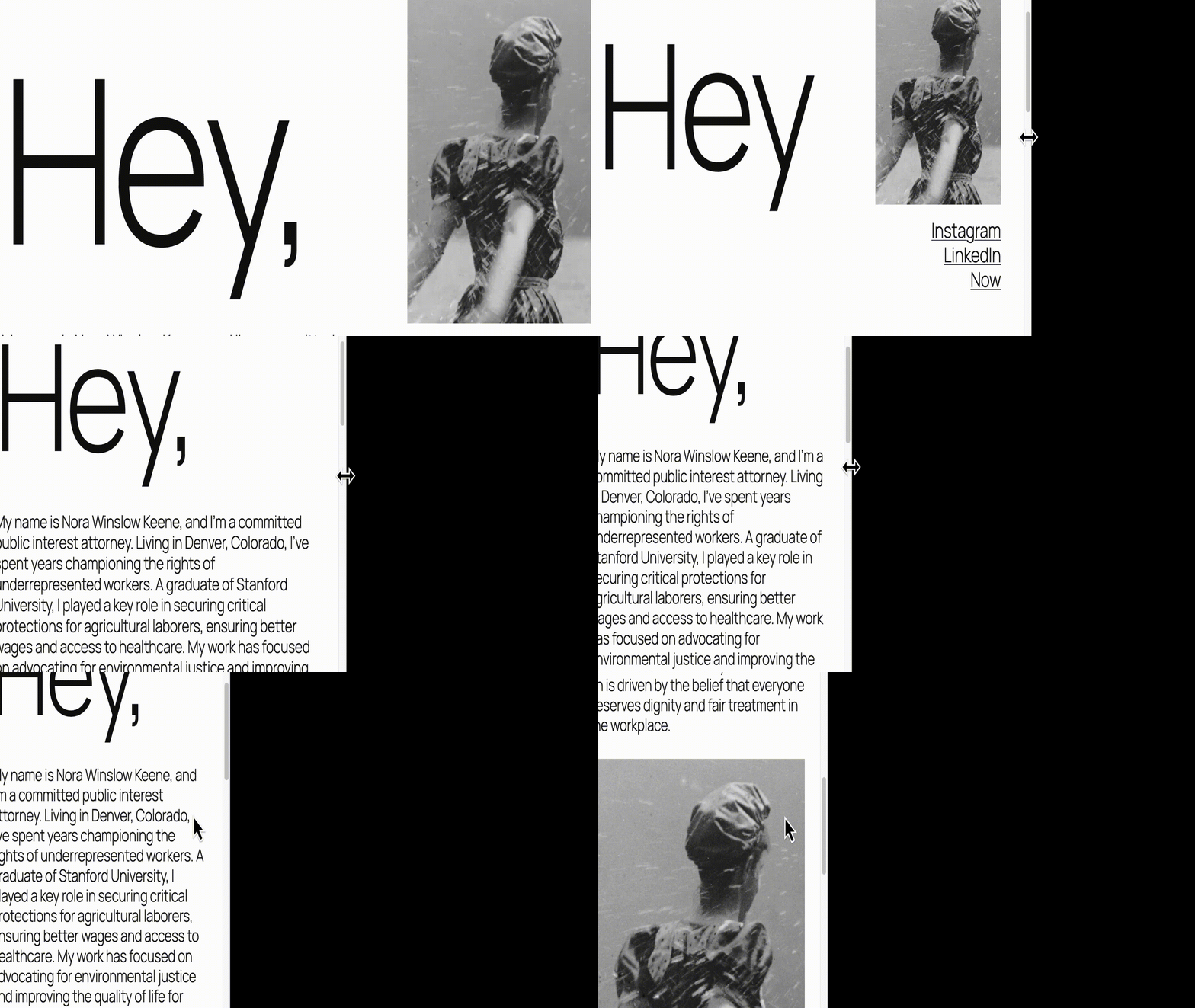
In this GIF, as the viewport narrows, the text adjusts fluidly. There are no jumps or sudden size changes.
This smooth behavior is what makes fluid typography such a leap forward from breakpoint-based design. Instead of adjusting text in steps, it allows for seamless scaling that feels natural across every device.
But smooth resizing is just the start. Fluid typography offers several other advantages that make it easier to build flexible, consistent, and accessible designs.
The case for fluid typography
As you work with fluid typography, the following benefits will become apparent.
Responsive by default
Text automatically scales with the viewport, eliminating the need for breakpoints. Whether your site is viewed on a phone, tablet, or ultra-wide monitor, font sizes adjust naturally without extra CSS.
Easier to maintain
Without the need for multiple media queries, your code stays simple and readable. You can define font sizes using a simple “T-shirt” scale, ranging from small to extra-large, and apply them consistently across your theme.
Consistent design
Ensure your font sizes remain consistent across the entire site, both globally and within individual blocks as needed. Define your scale once, and it flows seamlessly through all blocks, patterns, and templates.
Improved accessibility and readability
Because fluid typography scales smoothly, text always appears at a readable size for each device. This makes your content more accessible, especially for users with vision preferences or custom browser zoom levels.
Future-proof design
Since text size is no longer tied to artificial breakpoints, your type scale is guaranteed to work with any future screen size and viewport.
Control over scaling speed
The ability to control the speed at which text grows or shrinks is set by a preferred value that changes with a viewport’s width.
Browser support
The clamp() function is well-supported in all modern browsers, including the current versions of Chrome, Edge, Firefox, and Safari.
However, if you need 100% coverage, you’ll still want to include a fallback for legacy browsers such as Internet Explorer 11 and pre-2020 versions of Safari and Chrome.
Here’s how to do that:
/* Fallback (for IE11 and other old browsers) */
li {
  font-size: 1.25rem;
}

/* Preferred (modern browsers) */
li {
  font-size: clamp(1rem, 1rem + 0.5vw, 1.5rem);
}How fluid typography works
At the heart of fluid typography are three settings: minimum size, maximum size, and a preferred size, which is a sliding scale between the minimum and maximum values, determined by the width of the viewport.
The clamp() function uses these three values in a single declaration:
font-size: clamp(min, preferred, max);This ensures text never becomes too small on small screens or too large on wide ones. For example:
font-size: clamp(1rem, 1rem + 0.5vw, 1.25rem);In this example, the font size starts at 1rem, grows smoothly as the viewport expands, and stops increasing at 1.25rem.
How WordPress handles it
WordPress does the heavy lifting for you. Instead of manually calculating these values, you can define your font sizes directly in theme.json.
Here’s a simplified example of how WordPress represents a font size in JSON:
{
  "fluid": {
    "min": "1rem",
    "max": "1.25rem"
  },
  "name": "Medium",
  "size": "1.125rem",
  "slug": "medium"
}
From this, WordPress automatically generates the CSS:
font-size: clamp(1rem, 1rem + 0.5vw, 1.25rem);This makes implementing fluid typography fast, consistent, and error-free. You just define your values once in theme.json, and WordPress handles the math.
Common terms
Before moving on, let’s revisit a few key units used in fluid typography. Each one scales relative to something else.
| Unit | Definition | Notes |
| em | Relative to the font size of its parent element. | Sizes compound through nesting. |
| rem | Relative to the root (html) element’s font size. | Scales consistently across the site. |
| vw | 1% of the viewport width. | Used for width-based scaling. |
| vh | 1% of the viewport height. | Used for height-based scaling. |
A few words about theme.json
theme.json is data-driven, so it generates CSS automatically rather than requiring manual writing.
As you would expect, WordPress core includes a theme.json file that sets baseline properties used by a block theme’s own theme.json file. This is the case with how WordPress implements fluid typography.
As with virtually every style property, these can be changed globally or on a per-block basis using a child theme, which we recommend for all customizations.
If you are not familiar with theme.json, we urge you to read our article, “Working with properties and key-value pairs in theme.json.”
How WordPress uses fluid typography in TT5 (Twenty Twenty Five)
When a block theme’s theme.json file includes the setting "fluid": true, WordPress automatically generates fluid typography rules using the CSS clamp() function. This is handled through a built-in algorithm that calculates smooth scaling for each font size.
{
  "settings": {
    "typography": {
      "fluid": true
    }
  }
}
If "fluid" is omitted, WordPress defaults to false, meaning text sizes remain fixed and do not scale fluidly.
With fluid typography enabled, TT5 defines five preset font sizes. Each includes minimum and maximum values that WordPress uses to generate the final CSS using the clamp() function.
| Size Name | Theme.json values | Generated CSS clamp values |
| small | size:0.875rem | clamp(0.875rem, 0.8125rem + 0.2vw, 1rem) |
| medium | min:1rem max: 1.125rem | clamp(1rem, 0.9375rem + 0.25vw, 1.125rem) |
| large | min:1.125rem max: 1.375rem | clamp(1.25rem, 1.125rem + 0.5vw, 1.5rem) |
| x-large | min:1.75rem max: 2rem | clamp(2.25rem, 1.75rem + 1.5vw, 3rem) |
| xx-large | min:2.15rem max: 3rem | clamp(3rem, 2.25rem + 2vw, 4rem) |
Practical examples
Now that we know how TT5 handles fluid type by default, let’s look at a few real-world scenarios where you might want to customize or extend it.
For these examples, we’ll use a TT5 child theme, and as always, make sure your scripts are properly enqueued.
Increase all font sizes by 25%
If your audience prefers larger text (for example, on accessibility-focused or senior-friendly sites), you might want to increase all font sizes globally.
Option 1 — Using theme.json
While there’s no single toggle to scale all fonts, you can manually increase each font size by 25 %. Here’s an example configuration:
"typography": {
  "fontSizes": [
    {
      "fluid": false,
      "name": "Small",
      "size": "1.09375rem",
      "slug": "small"
    },
    {
      "fluid": { "max": "1.40625rem", "min": "1.25rem" },
      "name": "Medium",
      "size": "1.25rem",
      "slug": "medium"
    },
    {
      "fluid": { "max": "1.71875rem", "min": "1.40625rem" },
      "name": "Large",
      "size": "1.725rem",
      "slug": "large"
    },
    {
      "fluid": { "max": "2.5rem", "min": "2.1875rem" },
      "name": "Extra Large",
      "size": "2.1875rem",
      "slug": "x-large"
    },
    {
      "fluid": { "max": "3.75rem", "min": "2.6875rem" },
      "name": "Extra Extra Large",
      "size": "2.6875rem",
      "slug": "xx-large"
    }
  ]
}
This follows TT5’s pattern: the small size remains fixed, while the other sizes scale smoothly.
Behind the scenes, WordPress still calculates the preferred (fluid) value between each min and max.
Option 2 — Using style.css
Alternatively, you can scale everything globally with a single line in your stylesheet:
:root {
  font-size: 125%;
}
This increases the root font size by 25 %, effectively scaling all elements that use rem units.
Custom fluid typeface for a single block
You can also apply fluid sizing selectively.
For example, to make all list items (core/list) use the medium size instead of the default large, add the following to your theme.json:
"styles": {
  "blocks": {
    "core/list": {
      "typography": {
        "fontSize": "var:preset|font-size|medium"
      }
    }
  }
}
The result is a cleaner hierarchy, where list items display slightly smaller text than paragraphs.

Setting fluid typography in style.css
If you’re working with a classic theme, you’ll define your own clamp() values directly in style.css.
For instance, here’s how you could increase list items by 125 % of the large font size:
li {
  font-size: clamp(1.725rem, 1.725rem + 0.17vw, 1.71875rem) !important;
}
This displays a larger font size for list items set in the CSS file. As you would expect, if you are working with a classic theme, you will need to use the clamp() property in your styles.css file.
Fluid spacing
Typeface is but one factor to consider when using fluid typography.
The dimensions of padding, margin, and block gaps (the space inside a group block) can also scale smoothly by using the same concepts set forth with fluid typeface.
TT5 uses these settings to establish space sizes.
"spacing": {
  "defaultSpacingSizes": false,
  "spacingSizes": [
    { "name": "Tiny", "size": "10px", "slug": "20" },
    { "name": "X-Small", "size": "20px", "slug": "30" },
    { "name": "Small", "size": "30px", "slug": "40" },
    { "name": "Regular", "size": "clamp(30px, 5vw, 50px)", "slug": "50" },
    { "name": "Large", "size": "clamp(30px, 7vw, 70px)", "slug": "60" },
    { "name": "X-Large", "size": "clamp(50px, 7vw, 90px)", "slug": "70" },
    { "name": "XX-Large", "size": "clamp(70px, 10vw, 140px)", "slug": "80" }
  ]
}
The first three sizes (tiny, x-small, small) are fixed, while the larger ones scale fluidly using clamp().
This ensures that not only your text but also your layout spacing adapts elegantly to different screen sizes.
Summary
Breakpoint and fluid typography serve different purposes. When used together, they create forward-compatible layouts that scale smoothly across screens, delivering consistent and readable experiences for everyone.
If you’d rather not do the math by hand, several free tools can help you fine-tune and visualize your values:
These make it simple to generate clamp() values that align with your design scale, especially useful for classic theme development.
Ready to see it in production? Host your WordPress site on Kinsta for fast TTFB, built-in CDN, and edge caching, so your fluid type looks (and loads) great everywhere. Start free for your first month.

Bud Kraus has been working with WordPress as an in-class and online instructor, site developer, and content creator since 2009. He has produced instructional videos and written many articles for WordPress businesses.


