


WP Rocket is the most widely recommended WordPress caching plugin, running server-side, highly configurable, and trusted by over 3 million sites. FastPixel is a newer cloud-based alternative from the ShortPixel team that bundles caching, CDN, Critical CSS, and image optimisation into one plugin, with no server resources required and a free plan available.
If you’re here today looking for deep control over your caching configuration, WP Rocket is the established choice. But if you want the full performance stack handled automatically from the cloud, FastPixel is the more direct route you’ll want to take on.
The difference between them isn’t really about which produces better results. In truth, from our own experience, both will improve your site’s performance. It’s more about where the processing happens, what’s included out of the box, and how much you want to configure.
By the end of this comparison, you’ll understand exactly where each plugin excels and which one makes more sense for your site.
Comparing FastPixel and WP Rocket
Before getting into the detail, here’s how the two plugins compare across the key criteria. Keep reading for the full breakdown.
| Feature | FastPixel | WP Rocket |
|---|---|---|
| Approach | Cloud-based | Server-side (local) |
| Server resources used | No | Yes |
| Caching | Yes | Yes |
| CDN delivery | Yes (included) | Optional (RocketCDN, $8.99/month) |
| Critical CSS | Yes (per page, automatic) | Yes (automatic) |
| JS/CSS minification | Yes | Yes |
| Image optimization | Yes (ShortPixel technology, built-in) | Requires Imagify (separate plugin) |
| WebP conversion | Yes | Via Imagify (separate plugin) |
| Object Cache | Yes | No |
| Cloudflare integration | Yes | Yes |
| WooCommerce compatible | Yes | Yes |
| Configuration required | Minimal (preset selection) | Moderate (manual settings) |
| Free plan | Yes (1,000 pageviews/month) | No |
| Paid plans | From $10/month | From $59/year |
FastPixel Overview
FastPixel is a cloud-based performance plugin built by the team behind ShortPixel. Rather than running optimisation tasks on your hosting server like most optimization plugins do, it processes everything on FastPixel’s own infrastructure and delivers the result to your visitors via CDN.
The plugin itself is available from the WordPress repository with a limited free plan, and all the heavy lifting happens off-site.
What FastPixel Includes and Handles Automatically
FastPixel is designed to replace the stack of separate plugins most WordPress sites end up with. From a single installation, it covers:
- Page caching with smart cache warmup, so visitors don’t hit a cold cache
- Critical CSS generated per page, not from a global template
- JS, CSS, and HTML minification delivered via CDN
- Image optimisation using ShortPixel’s compression engine, with automatic WebP conversion
- Lazy loading for images and iframes below the fold
- Font optimisation and DNS preconnects for third-party resources
- Object Cache for database query optimisation
- Cloudflare integration with automatic cache purging

None of this requires server access, modified configuration files, or changes to your hosting environment. The setup consists of a preset selection (Safe, Balanced, or Fast) and everything runs from there.
- Safe applies HTML and CSS optimisation with lossless image compression and no JavaScript changes, which minimises compatibility risk across your site.
- Balanced adds script optimisation and glossy image compression, taking things up a notch to give you better bang for your buck.
- Fast goes furthest, applying lossy compression, script deferral, and adaptive image resizing for the strongest performance gains.

FastPixel Pricing Plans
FastPixel’s free plan covers up to 1,000 pageviews per month on a single site, which is enough to test the plugin properly before committing long-term. The paid plans are then structured around pageview volume rather than site count:
- Plan A: $10/month ($100/year) for 300,000 pageviews/month, supporting 3 sites.
- Plan B: $30/month ($300/year) for 2,000,000 pageviews/month, supporting 50 sites.
- Plan C: $50/month ($500/year) for 5,000,000 pageviews/month, supporting unlimited sites, and with personalized migration assistance included.
All FastPixel premium plans include the full feature set, image optimisation, and unmetered CDN traffic. There’s no feature gating between tiers as we see with many other plugins, so you’re essentially paying for pageview capacity, not capability.
FastPixel: Where It Falls Short
If we had to look at one criticism of FastPixel, it’s that their page-view-based pricing model can be harder to predict for sites with variable traffic. The free plan’s 1,000 page-view limit is a little restrictive too, but it’s enough for a low-traffic site or testing purposes, which is only fair given the value provided by the plugin.
As a newer solution in this space, it also doesn’t yet have the same depth of community resources, tutorials, and hosting-specific documentation that WP Rocket has built up over a decade, but it’s working its way there.
WP Rocket Overview

WP Rocket has been the go-to recommendation for WordPress performance since its launch in 2013. It’s a premium plugin sold directly from their website and isn’t available on the WordPress repository. That being said, the WP Rocket team claims it’s trusted by over 3,000,000 websites, which is no small feat.
What WP Rocket Includes Out of the Box
In a nutshell, WP Rocket is a server-side caching plugin with a broad feature set. It runs on your own server and creates cached versions of your pages, reducing the processing load on each request. It includes:
- Page caching with automatic cache preloading
- JS and CSS file optimisation, including minification, deferral, delay, and removal of unused CSS
- HTML minification
- Lazy loading for images, iframes, and videos
- Critical CSS generation
- Database cleanup and optimisation
- Link preloading for faster perceived navigation
- Cloudflare integration
- CDN support via RocketCDN (optional add-on)
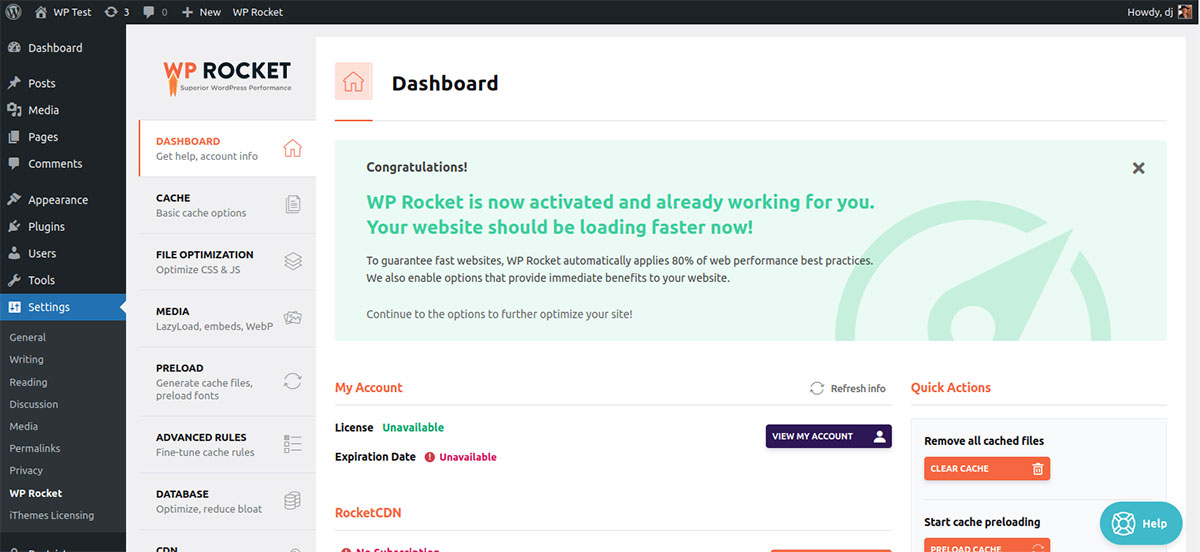
What WP Rocket doesn’t include out of the box is image optimisation or WebP conversion — those require Imagify, which is a separate plugin from the same company. We’ve covered how Imagify compares to ShortPixel (a sister-product to FastPixel) if you want a full breakdown of what it does.
WP Rocket Pricing Plans
WP Rocket has no free plan and no trial period, though it offers a 14-day money-back guarantee on all its premium plans. Those plans are priced annually by site count, so again, the decision at checkout is quite simple since every tier includes all the features on offer:
- Single: $59/year for 1 website
- Plus: $119/year for 3 websites
- Multi: $299/year for 50 websites
Apart from Imagify being a separate plugin if you want WebP conversion, it’s also worth consdiring that RocketCDN, the optional CDN add-on, is priced separately at an additional $8.99/month.
WP Rocket: What’s Not Included
WP Rocket’s biggest limitation is what it doesn’t include. As I’ve just explained above, CDN delivery and image optimisation both require additional setup and additional cost. For a site that needs the full performance stack, the total cost of WP Rocket plus add-ons can exceed FastPixel’s equivalent plan.
It also runs on your server, which means it’s less of a natural fit for shared hosting setups where resources are already limited.
FastPixel vs WP Rocket: Head-to-Head Comparison
Setup and Configuration: FastPixel vs WP Rocket
FastPixel’s setup is as close to one-click as a performance plugin gets. You install it, connect your account, choose a preset, and it’s running. There are settings to adjust if you need to, but the preset handles the decisions that would otherwise require testing and judgment.
WP Rocket is also considered easy to use by performance plugin standards, and its default settings apply around 80% of recommended optimisations automatically. That said, getting the most out of it by configuring CDN integration, tuning the CSS optimisation, and installing another plugin for WebP conversion requires more work. It rewards the time investment in the end, but it does require one.
Server Resources: FastPixel vs WP Rocket
This is where the two plugins are most fundamentally different. WP Rocket runs on your server, meaning cache generation, minification, and all optimisation tasks consume your hosting resources. On shared hosting or resource-limited environments, this can hit a ceiling quite quickly.
FastPixel offloads all of that processing to its own cloud infrastructure. Your server receives an already-optimised page and serves it, so the processing load on your hosting is minimal regardless of what FastPixel is doing in the background. For sites on shared hosting, this is a significant practical advantage.

CDN Delivery: FastPixel vs WP Rocket
FastPixel includes CDN delivery from bunny.net’s global network in every plan, including the free one. There’s no additional cost, no additional setup, and no separate account to manage.
WP Rocket’s CDN option is RocketCDN, an optional add-on at $8.99/month. It needs to be enabled separately and adds to the total cost of the WP Rocket stack.
Image Optimisation: FastPixel vs WP Rocket
FastPixel handles image optimisation and WebP conversion automatically using ShortPixel’s compression engine. It’s part of the same plugin, enabled by default, and requires nothing extra, so you don’t even need to think about it.

On the contrary, WP Rocket doesn’t include image optimisation. Imagify, the plugin from WP Media (the same parent company), handles this and integrates naturally with WP Rocket. It’s a clean integration, but it’s a separate plugin with its own pricing and account.
If you want to go deeper on image compression specifically, including bulk processing your existing media library, AVIF conversion, and compression mode selection, our image optimisation tips guide covers that in detail alongside ShortPixel, which powers FastPixel’s image engine.
Core Web Vitals: FastPixel vs WP Rocket
FastPixel is explicitly built around Core Web Vitals. The Critical CSS generation runs per page rather than from a global template, which is what actually moves LCP scores on sites with varied page layouts. Object Cache reduces database query times, which affects INP, and every other feature in the plugin exists in direct relationship to a Core Web Vitals metric.
WP Rocket, on the other hand, improves Core Web Vitals as a byproduct of its broader caching and optimisation work. The results are strong for most sites, but the plugin’s primary model is caching rather than metric-specific optimisation.
Pricing: FastPixel vs WP Rocket
Below is a quick comparison of the total annual cost for each setup, given different scenarios:
| Scenario | FastPixel | WP Rocket |
|---|---|---|
| 1 site, < 1,000 page-views/month | Free | $59/year |
| 1 site, < 300,000 page-views/month | $99.96/year | $59/year |
| 1 site, < 300,000 page-views/month, with CDN | $99.96/year | $148.99/year ($59+ $89.99 for RocketCDN) |
| 1 site, < 300,000 page-views/month, with images | $99.96/year | $178.88/year ($59+ $119.88 for Imagify) |
| 1 site, < 2,000,000 page-views/month, full stack | $300/year | $268.87/year ($59 + $89.99 + $119.88) |
| 5 sites, < 2,000,000 page-views/month, full stack | $300/year | $868.83/year ($299 + ($89.99 x 5) + $119.88) |
For a small single site, FastPixel is the no-brainer starting point. When your site scales up and needs caching only with no CDN and no image optimisation, WP Rocket’s $59/year is straightforward value.
Once you add a CDN and image optimisation, FastPixel’s all-in pricing takes the cake in practically every scenario. It’s more cost-effective as the number of sites ramps up, so for agencies and developers with multiple sites, it’s the obvious choice financially.
User Reviews: FastPixel vs WP Rocket
WP Rocket has a great track record with a 4.5/5 rating on TrustPilot. Over a decade of development, 3,000,000+ sites, and extensive community resources, third-party testing, and hosting-specific documentation make it one of the most battle-tested plugins in the WordPress ecosystem.

FastPixel is newer and has a smaller install base, though reviews consistently highlight its simplicity and the quality of its support team. Users switching from established plugins frequently cite performance score improvements on the first try without configuration. The ShortPixel team’s track record gives it credibility that most newer plugins don’t start with, currently having a 4.8/5 rating on the WordPress repository.

FastPixel or WP Rocket: Which One Fits Your Site?
If you want the full performance stack with caching, CDN, Critical CSS, and image optimisation all handled automatically from the cloud without installing separate plugins or working through configuration decisions, FastPixel is the more direct choice.
It’s particularly well suited to sites on shared hosting, non-technical users who want results without the learning curve, and agencies that need consistent performance across multiple sites without per-site setup work.
WP Rocket makes more sense if you already have Imagify handling your images and RocketCDN set up, and what you actually want is granular control over your caching configuration.
It’s also the lower-risk option for complex or heavily customised sites where predictability and an extensive support community matter more than out-of-the-box simplicity.
The Bottom Line on FastPixel and WP Rocket
WP Rocket is excellent at what it does, and its reputation is deserved. The case for FastPixel isn’t that WP Rocket is flawed — it’s that the cloud-based model suits a broader range of hosting environments and removes the add-on complexity that comes with building out a complete WP Rocket stack.
For most WordPress sites looking for the shortest path to green Core Web Vitals and genuinely better performance, FastPixel is the more direct route. If you’re ready to get started, the FastPixel setup guide walks through the full process from installation to verifying your scores in PageSpeed Insights.
How are you currently handling performance on your WordPress sites? Are you using a single plugin or a stack of tools? It would be interesting to hear what’s working for your setup.


