


Want your recipes to stand out in search results with photos, star ratings, and cook times? The secret isn’t better photography or more keywords; it’s using the right recipe template for WordPress.
Using a WordPress recipe block automatically adds the “hidden code” (schema) that Google needs to display these rich features.
In this guide, I’ll explain why this recipe block is essential for your success and how to set it up easily with All in One SEO.
In This Article
What Is a WordPress Recipe Block?
A WordPress recipe block is a tool inside your WordPress editor designed specifically for showcasing recipes.
Instead of typing your ingredients and instructions into a regular paragraph, you enter them into specific fields, like:
- Prep Time
- Cook Time
- Ingredients
- Instructions
This organizes your recipe details into a visually appealing WordPress recipe card that readers love.
The best WordPress recipe blocks will also add recipe schema markup behind the scenes. This code translates your recipe into a language search engines can understand, telling Google explicitly, “This is a recipe, here is how long it takes, and here is a picture of the final dish.”
Ultimately, implementing schema markup can help you get recipe snippets in search engine results pages (SERPs). These enhanced search listings show customer reviews, photos, and recipe details right in Google search results, increasing your click-through rate (CTR).
The 3 Big Risks of Not Using a Recipe Block
You might be thinking, “My recipe looks fine just typed out in the editor. Why do I need a special block?”
The truth is, a recipe block isn’t just about design—it’s about data. By skipping it, you are taking major risks that can hold your blog back.
Risk 1: You Miss Out on Rich Snippets
This is the biggest one.
That recipe snippet I just showed you? Well, you have a much higher chance of getting them when you use recipe schema. And unless you want to add it to your site manually (using JSON-LD code), a recipe block is the easiest way to implement it.
Without one, your result looks like a plain blue link, which gets far fewer clicks.
Risk 2: A Poor User Experience
Readers have expectations. They want to see a clear, organized WordPress recipe card in your post. Sometimes users don’t have the time or simply don’t want to your entire article.
Plain text forces them to scroll and hunt for ingredients, which is frustrating on a mobile phone while cooking.
Risk 3: You’re Invisible to Smart Devices
More people than ever are using smart displays (like Google Nest Hub) or voice assistants in the kitchen. These devices rely entirely on structured data to read recipes aloud or display them step-by-step.
If you don’t use a recipe block, your content effectively doesn’t exist for these users.
Why You Should Trust Me
I’ve worked with food bloggers over the years to help them improve their traffic and site performance. I’ve seen firsthand how switching from plain text to a proper recipe block can skyrocket a site’s visibility in search results.
I also know that technical terms like “schema markup” can be intimidating. (It was for me too, when I first got into SEO.)
My goal is to handle those technical details for you, explaining why they matter and giving you a simple, non-technical way to implement them so you can focus on cooking and growing your readership.
What Is the AIOSEO Recipe Block? (And Why I Recommend It)
Now that you know why you need one, let me introduce you to the best tool for the job: the AIOSEO Recipe Block.

While there are many standalone recipe plugins out there, the AIOSEO block is different because it’s built directly into your complete SEO toolkit.
As the name suggests, All in One SEO (AIOSEO) is a comprehensive and beginner-friendly WordPress SEO plugin. Its Schema Generator has over 20 schema types, including recipe.
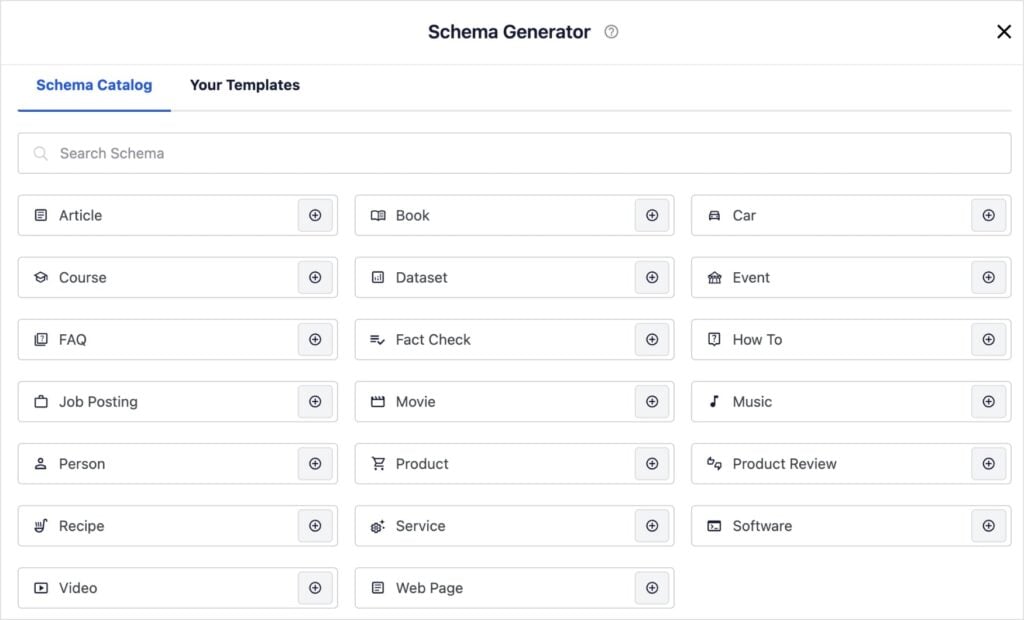
Here’s why it’s the smartest choice for food bloggers:
- Automatic Schema Markup: You don’t need to know JSON-LD or touch a single line of code. The block automatically adds all the complex schema data Google needs behind the scenes.
- Beautiful, Professional Design: It instantly creates a clean, perfectly formatted recipe template for WordPress that looks great on any device.
- No Extra Plugins Required: Instead of slowing down your site with a heavy, separate recipe plugin that creates bloat, you get this feature built right into the lightweight AIOSEO plugin you’re already using for rankings.
It’s the simplest way to turn a regular post into a traffic-generating recipe page.
How to Add a Recipe Block on WordPress
Creating a professional recipe card is incredibly easy. Let’s walk through it step-by-step.
Step 1: Add the Recipe Block
Open the post where you want to add your recipe.
Inside the WordPress editor, click the plus (+) button to add a new block. Type “AIOSEO Recipe” in the search bar and click the block to add it to your page.

Step 2: Fill in the Tasty Details
You’ll see a clean form appear in your editor. Start by filling out the key details that appear at the top of the card:
- Name: The title of your dish.
- Description: A short, appetizing summary of what you’re making.
- Author: Your name (or the chef’s name).
- Ingredients: A list of what’s needed to make the dish.
- Image: Upload a high-quality photo of the finished dish. This is crucial for getting that image to show up in Google search results!
I highly recommend filling out all the fields in this General tab.
Step 3: Add Nutrition and Time Required
Now, click on the second tab: Nutrition.
Adding calories and serving sizes can help you rank for specific health-related searches (like “low calorie dinner”). You can also add serving size details.

Next, don’t skip the time fields! Google loves this data.
Click on the Time Required tab, and fill in the Prep Time (how long to chop/prepare) and Cook Time (how long on the stove/oven).

Step 4: Add Instructions and Images
Now for the meat of the recipe. Click on over to the Instructions tab and start writing out each step. They’re already numbered, so it’s easy to follow a logical order.
You can also add more steps by clicking Add Another Instruction at the bottom of the block (not pictured below).

What I love about this recipe block is that you can upload an image for every single step. Not all recipe blocks offer this, but it’s incredibly helpful for your readers.
A picture really is worth a thousand words when you’re trying to show exactly what “golden brown” looks like or the perfect consistency for a batter.
Step 5: Add Reviews and Ratings
Finally, click on the Reviews tab.
This is where the magic happens for your SEO. You can manually add a Rating Value (1-5 stars), Review Headline, and the Review Content itself.
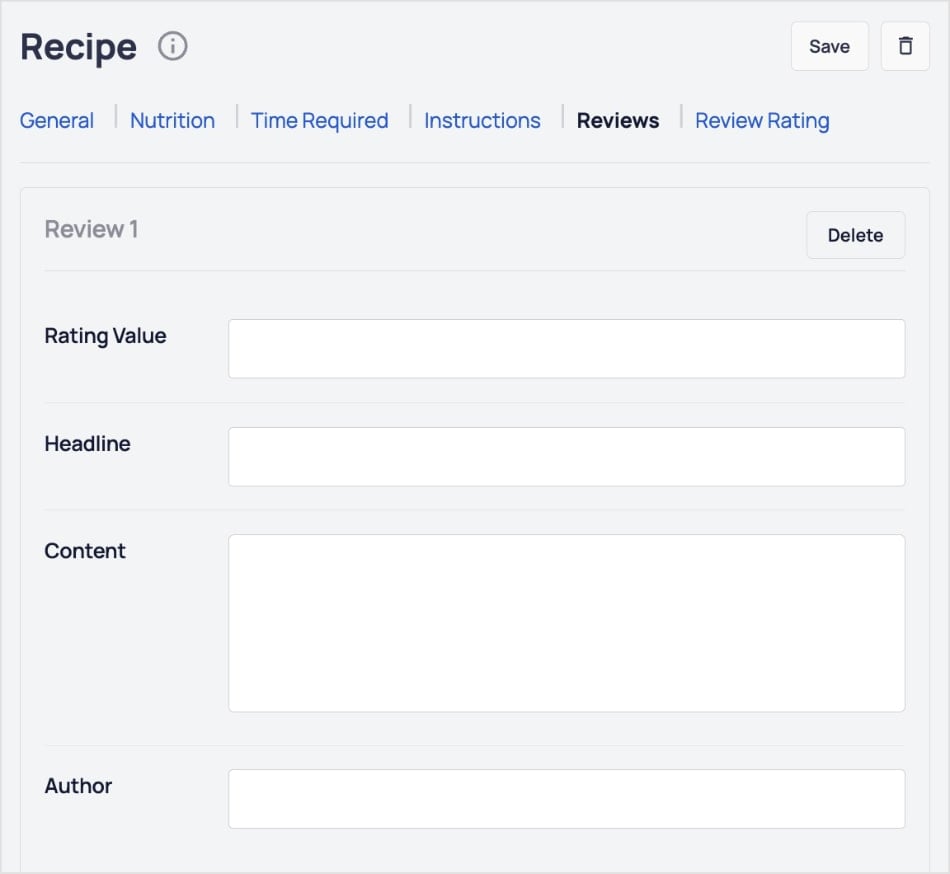
You can also include the Author to show users and search engines that these are real reviews from real people.
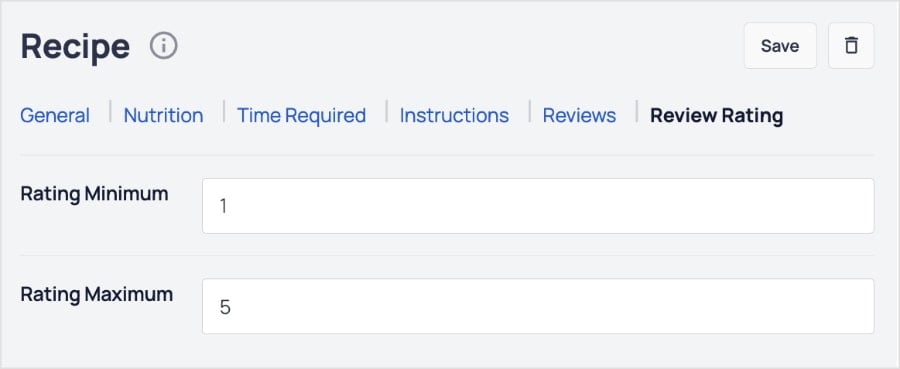
Pro Tip: If you want to change the rating scale, navigate to the Review Rating tab. I recommend leaving it as the default settings of 1 to 5, but you can customize it to your preferences.
And there you have it!
You’ve just created a stunning, SEO-optimized recipe card without touching a line of code.

Once you’re done, simply hit publish, and your beautiful, SEO-ready recipe post is live.
Recipe Blocks: The Secret Weapon of Successful Food Bloggers
A WordPress recipe block is a survival tool for modern food bloggers. It creates the beautiful, organized experience your readers expect while providing the crucial schema Google demands for ranking.
By using the AIOSEO Recipe Block, you solve both problems at once—getting a stunning recipe card and powerful schema markup in one simple step.
Now that your recipes are optimized, make sure the rest of your site is ready to rank. Check out our guide on image SEO best practices to get your food photos found in Google Images. You can also read up on how to use an AI blog post generator to help write the rest of your article.
For even more WordPress tutorials and SEO tips, subscribe to our YouTube Channel. You can also follow us on X (Twitter), LinkedIn, or Facebook to stay in the loop.
FAQs About WordPress Recipe Blocks
Do I need a separate recipe plugin if I have AIOSEO?
No, you do not need a separate recipe plugin if you have AIOSEO. The AIOSEO Recipe Block is a complete solution that allows you to create beautiful recipe cards and automatically adds the necessary schema markup for SEO. This saves you from installing an extra plugin that could slow down your site.
How do I get my recipe to show stars in Google?
To get star ratings in Google search results, you must use recipe schema markup. The AIOSEO Recipe Block handles this automatically. When you enter a rating in the “Reviews” tab of the block, AIOSEO adds the correct code to your page, signaling to Google that your recipe has a star rating eligible for rich snippets.
Can I use the recipe block on pages as well as posts?
Yes, the WordPress recipe block from AIOSEO works on any post or page where you use the WordPress block editor. Whether you are writing a dedicated blog post for a single dish or creating a landing page with a featured recipe, you can simply add the block and fill in the details.
The post Why a WordPress Recipe Block Is a Must for Food Bloggers first appeared on AIOSEO.
Source link


